
A Guide To Virtual Local Area Network (VLAN)
Updated: May 21, 2026
Your fintech startup just hit 60 people. Engineering sits in one corner, finance in another, and a rotating crew of contractors occupies the middle of the floor. They're all on the same office network (which means, technically, they can all see each other's traffic. Your compliance officer is not thrilled.
A Virtual Local Area Network (VLAN) is built for exactly this. A VLAN lets you divide one physical network into multiple logically separate segments, each behaving like its own independent network. Engineering gets their segment. Finance gets theirs. Contractors get internet access and nothing else: no new cabling, no separate physical infrastructure, just smart configuration on your existing switches.
VLANs are one of those foundational networking concepts that don't get talked about enough outside of IT circles, but that matter enormously for any growing company. In this post, we'll cover everything you need to know: what VLANs are, how they work, their types and advantages, and how to configure them.
We will cover the following:
What is a VLAN?
How does a VLAN work?
Why use a VLAN? (Use cases and advantages)
What are the types of VLANs?
How do you configure a VLAN?
VLAN connection links: access and trunk
VLAN tagging: tagged, untagged, and native
Is a VLAN right for your business?
1. What is VLAN?
A Virtual Local Area Network (VLAN) is a logically segmented group of network devices that communicate as if they share a single physical network, even when they are distributed across different switches or locations. The word "virtual" is the key. A VLAN has all the properties of a separate network but exists through software configuration rather than physical wiring.
To understand why VLANs matter, it helps to start with a LAN (Local Area Network). A traditional LAN connects devices within a shared physical location, originally via Ethernet cables, now through a mix of wired and wireless connections. LANs are useful, but they're rigid. Every device on the LAN sits in the same broadcast domain, which means network traffic from one device propagates to every other device. As a network grows, that gets messy fast: more traffic, more potential for congestion, and no clean way to enforce boundaries between departments or user groups.
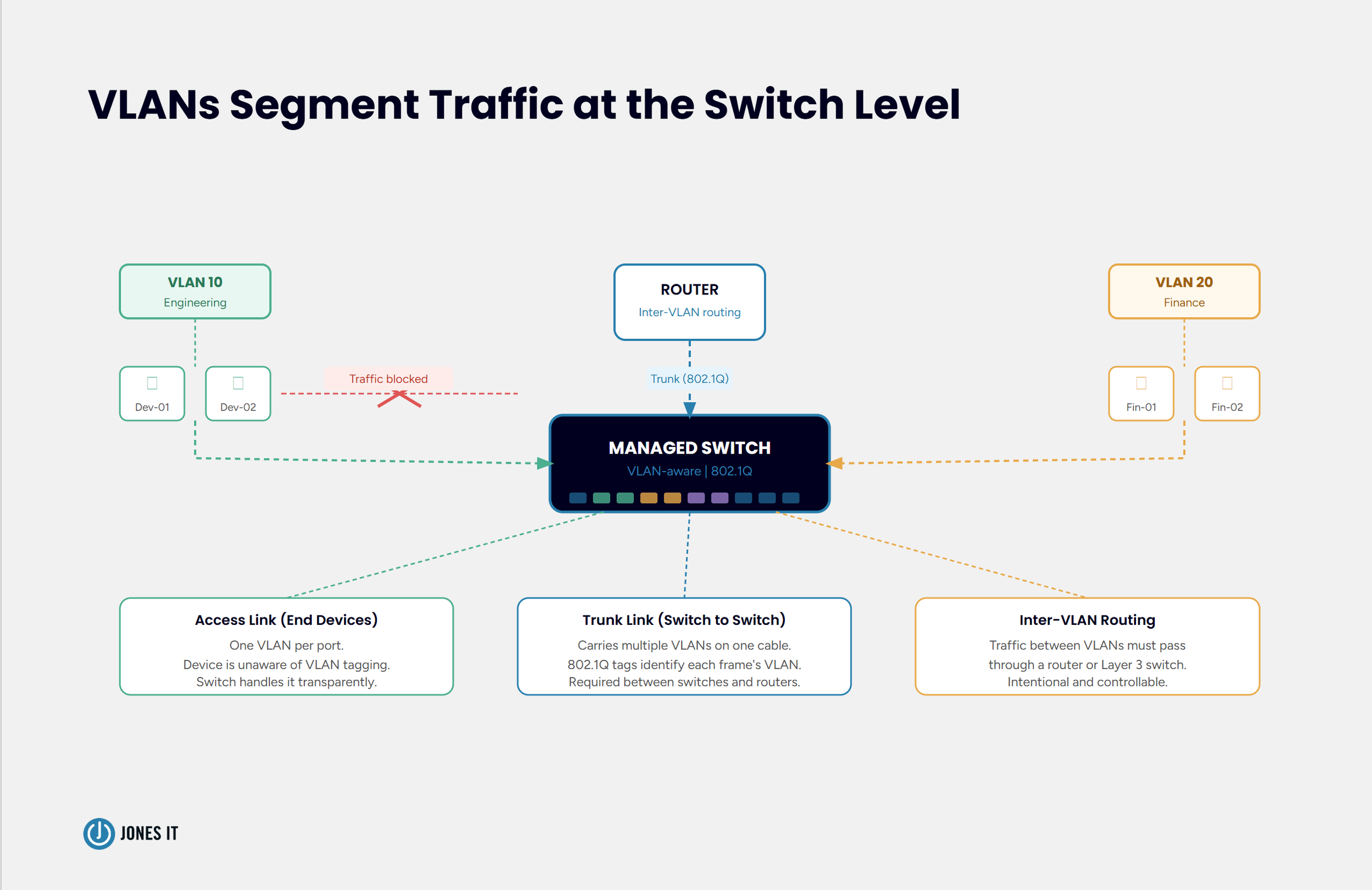
VLANs solve this by letting you carve a single physical LAN into multiple logical segments. Each segment, each VLAN, operates as its own broadcast domain. Traffic within a VLAN stays within that VLAN unless a router explicitly moves it between segments. You get the isolation of separate networks without the cost or complexity of building them physically.
2. How Does a VLAN Work?
VLANs work at the data link layer (Layer 2) of the network stack. They are implemented on managed switches, which are switches that can be configured to assign ports, or individual devices, to specific VLANs.
When a device sends data, the switch looks at which VLAN that device belongs to and keeps the traffic within that VLAN's broadcast domain. Data from one VLAN does not reach devices in another VLAN unless it passes through a router (or a Layer 3 switch) configured to route between them. This inter-VLAN routing is intentional and controllable, which is exactly the point.
VLAN membership is assigned via VLAN IDs: numbers between 1 and 4094, with 1 being the default VLAN on most switches. When a switch port is configured with a VLAN ID, every device connected to that port joins that VLAN automatically. More sophisticated configurations can assign VLAN membership based on a device's MAC address, IP subnet, or user credentials; we'll cover those in the types section below.
For example, say you want to keep your VoIP phone system on a separate network from your data traffic. Without a VLAN, both share the same bandwidth and the same broadcast domain. With a VLAN, you assign your phones to VLAN 20 and your computers to VLAN 10. The switch keeps the traffic separate, your voice quality improves because your phones aren't competing with file transfers, and your network team can apply different quality-of-service (QoS) policies to each.
3. Why Use a VLAN? Use Cases and Advantages
VLANs show up in almost every well-designed business network. They address several real problems simultaneously.
Network Security
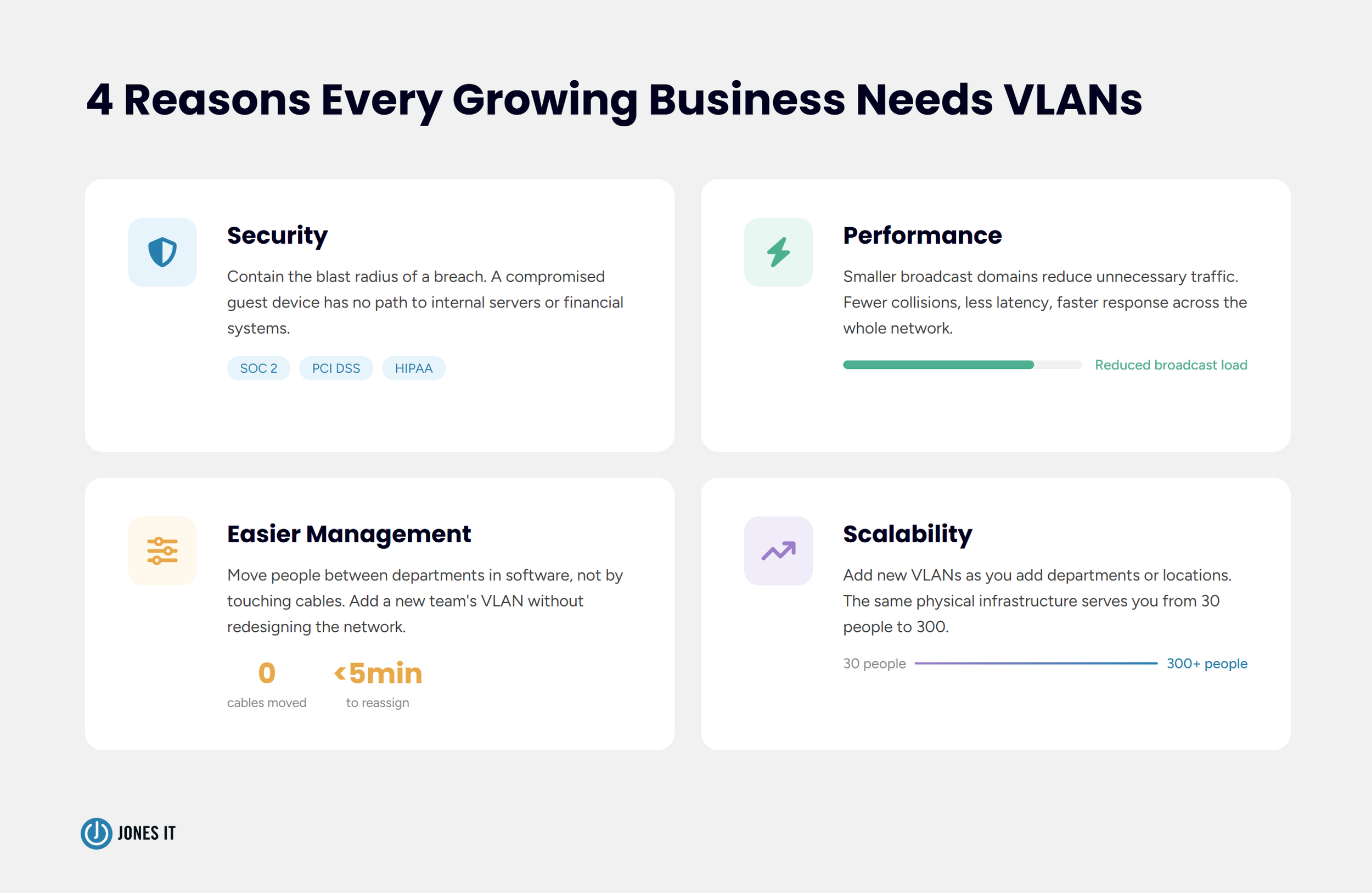
Security is probably the strongest argument for VLANs in a startup or growth-stage company. When all your devices share a flat network, a single compromised machine can potentially communicate with every other machine on that network. VLANs contain the blast radius. If a device on your guest Wi-Fi VLAN is compromised, it has no path to your internal servers or financial systems.
This segmentation also makes it significantly easier to meet network security best practices and compliance requirements. Frameworks like SOC 2, PCI DSS, and HIPAA all favor (and in some cases require) network segmentation. A VLAN architecture gives you a clean, auditable way to demonstrate that sensitive data is isolated from general-purpose traffic.
Performance
Every device on a network generates broadcast traffic: routine messages sent to all devices on the same broadcast domain. On a large, flat network, this broadcast traffic accumulates and starts consuming meaningful bandwidth. VLANs shrink the broadcast domain, which means each device sees far less irrelevant traffic and the network runs more efficiently.
Data collision is another issue that VLANs address. When two devices on the same segment send data simultaneously, collisions occur and propagate through the entire network, raising latency for everyone on it. Smaller broadcast domains mean fewer collisions; and fewer collisions mean less latency across the whole network.
Network Management
VLANs make network management considerably simpler. Instead of physically moving cables when someone changes departments, you reassign their port or device to a different VLAN in software. When a new team joins your office, you create a VLAN for them without touching any hardware. Troubleshooting is easier too, because problems are scoped to a VLAN rather than affecting the entire network.
Scalability
A well-planned VLAN architecture grows with your company. You can add new VLANs as you add departments, office locations, or use cases, without redesigning your physical network. This flexibility is one reason we consistently recommend VLANs to the startups and growth-stage companies we work with across SoMa, Mission Bay, and the Financial District. The network you set up at 30 people can scale comfortably to 200 with the right VLAN structure in place.
4. What Are the Types of VLANs?
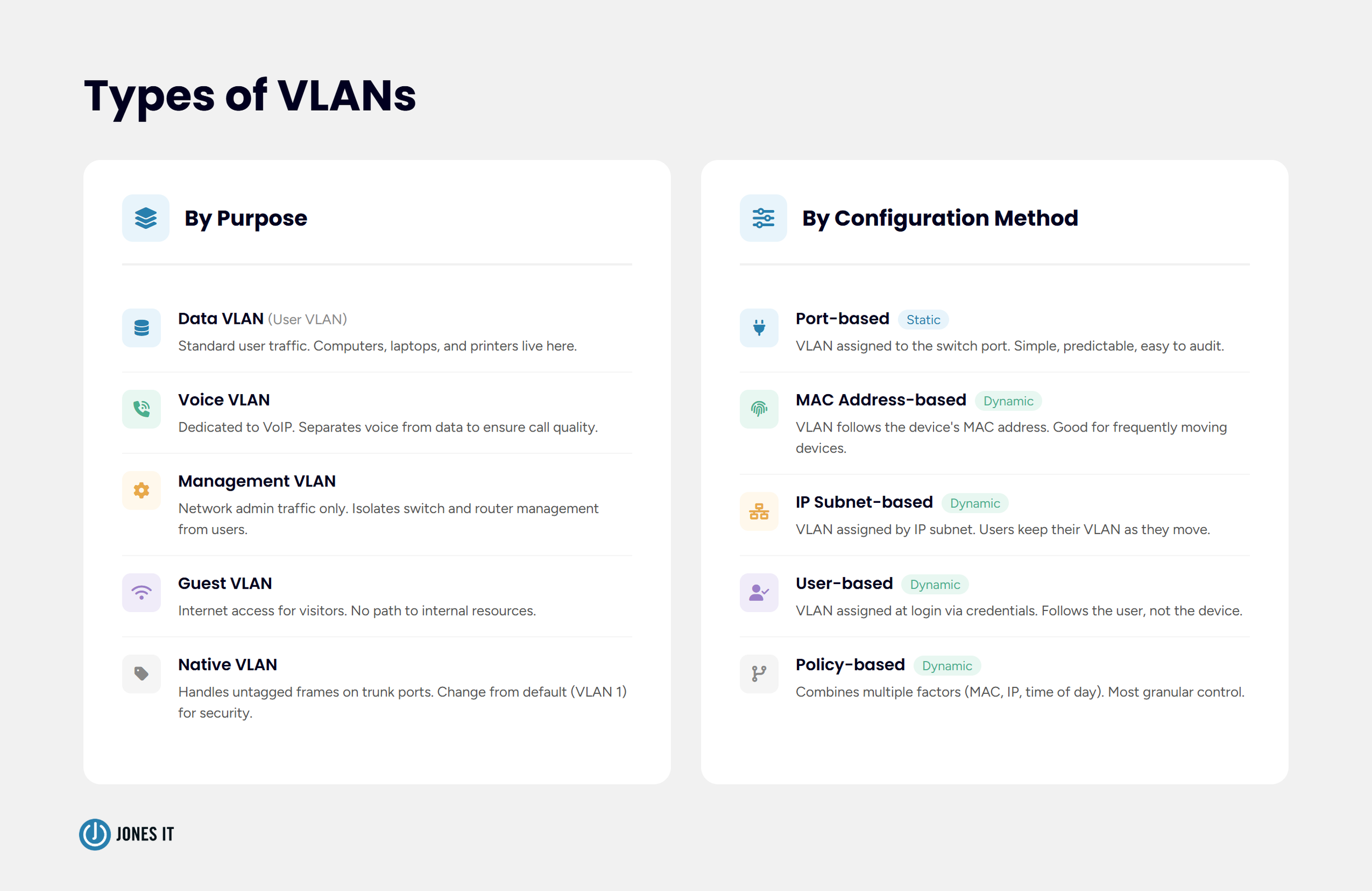
VLANs can be categorized in a few different ways: by their purpose, or by how membership is assigned.
By Purpose
Data VLAN (also called a user VLAN): carries standard user-generated traffic. Most devices (computers, laptops, printers) live here.
Voice VLAN: dedicated to VoIP traffic. Separating voice from data ensures consistent call quality by preventing data-heavy transfers from competing with voice packets. Most managed switches support a dedicated voice VLAN configuration.
Management VLAN: used exclusively for network administration traffic. Switches, routers, and access points are managed through this VLAN. Keeping management traffic on a separate VLAN reduces the risk of unauthorized access to network infrastructure.
Native VLAN: the VLAN that handles untagged traffic on a trunk link. We'll cover this in more detail in the tagging section.
Guest VLAN: provides internet access to visitors without giving them any access to internal resources. Guest VLANs are a standard feature on business-grade wireless equipment and are one of the simplest, highest-value network security measures you can implement.
By Configuration Method
Port-based VLAN: VLAN membership is assigned to a switch port. Any device plugged into that port joins the assigned VLAN. Simple and predictable.
MAC address-based VLAN: membership is assigned based on a device's Media Access Control (MAC) address rather than the port it's connected to. The switch authenticates the MAC address and maps it to a VLAN. This approach works well when devices move around frequently.
IP subnet-based VLAN: membership is assigned according to a device's IP subnet. Users can move their devices without losing their VLAN membership as long as their IP address doesn't change, making this a popular choice for larger, more mobile environments.
User-based VLAN: membership is assigned based on login credentials. When a user authenticates to the network, the switch places them in the appropriate VLAN regardless of which physical port they're using.
Policy-based VLAN: membership is determined by a combination of factors, such as MAC address, IP address, time of day, and so on. This approach offers the most granular control and is commonly used in enterprise environments where security policies are complex.

5. How Do You Configure a VLAN?
VLAN configuration happens on your managed switches. Unmanaged switches cannot support VLANs. This is one of the key reasons we always recommend managed switches for business environments, even small ones. The configuration interface varies by vendor (Cisco, Meraki, Ubiquiti, Aruba all have their own), but the underlying concepts are consistent.
There are two broad approaches to VLAN configuration: static and dynamic.
Static VLAN Configuration
A static VLAN, also called a port-based VLAN, is configured by manually assigning a VLAN ID to each switch port. Port 1 belongs to VLAN 10 (Engineering). Port 2 belongs to VLAN 20 (Finance). Any device plugged into those ports automatically joins the corresponding VLAN.
Static VLANs are simple, transparent, and easy to audit, because you always know exactly which port belongs to which VLAN. The downside is administrative overhead: if a user changes desks or a device moves to a different port, someone needs to update the configuration manually. For small, stable environments this is rarely a problem. For larger or more dynamic ones, it can become a burden.
Dynamic VLAN Configuration
Dynamic VLANs have the switch assign VLAN membership automatically based on information from the connecting device. The switch doesn't care which port a device plugs into: it evaluates the device's MAC address, IP address, or user credentials and assigns the appropriate VLAN accordingly.
Dynamic VLANs are more flexible and easier to manage at scale. When someone moves desks, their VLAN membership follows them. The tradeoff is complexity: dynamic VLANs typically require a RADIUS server or similar authentication infrastructure, which adds setup effort and another system to maintain.
For most small and mid-sized businesses, a hybrid approach works well: static VLANs for infrastructure (servers, printers, access points) and dynamic assignment for end-user devices.
6. VLAN Connection Links: Access and Trunk
Once you have VLANs configured on a switch, you need to connect things together: switches to other switches, switches to routers, switches to access points. This is where the concept of link types comes in. VLAN links are either access links or trunk links, and understanding the difference is essential.
Access Links
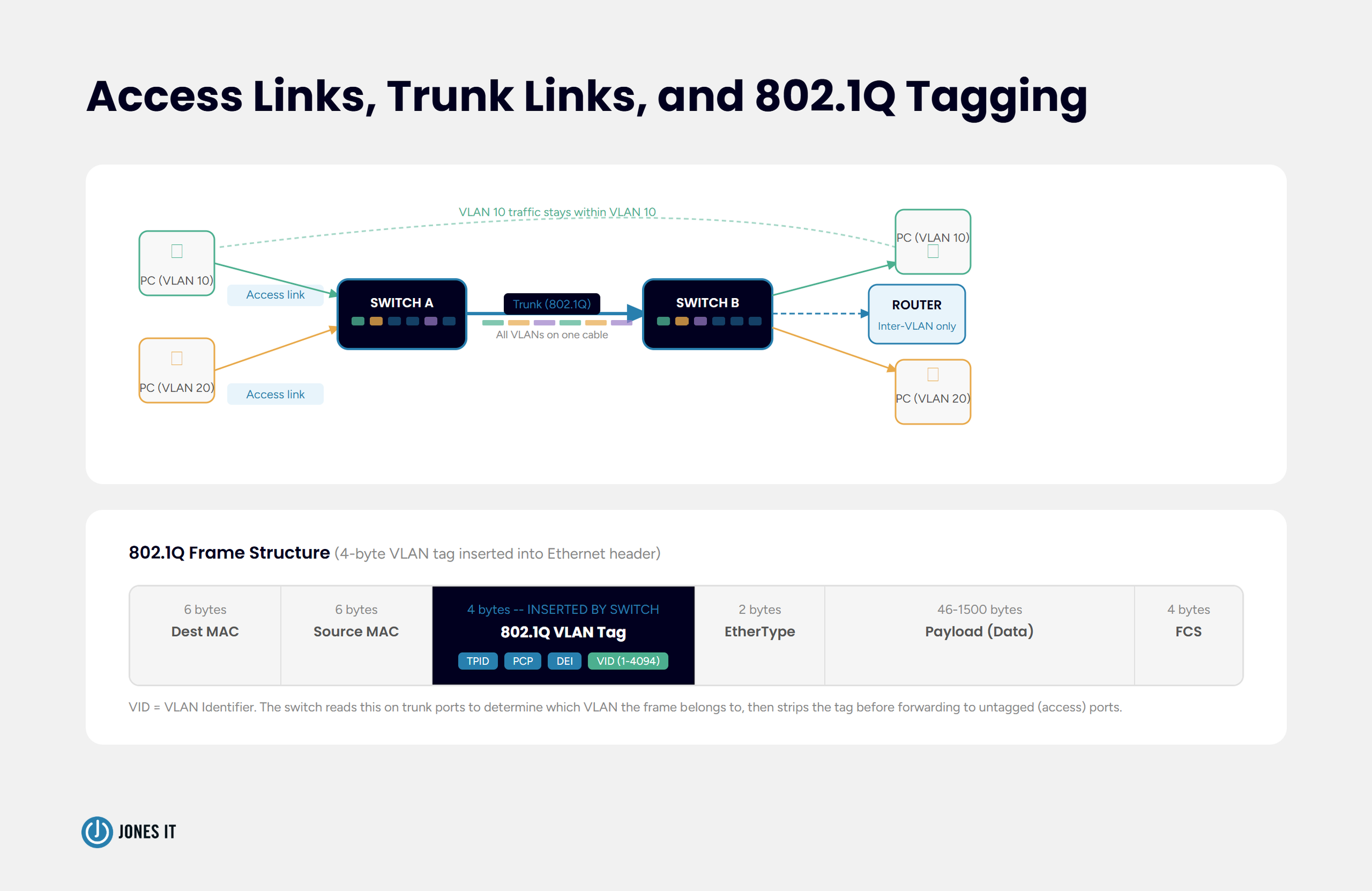
An access link connects an end device, a computer, a printer, a phone, to a switch. Each access link belongs to exactly one VLAN. The device connected to an access link has no awareness of VLANs at all. It simply sends and receives standard Ethernet frames, and the switch handles all the VLAN logic behind the scenes.
When a frame arrives on an access link, the switch tags it internally with the appropriate VLAN ID before forwarding it. When a frame leaves an access link toward an end device, the switch strips the VLAN tag so the receiving device sees ordinary traffic. The VLAN is invisible to the end device, which is exactly how it should be.
Trunk Links
A trunk link is a connection that carries traffic from multiple VLANs simultaneously. Trunk links connect switches to other switches, or switches to routers; essentially anywhere that traffic from more than one VLAN needs to travel over the same physical cable.
Because a trunk link carries frames from many VLANs at once, the switch needs a way to identify which frame belongs to which VLAN. That's what VLAN tagging handles, which we'll cover in the next section.
If your office has two managed switches and 10 VLANs spread across both, you run a single trunk link between the two switches. That one cable carries all 10 VLANs' traffic, with tagging ensuring each frame reaches the correct destination. Without trunking, you'd need 10 separate cables (one per VLAN).
7. VLAN Tagging: Tagged, Untagged, and Native
VLAN tagging, formally defined in the IEEE 802.1Q standard, is the mechanism that keeps traffic from different VLANs separate as it travels across trunk links. Without tagging, a switch receiving a frame on a trunk link would have no way of knowing which VLAN that frame belongs to.
When a switch sends a frame across a trunk link, it inserts a 4-byte VLAN tag into the Ethernet frame header. This tag contains the VLAN ID (a number between 1 and 4094) that identifies which VLAN the frame belongs to. When the frame arrives at the other end of the trunk, the receiving switch reads the tag, strips it, and forwards the frame to the correct VLAN.
Tagged Ports
A tagged port (also called a trunk port) expects frames that include a VLAN tag. When a tagged frame arrives, the switch reads the VLAN ID and forwards the frame to all ports configured for that VLAN. Tagged ports are used on trunk links between switches, and on connections to devices that are VLAN-aware, such as routers and wireless access points.
Untagged Ports
An untagged port (also called an access port) connects to end devices that are not VLAN-aware. Frames arriving on an untagged port have no VLAN tag: the switch adds the VLAN tag internally when it receives the frame, and removes it before sending a frame out to the device. From the end device's perspective, it's just connected to a normal network.
Native VLAN
The native VLAN handles a specific edge case: what happens when an untagged frame arrives on a trunk port? This can occur with certain older devices or specific configurations. The native VLAN provides a default VLAN for that untagged traffic. By default on Cisco equipment, the native VLAN is VLAN 1, though best practice is to change it to a dedicated, unused VLAN to reduce security exposure.
A known attack called "VLAN hopping" exploits misconfigured native VLANs to send traffic across VLAN boundaries without authorization. Keeping your native VLAN configuration intentional and documented closes that gap.
8. Is a VLAN Right for Your Business?
For most businesses beyond a handful of employees, the answer is yes. The moment you have more than one type of user, more than one type of device, or any compliance requirement that touches network architecture, VLANs start earning their keep.
VLANs do require managed switches, which cost more than consumer-grade equipment. They also require configuration expertise; a misconfigured VLAN can create security holes or break connectivity in ways that are difficult to diagnose without the right knowledge. This is one area where working with an experienced network engineer pays off quickly. Getting the VLAN architecture right from the start is far cheaper than untangling a poorly designed one later.
We've designed and deployed VLAN architectures for companies across the Bay Area: from seed-stage startups in Dogpatch configuring their first managed switches, to Series B fintech companies in the Financial District restructuring networks ahead of SOC 2 audits. Every time, the question is the same: who needs access to what, and who definitely shouldn't? A well-planned VLAN structure answers that at the network level, automatically, all the time.
If you're building a small business computer network from scratch or rearchitecting one that's grown beyond its original design, we're happy to take a look and help you think through the right segmentation strategy.



About The Author

Hari SubediMarketing Manager at Jones IT
Hari is an online marketing professional with a focus on content marketing. He writes on topics related to IT, Security, and Small Business. He is also the founder and managing director of Girivar Kft., a business services company located in Budapest, Hungary.

Business Wi-Fi infrastructure guide for offices: access point planning, Wi-Fi 6 vs Wi-Fi 7, signs your network needs an upgrade, and when to consider managed Wi-Fi services.