
Business WiFi Infrastructure: A Complete Guide to Planning, Upgrading, and Managing Your Office Network
Twelve people. One router. The kind that sits in the corner of the front office and came bundled with the internet package three years ago.
If you have ever sat through a video call where the screen froze, someone blamed the Wi-Fi, and then watched four colleagues nod in tired recognition, you already know what this post is about. Business Wi-Fi infrastructure is the complete system of hardware and configuration that delivers reliable wireless connectivity across a commercial office environment, and most small and medium businesses are running theirs on equipment that was built for a living room.
That gap between what businesses need and what they actually have costs real money. Dropped calls, slow file transfers, and IT tickets that circle back to the same connectivity issues are much more than an annoyance. They compound quietly into hours of lost productivity each week. We have seen this pattern in offices of every size, and the fix is almost never as complicated as it seems. What is usually missing is a clear picture of what a small business Wi-Fi upgrade actually involves: what good business WiFi infrastructure looks like, what it costs to address, and how to approach it without overcomplicating things.
Here is that picture.
Why Your Office Wi-Fi Needs Are Different from Home
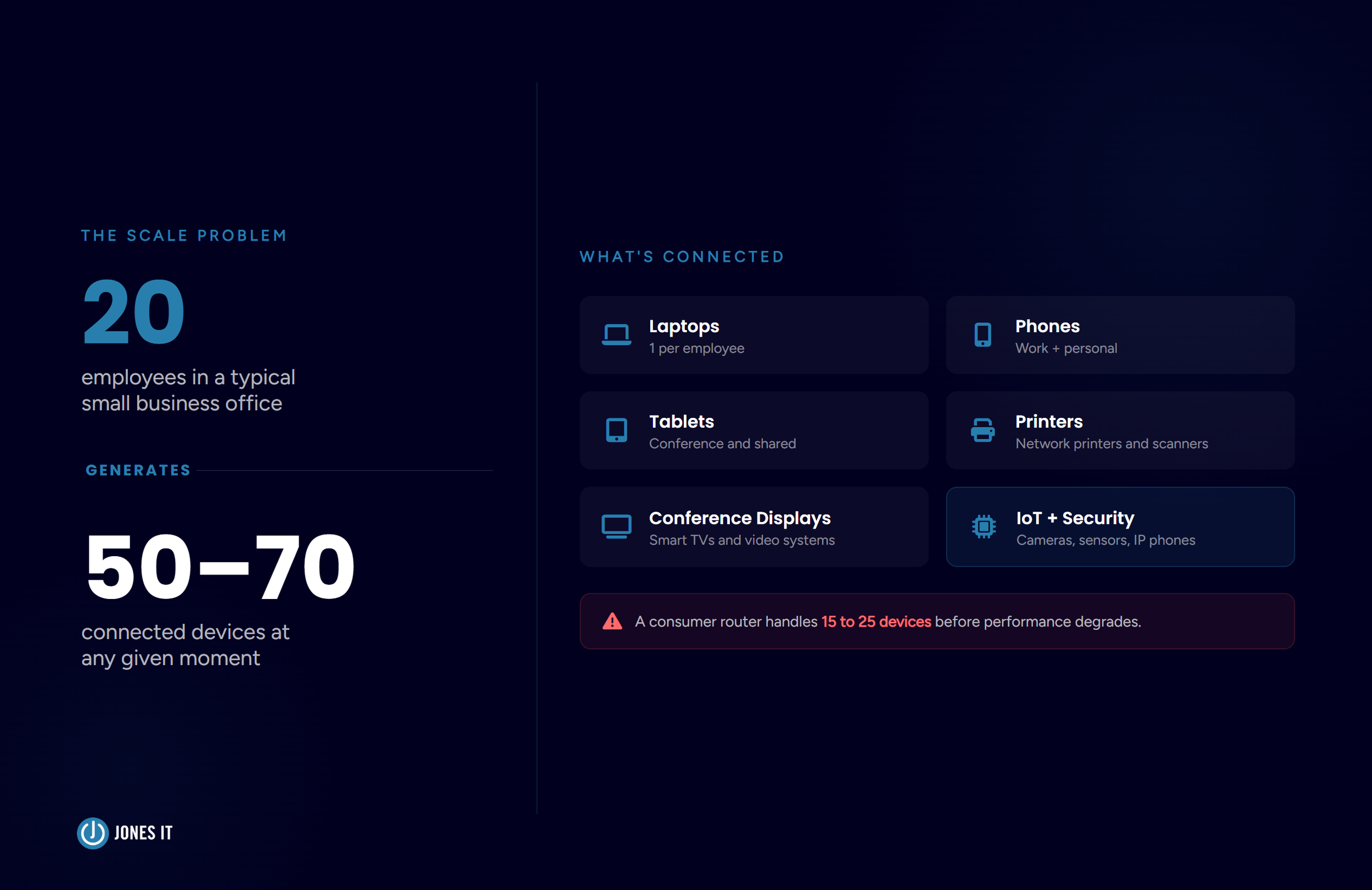
A consumer router, the kind available at any electronics store or provided free by your ISP, is designed for one environment: a household with a small number of people streaming video and browsing the web. A consumer router broadcasts a single wireless signal from a central device and handles roughly 15 to 25 simultaneous connections before performance degrades noticeably.
Your office is a fundamentally different environment. A team of 20 employees typically brings 50 to 70 connected devices: laptops, phones, tablets, printers, conference room displays, IP phones, and an expanding number of smart sensors and IoT devices. Add several video calls happening simultaneously, and you have saturated a consumer router's capacity entirely.
There is also the layout problem. Offices have walls, structural columns, elevator shafts, and floor-to-ceiling glass that fragment wireless signal in ways a single access point cannot compensate for. A router in one corner of a 4,000-square-foot office provides excellent coverage nearby and essentially nothing in the conference room at the far end of the building.
Security is the third difference, and the one most businesses underestimate. Consumer routers rarely support the network segmentation a business requires. Separate wireless networks for employees, guests, and operational devices like point-of-sale terminals or security cameras are not optional features. Without that segmentation, a guest device, or any compromised device, has potential visibility into your internal network traffic.
The Anatomy of a Proper Business Wi-Fi Infrastructure
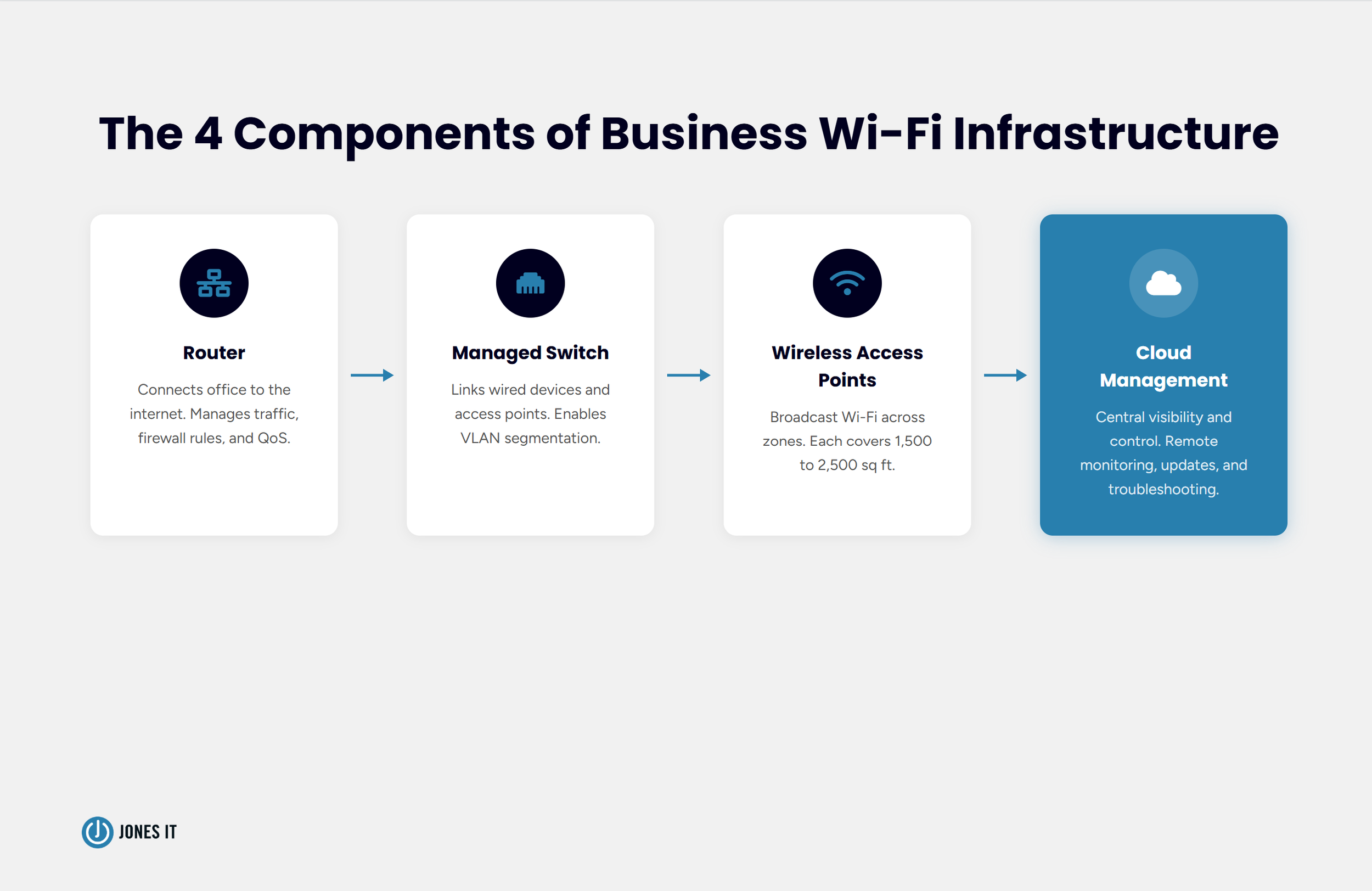
A correctly designed business Wi-Fi infrastructure has four main components, each with a specific job.
The router connects your office to the internet and manages traffic between your internal network and the outside world. A business-grade router supports VPN passthrough, configurable firewall rules, and traffic prioritization (Quality of Service, or QoS) that consumer devices either lack or implement only superficially.
The switch connects all your wired devices and access points back to the router. A managed switch, a device that lets you control how your network distributes bandwidth across connected equipment, is what makes network segmentation through VLANs (Virtual Local Area Networks) possible. Unmanaged switches pass traffic indiscriminately, which is fine at home and a liability at the office.
Wireless access points (APs) are the devices that actually broadcast the Wi-Fi signal across your office. Unlike a home router, which combines routing and wireless broadcasting in one box, a dedicated access point does one thing: extend wireless coverage across a defined zone. Most offices require multiple access points, each covering roughly 1,500 to 2,500 square feet, depending on wall density and device count.
A cloud management platform ties everything together. Tools from vendors like Cisco Meraki, Ubiquiti UniFi, and HPE Networking Instant On let your IT team or managed services provider monitor performance, push firmware updates, and troubleshoot issues remotely without needing someone on-site every time a change is needed.
This four-component architecture is what separates a real business network from a consumer router with a long password.
5 Signs Your Office Wi-Fi Is Holding Your Business Back
Most businesses do not realize their Wi-Fi infrastructure is a bottleneck until it has been one for a while. These are the five signs we see most consistently across small business Wi-Fi upgrades.
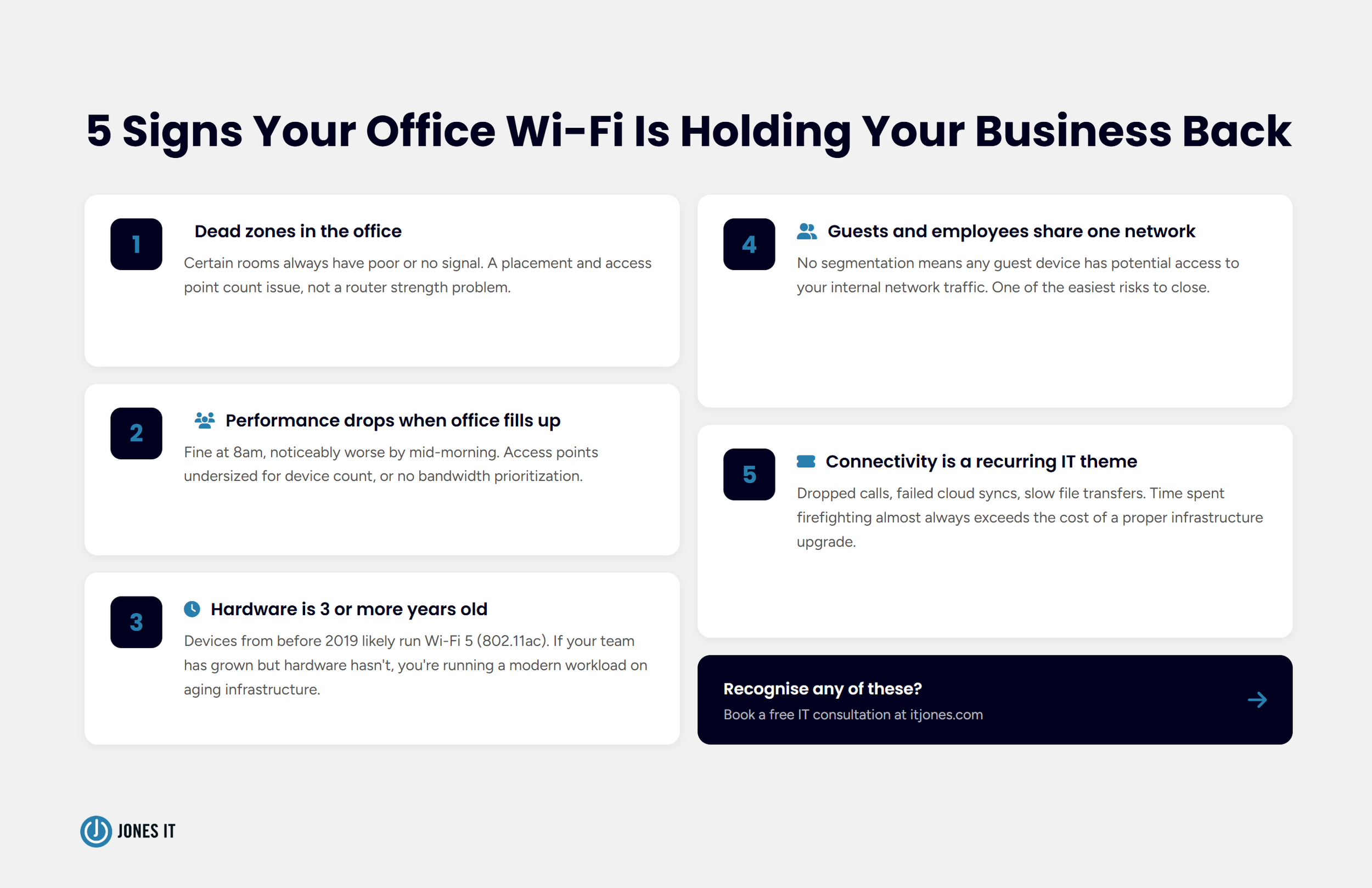
Dead zones in the office. If certain rooms or areas consistently have poor or no signal, you have a coverage problem, not a Wi-Fi strength problem. Dead zones are almost always a placement and access point count issue, not something a stronger router solves.
Performance drops when the office fills up. If connectivity is fine at 8 am but noticeably worse by mid-morning when everyone is at their desk, your network is congested. This typically points to access points that are undersized for the device count, or internet bandwidth being shared without prioritization.
Your hardware is three or more years old. Wi-Fi standards have advanced meaningfully. Devices from before 2019 likely operate on Wi-Fi 5 (802.11ac), which handles simultaneous device connections less efficiently than Wi-Fi 6 (802.11ax). If your team has grown but your hardware has not, you are running a modern workload on aging infrastructure.
Guests and employees share the same Wi-Fi network. A flat network where everyone connects to a single SSID with no segmentation creates real security exposure. Any guest device, or any compromised device, has potential access to your internal network traffic. This is one of the easiest risks to close with the right infrastructure.
Connectivity issues are a recurring IT theme. If your team spends meaningful time troubleshooting dropped calls, failed cloud syncs, or slow file transfers, the cost of that lost time almost always exceeds the cost of a proper infrastructure upgrade. We have run those numbers for clients more than once.
Planning Your Coverage: How Many Access Points Does Your Office Actually Need?
This is one of the most common questions we get, and the honest answer is that it depends on your specific environment. Here is a practical framework that holds up well in most office settings.
Start with square footage. A single access point in a typical office with standard drywall construction covers approximately 1,500 to 2,500 square feet. For denser environments with concrete walls, brick, or significant glass partitioning, plan for the lower end of that range. Concrete and structural steel attenuate wireless signals significantly.
Divide your total office square footage by your per-AP coverage estimate, then round up. For a 6,000-square-foot office with mixed construction, that is three to four access points as a starting baseline.
Then adjust for density and usage patterns. A conference room that regularly seats 10 or more people on video calls warrants its own dedicated AP, regardless of where it falls in your coverage map. High-density open-plan areas may need APs placed every 30 to 50 feet to prevent congestion. Reception areas and lobbies with frequent guest traffic should be on a separate SSID, which may mean a dedicated AP or VLAN configuration.
For multi-floor offices, plan APs on each floor independently. Signal rarely penetrates concrete slabs reliably enough to serve as primary coverage for the floor above or below.
For most small and medium businesses in the 10 to 100 employee range, the practical answer lies between 3 and 15 access points, managed through a cloud platform that provides central visibility and control.
If you want a more precise estimate for your specific office, our team at Jones IT can include coverage assessments as part of our free IT consultations.
Wi-Fi 6 and Wi-Fi 7: What the Standards Actually Mean for Your Business
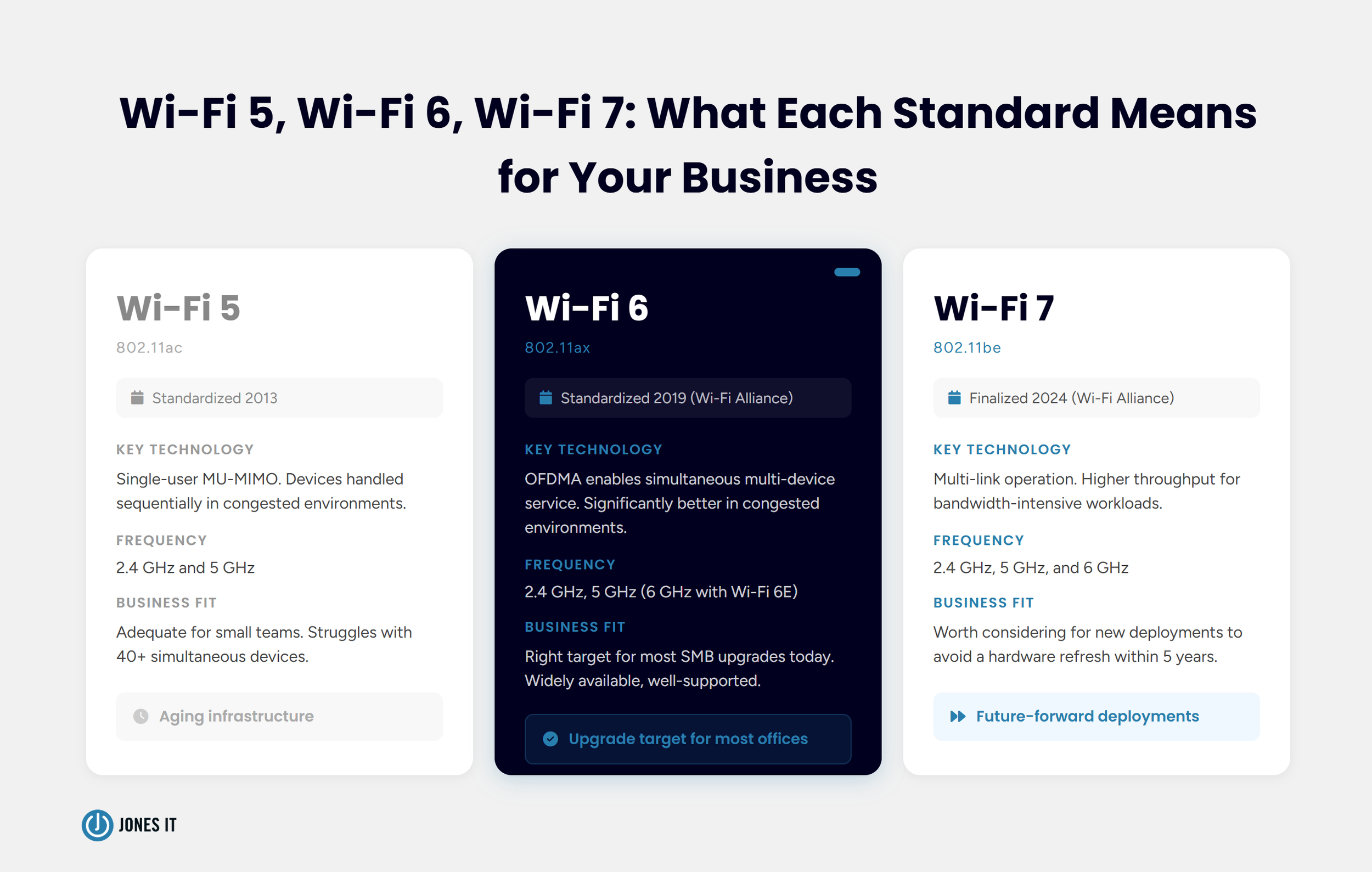
Wi-Fi 6 (802.11ax, standardized in 2019 by the Wi-Fi Alliance) introduced a technology called OFDMA (Orthogonal Frequency Division Multiple Access) that allows a single access point to serve multiple devices simultaneously rather than handling them in sequence. In practical terms, Wi-Fi 6 access points perform significantly better in congested environments, which is precisely the problem that most office networks face.
Wi-Fi 6E extended the 802.11ax standard to include the 6 GHz frequency band, reducing interference from neighboring networks and consumer devices. The 6 GHz band matters most in dense urban environments where dozens of overlapping networks compete for the same frequencies. Wi-Fi 7 (802.11be), finalized by the Wi-Fi Alliance in 2024, adds multi-link operation and pushes throughput further for organizations running bandwidth-intensive workloads like large file transfers, video production, or on-premises AI inference.
For most small and medium businesses upgrading today, Wi-Fi 6 hardware is the right target: widely available, well-supported, and meaningfully better than Wi-Fi 5 in multi-device environments. Wi-Fi 7 is worth considering for new deployments where you want to avoid another hardware refresh within five years. We cover both in more detail in our dedicated guides on Wi-Fi 6 and 6E and Wi-Fi 7.
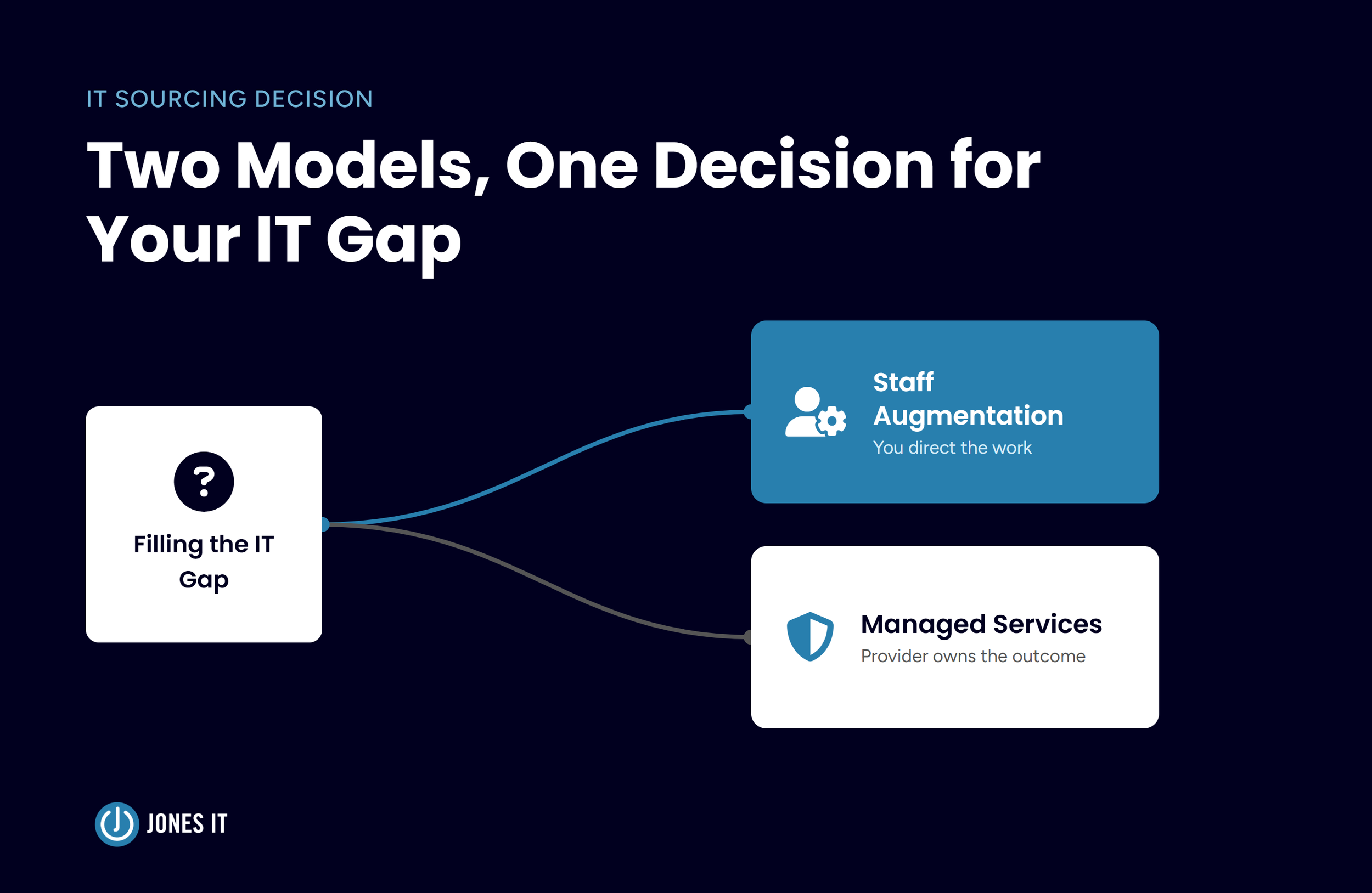
Managed vs. Self-Managed: Who Should Be Running Your Office Wi-Fi?
Here is where the practical decision lives for most business owners evaluating their Wi-Fi infrastructure options, and it is a more consequential question than it first appears.
Self-managed Wi-Fi works well when you have dedicated IT staff with networking experience, time to monitor performance, and a clear process for applying firmware updates before vulnerabilities become incidents. If you have that, managing your own infrastructure is completely reasonable.
Most small and medium businesses do not have that. What they have is someone who is good with computers, a shared IT responsibility that falls to whoever is available, and a reactive approach to problems that emerge. That is not a criticism. It is just the reality of running a lean organization. And in that context, self-managed Wi-Fi ends up costing more in firefighting and productivity loss than managed Wi-Fi for business would.
Managed Wi-Fi, provided through a managed IT services provider or through a cloud-managed platform with professional oversight, shifts that burden to people who monitor networks continuously, apply patches proactively, and can identify performance degradation before your team notices it. For businesses in the 15 to 100 employee range, we consistently find that managed networking costs less than what internal teams spend dealing with connectivity issues when infrastructure is self-managed and under-maintained.
The calculus shifts as you grow. A 10-person team might manage perfectly well with a well-configured UniFi setup and occasional attention. A 60-person team operating across multiple floors, with compliance requirements and remote employees, needs something more deliberate.
What to Do Next
Business Wi-Fi infrastructure that was set up three or more years ago, especially if it relies on a single consumer router or ISP-provided equipment, is almost certainly a bottleneck somewhere in your organization. The symptoms tend to be things you live with rather than fix, right up until they become impossible to ignore.
The practical path forward is straightforward. Assess your current setup against the five signs listed above, map your coverage needs against the square footage and density framework, and make a clear decision about whether Wi-Fi management is work your team can own well or work that belongs with a managed IT partner.
If you would like a second opinion on your office network, reach out to the Jones IT team. We work with businesses across the Bay Area and include wireless coverage assessments in our free IT consultations. We can give you a clear picture of where your Wi-Fi infrastructure stands, what it would take to address the gaps, and whether professional management is the right fit for where your business is today.




About The Author

Sarang JoshiCTO at Jones IT
Sarang Joshi leads and mentors the engineering team at Jones IT. With a Master's in Computer Engineering from San Jose State and over a decade of hands-on experience, he's the person we call when the toughest infrastructure problems show up. Cisco, Meraki, AWS, Azure, you name it, Sarang has probably debugged it at 2 am and still made it to standup.
Most managed IT contract terms are fixed, but exit fees, term lengths, and liability caps are negotiable. Learn what to push back on before signing.