
Device Deployment and Onboarding In A Remote Environment
Updated: April 29, 2026
It's 8:45 a.m. on a Monday. Your newest engineer opens their laptop, coffee ready, excited to get started. By 9:30, they're DMing their manager asking why they can't access GitHub. By 10:00, they're in a Slack thread with IT, still waiting on an invite to the project management tool. By noon, half the day is gone, and they've accomplished exactly nothing. We see this play out constantly, and it's rarely the new hire's fault.
IT onboarding and offboarding for remote employees is the process of deploying devices, provisioning access, and securely revoking credentials for a workforce that never sets foot in the same office. Done well, it's invisible. The new hire shows up on day one with a configured laptop, the right tools already installed, and access to everything they need. Done poorly, it's the kind of thing that makes good people quietly update their LinkedIn profiles after week two.
This guide walks through what a solid remote IT onboarding and offboarding process actually looks like, the tools that make it work at scale, and the security gaps that tend to quietly open up when startups grow faster than their processes.
Why Remote IT Onboarding Is Harder Than It Looks
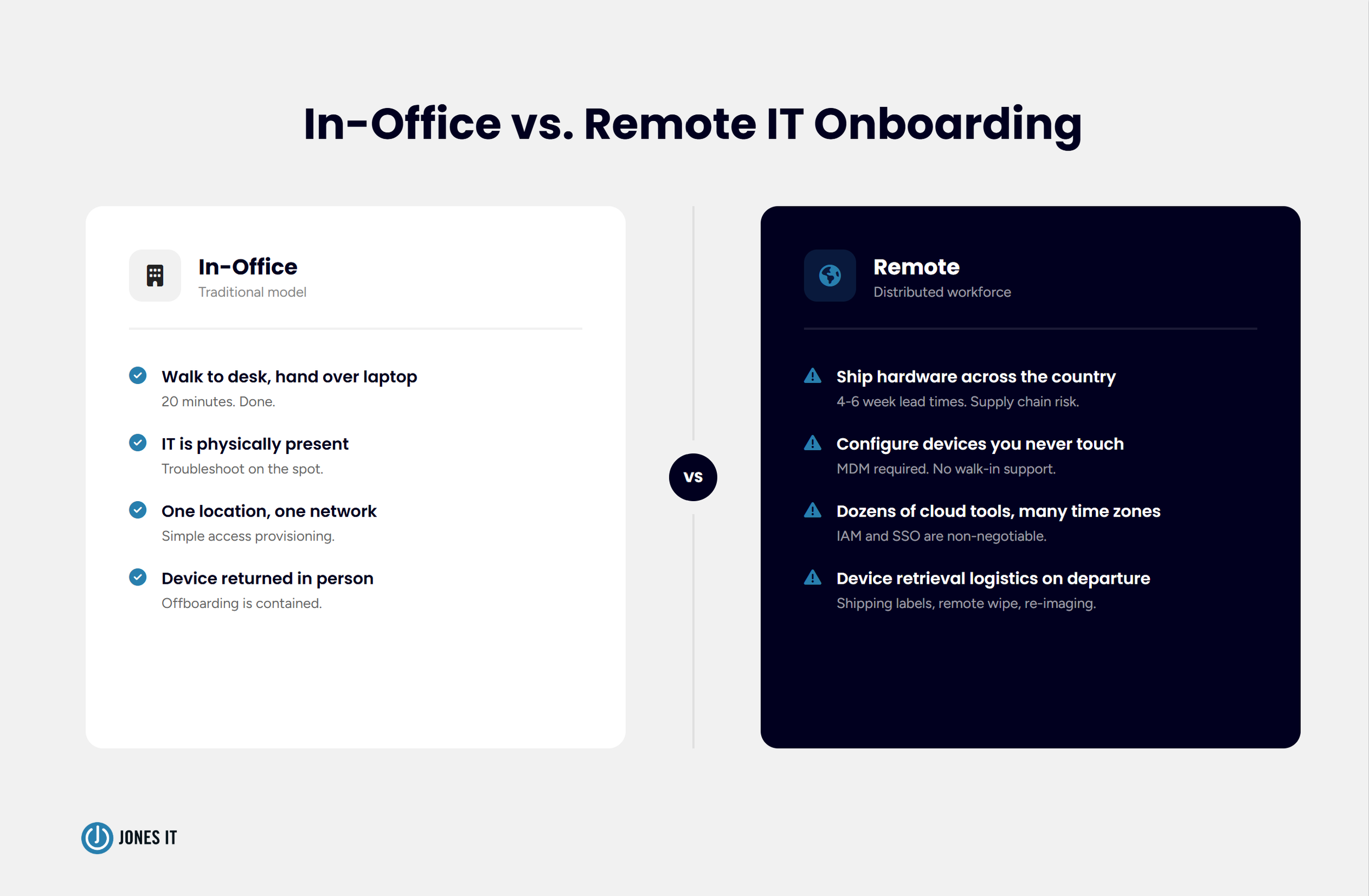
In a traditional office, onboarding IT is almost embarrassingly simple. Someone walks the new hire to their desk, hands over a configured laptop, and spends 20 minutes on setup. The whole thing runs on physical proximity, and it works fine until the moment everyone stops being in the same building.
Remote IT onboarding breaks that model completely. Suddenly you're shipping hardware across the country (or across the Atlantic), configuring devices your IT team may never physically touch, managing access to dozens of cloud tools for someone who's never stepped inside your office, and doing all of it asynchronously. Supply chain delays can mean laptops ordered two weeks before a start date arrive three days after. Time zone differences mean a stuck new hire in Austin can't reach IT in San Francisco until noon Pacific, which is 2 p.m. their time on day one.
The part that catches startups off guard is how fast the cracks appear. When you're hiring one or two people a month, ad hoc processes limp along. When that becomes five or ten, they collapse. We've watched companies improvise laptop shipments at 30 employees and find themselves in genuine operational chaos at 80. The pattern is familiar enough that we can usually see it coming before the company can.
Here's what makes this particularly uncomfortable: the stakes are never just operational. Every day a new hire can't do their job is a productivity loss. Every access credential that isn't revoked the day someone leaves is an open security liability. The device that ships without proper enrollment is a potential data exposure waiting to happen. Remote IT onboarding and offboarding sit at the intersection of operations, security, and compliance, which is part of why so many companies handle it poorly.

Step 1: Remote Employee Device Deployment and Procurement
Everything starts with the device. Before a remote employee can do anything useful, they need hardware that arrives on time, correctly configured, and ready to go the moment they open the box. That sentence sounds obvious. The logistics behind it are not.
Procurement planning is where most startups underinvest. Lead times for business laptops, particularly MacBooks, can run four to six weeks during periods of high demand or supply chain disruption, and we've been in a period of supply chain disruption for long enough that four to six weeks should be your baseline assumption. Your hiring plan and your procurement plan need to stay in sync. If you're onboarding three engineers next month, the order should go in this week.
Storage is the piece that always catches people off guard. We've walked into situations where laptops were being received at an IT manager's home address, stacked in an unlocked closet, or sitting untracked in the corner of an office with no insurance and no inventory record. None of that is a criticism of the IT manager; it's a symptom of a process that was never designed for remote work. Proper device storage means a secure, insured location with inventory tracking so you know exactly what you have, where it is, and what condition it's in.
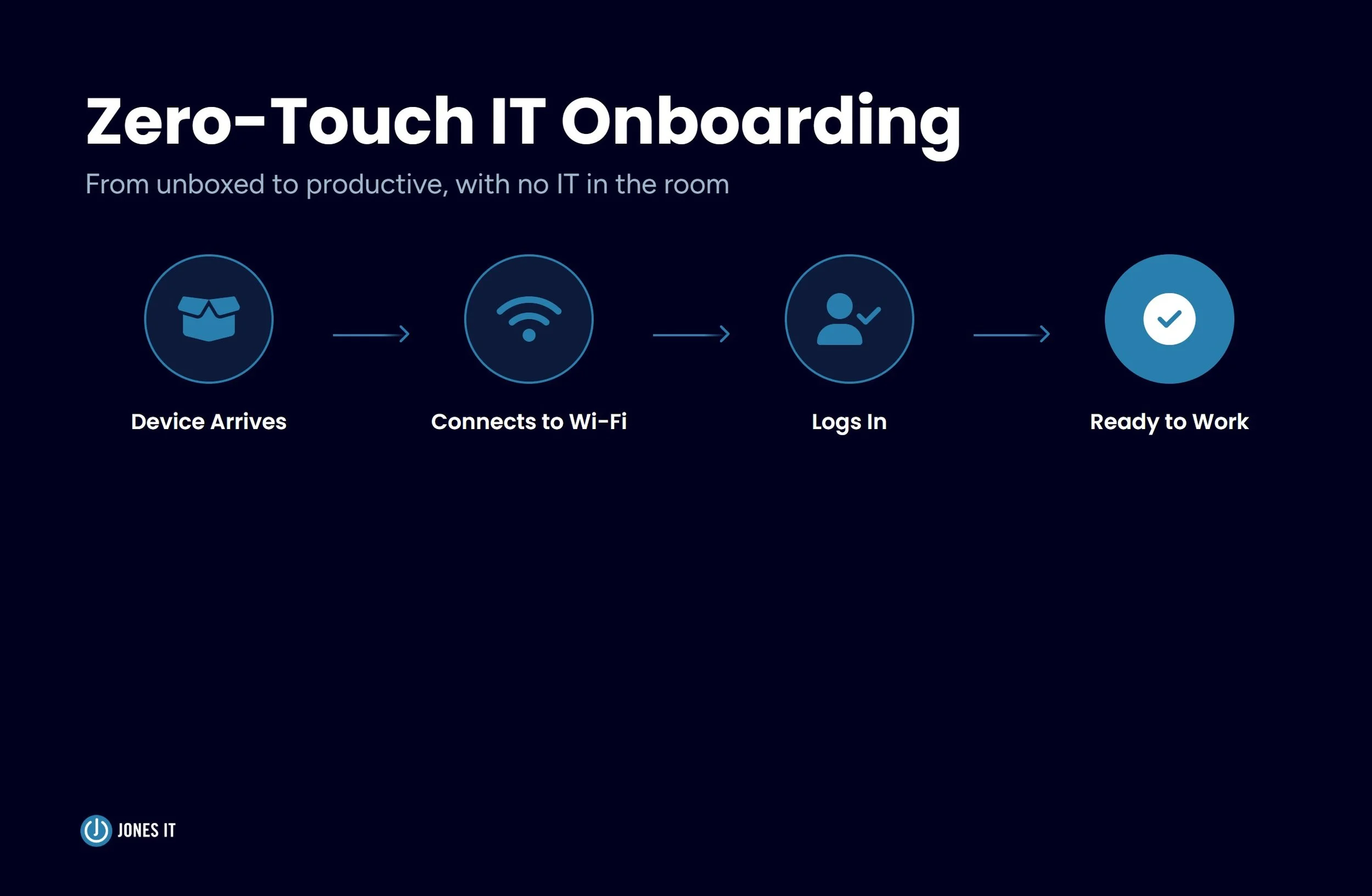
Order of operations matters too. The device should be enrolled and configured before it ships, not after it arrives at the employee's home. A laptop that ships unconfigured puts the new hire in the position of doing IT work on their first day, which is a bad experience for them and usually produces inconsistent setups that create problems later. The goal is zero-touch deployment: the employee opens the box, powers on the device, logs in with their company credentials, and everything is already there. That's the bar we set for every client we work with.
Step 2: Enrollment, Configuration, and MDM
Mobile Device Management (MDM) is the software layer that makes zero-touch deployment possible, and if your company doesn't have it yet, it belongs on your short list. MDM solutions like Jamf for Apple devices or Microsoft Intune for Windows allow IT teams to enroll, configure, and manage devices remotely, over the air, without ever physically handling the hardware.
Once a device is enrolled in your MDM platform, you can push configurations, install required applications, enforce security policies like screen lock and disk encryption, and remotely wipe the device if it's lost or stolen. For a distributed team, MDM is what makes consistent device management possible. Without it, every device becomes its own special configuration that IT has to manage individually. That approach doesn't scale, and it creates security inconsistencies that are painful to untangle later.
Apple Business Manager and Google Workspace's zero-touch enrollment programs take this a step further, allowing new devices to be enrolled automatically the first time they connect to the internet. The employee turns on the laptop, connects to Wi-Fi, and MDM takes over from there, pushing applications, applying security settings, and granting access to company resources, all without IT touching the device. It feels a little like magic the first time you see it work.
One thing worth being deliberate about: configuration templates. Every role should have a standard build. Developers get developer tools. Finance gets the accounting stack. Everyone gets the security baseline, which means disk encryption enabled, screen lock enforced, and endpoint protection installed. Deviating from the template might feel harmless in the moment, but it introduces the kind of inconsistency that creates support headaches later and, occasionally, genuine security gaps.
For a deeper look at how MDM fits into the broader picture of managing your device fleet, our post on mobile device lifecycle management covers the full arc from procurement through retirement and recycling.
Step 3: Identity and Access Provisioning
Identity and Access Management (IAM) is the system that controls which tools and data each employee can access, and for remote teams, it's as foundational as the device itself. A configured laptop gets someone in the door. IAM determines what they can actually do once they're there.
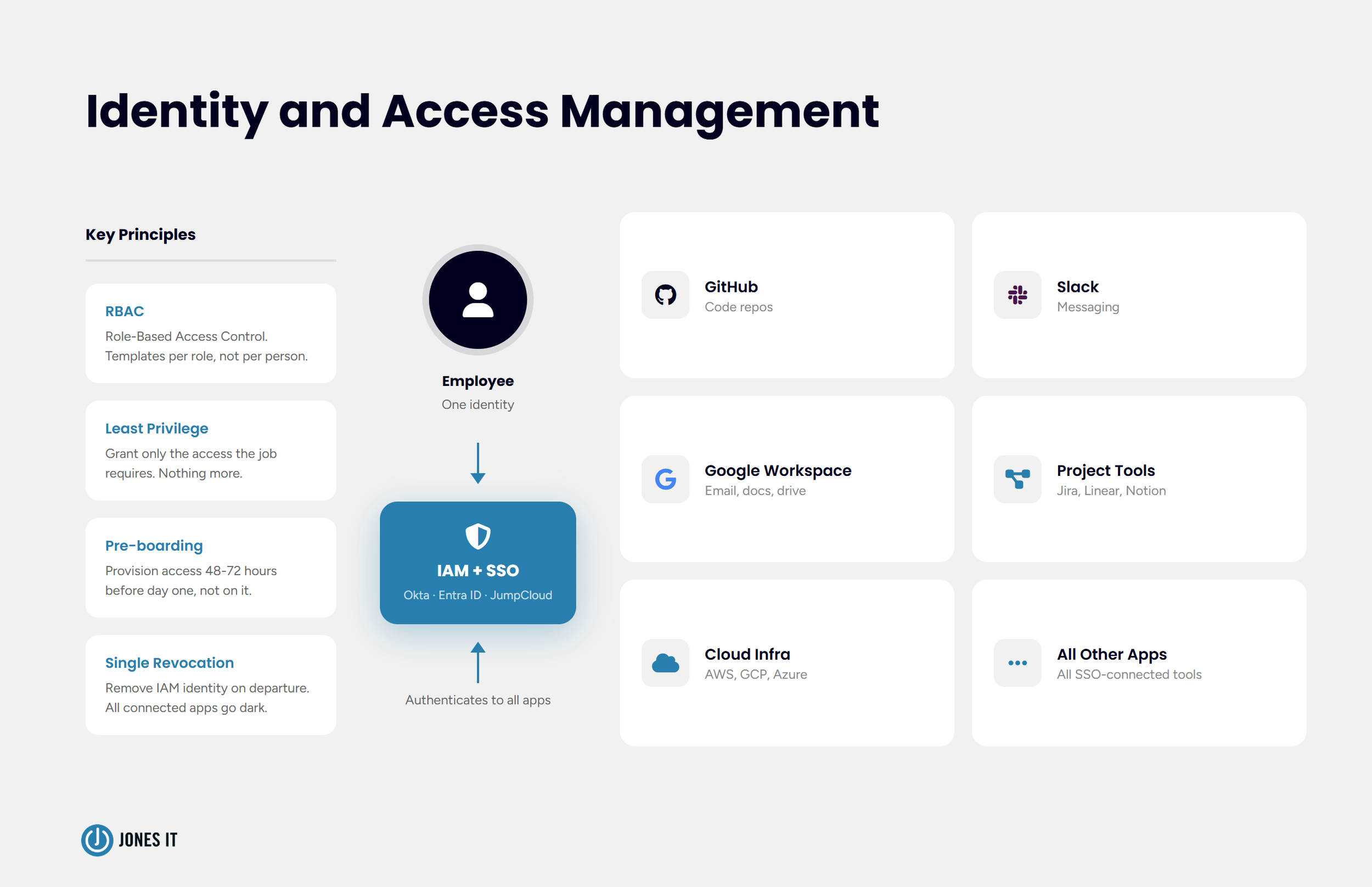
IAM platforms like Okta, Microsoft Entra ID (formerly Azure AD), or JumpCloud let you manage user identities centrally and connect them to every application in your stack through Single Sign-On (SSO). When a new hire is added to the IAM system and assigned to their role, they get access to the tools that role requires and nothing more. When they leave, revoking their IAM identity cuts off access to every connected application in a single action. That last part matters more than most people realize until they're dealing with an offboarding gone wrong.
Access provisioning needs to happen before day one, not on it. New hires who spend their first morning waiting on access invitations lose a chunk of their first day and form an impression of the company's operational competence that's hard to shake. We recommend triggering account creation and access provisioning at least 48 to 72 hours before the start date. Build it into the pre-boarding checklist, and it stops being something you have to remember.
Role-based access control (RBAC) is the principle that keeps permissions clean as the company grows. Instead of assigning access to individuals on an ad hoc basis, you define access templates for each role and assign the template. A new engineer gets the engineering template. A new account executive gets the sales template. It makes onboarding faster, offboarding cleaner, and access audits something other than a nightmare.
Over-provisioning is the most common access management mistake we see at growing startups, and I'd wager it's exactly as common as you're imagining. Everyone gets admin access because it's easier than thinking through what they actually need, and before long, your entire company is running at the admin level. Every over-provisioned account is a liability the moment credentials are compromised. The principle of least privilege, granting only the access required to do the job, keeps your exposure manageable if something goes wrong.
Step 4: The Secure Offboarding Process
Offboarding consistently gets treated as an afterthought. Someone puts in their notice, there's a flurry of knowledge transfer and goodbye Slack messages, and then IT gets a note three days later asking them to "handle the usual stuff." The problem is that the usual stuff includes an open door into your systems, and every hour that door stays open after someone's last day is an unnecessary risk.
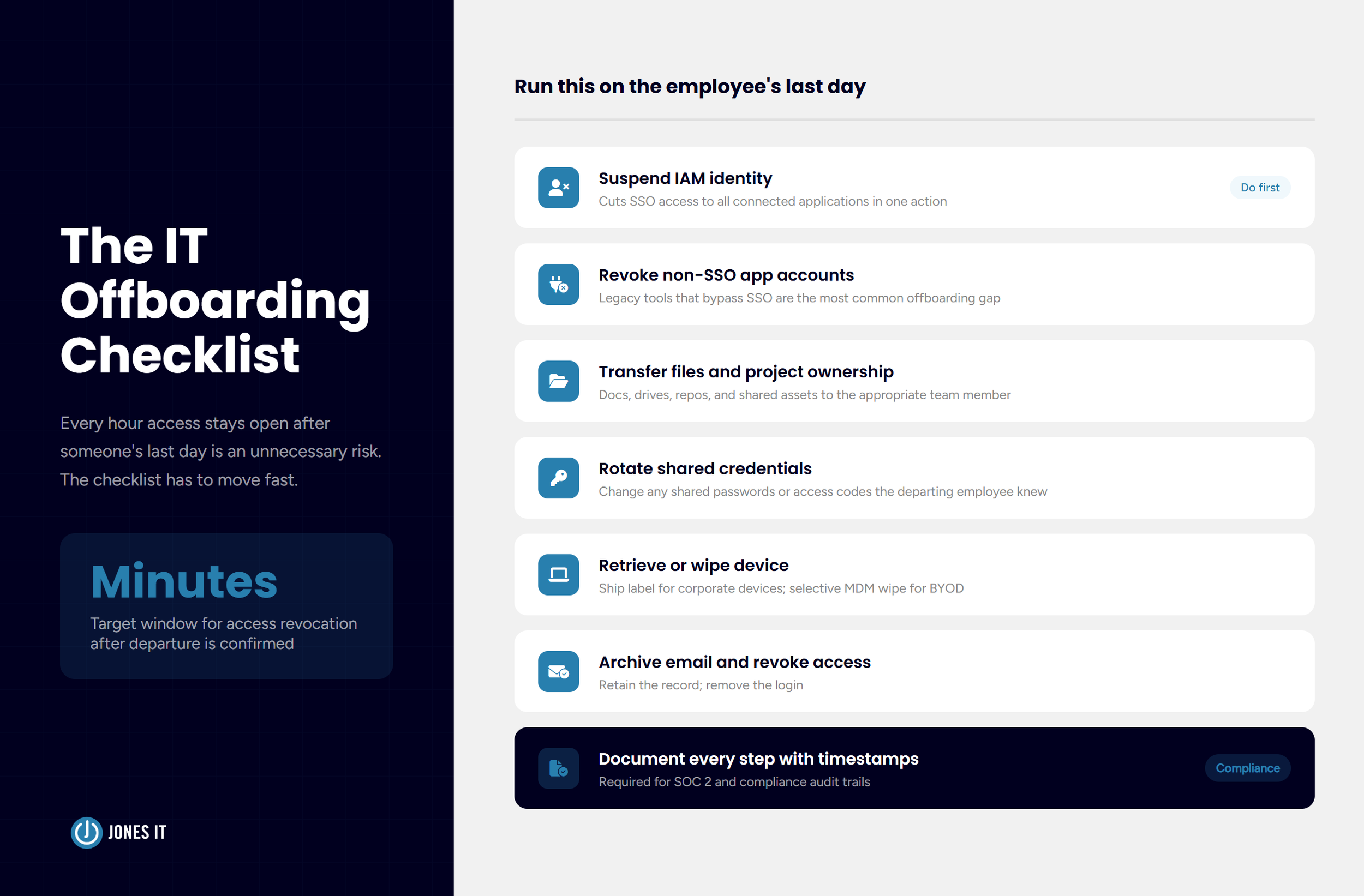
The IT offboarding checklist has to move fast. On the employee's last day, or ideally the moment their departure is confirmed, the following should happen:
Suspend or delete the IAM identity, cutting SSO access to all connected applications in one step.
Revoke any application-specific accounts that aren't connected to SSO (more on this below).
Transfer ownership of files, documents, and project assets to the appropriate team member.
Change any shared passwords or access codes known by the departing employee.
Initiate device retrieval or, for corporate-owned devices, trigger a remote wipe.
Archive email and revoke email access.
Document every step with timestamps for the compliance record.
Device retrieval is where remote offboarding gets logistically complicated in a way that in-office offboarding never had to be. For corporate-owned devices, you need a return process: a pre-paid shipping label, a secure return address, and a protocol for wiping and re-imaging the device before it goes to the next employee. For BYOD setups, MDM lets you selectively wipe corporate data without touching personal data, which keeps the process clean and avoids the kind of disputes you really don't want.
The piece that trips up even well-organized IT teams is the long tail of application-specific accounts that bypass SSO. Most startups accumulate tools over time, and some of them were set up before SSO was in place and never properly connected to the identity provider. A departing employee with a direct login to a legacy tool that IT doesn't know about is a gap in your offboarding coverage. Regular access audits, quarterly if you can manage it, are the only reliable way to keep that list current.
Our IT security checklist covers the broader access control landscape and is worth keeping alongside your offboarding documentation.
Building a Process That Scales With Your Headcount
The process that works for 20 people won't work at 100. That's not a flaw in the 20-person process; it's just the nature of operational infrastructure. The question is whether you build for scale before you need it or scramble to catch up after the chaos has already started.
At the early stage, the most valuable thing you can do is establish the baseline and write it down. Get devices enrolled in MDM, get SSO in place, and document the onboarding and offboarding steps clearly enough that anyone on the team can run them. Even if IT is one person wearing five hats, having the process documented means that it gets executed consistently instead of being improvised differently every time there's a new hire.
As the team grows, automation becomes the real lever. Modern IAM platforms can trigger provisioning workflows automatically when HR creates a new hire record in your HRIS (Human Resources Information System). Offboarding workflows can kick off the moment a termination is recorded. The human still makes the decision; the system handles the execution. This matters because manual checklists, however well-designed, depend on someone remembering to run them under pressure, and departures are almost always stressful.
Audit readiness is the dimension that tends to sneak up on companies in regulated industries or those working toward SOC 2. Every access grant, every revocation, every device enrollment, and wipe needs to be logged with timestamps and actor information. MDM platforms and IAM systems typically generate this data automatically. The question is whether you're capturing and retaining it in a form that satisfies your compliance requirements, and whether you can actually find it when an auditor asks.
For startups working through compliance requirements for the first time, our Compliance Kickstarter Program covers the foundational controls, including access management, that auditors consistently look for.
What Secure Remote IT Onboarding and Offboarding Looks Like in Practice
Here's what the good version looks like. The new hire gets a shipping notification four business days before their start date. The laptop arrives two days early, pre-configured, with a simple setup card telling them to power it on, connect to Wi-Fi, and log in with their company email. MDM handles the rest. By 9 a.m. on day one, they have access to every tool they need and zero outstanding IT tickets. Their first Slack message is something productive, not a request for help getting in.
On the offboarding side, HR notifies IT the moment a departure is confirmed. An automated workflow fires, suspending the IAM identity and generating a return shipping label. IT reviews the checklist within the hour, closes any gaps in SSO coverage, and logs everything. The device is wiped and back in inventory within two weeks. The former employee's access window is measured in minutes, not days or weeks.
That's the bar worth setting. Getting there takes the right tools, documented processes, and usually a managed IT partner who's built this kind of system before at companies that look like yours.
If your remote IT onboarding and offboarding process isn't reliably delivering that experience, we'd love to help you build one that does. Reach out and let's talk through what a structured approach looks like for your team.

About The Author

Hari SubediMarketing Manager at Jones IT
Hari is an online marketing professional with a focus on content marketing. He writes on topics related to IT, Security, and Small Business. He is also the founder and managing director of Girivar Kft., a business services company located in Budapest, Hungary.

Considering a vCIO? Avoid the hidden 'structural lock-in' that destroys ROI. Learn how to protect strategic hours and ensure you get IT leadership, not support.