
Updated: June 19, 2026
The call came in on a Tuesday. A founder we’d been introduced to through a mutual contact was three months out from a SOC 2 Type II audit, and his security consultant had just flagged something that was keeping him up at night: nobody on the IT side could tell the auditor with any confidence which employee devices were encrypted, which had current OS patches, or even how many laptops were actually connecting to company systems. The team consisted of twelve people. Half were using personal MacBooks. One engineer was running an OS version that had been end-of-life for eighteen months.
His first question to us was also, as it turned out, his most revealing one: “Do we need something called MDM?”
He’d heard the term from his consultant but wasn’t sure what it actually meant or whether it was truly necessary for a company his size. We told him yes, he needed it, and then we spent the better part of an hour walking him through what Mobile Device Management is, why it mattered for his audit, and how to choose the right solution for his team. This post covers that same conversation.
What Is Mobile Device Management (MDM)?
The way we explained it to the founder: imagine being able to see every device connected to your company’s network from a single screen, know whether each one is encrypted and patched, push a software update to all of them at once, and remotely wipe any device that goes missing. That’s what Mobile Device Management (MDM) gives you.
More formally: MDM is a technology solution that gives IT teams centralized control over the laptops, smartphones, and tablets connected to a company’s network. It works through a combination of on-device software agents and a backend management console (cloud-hosted or on-premises) that lets administrators push configurations, enforce policies, and monitor device health across the entire fleet from a single interface.
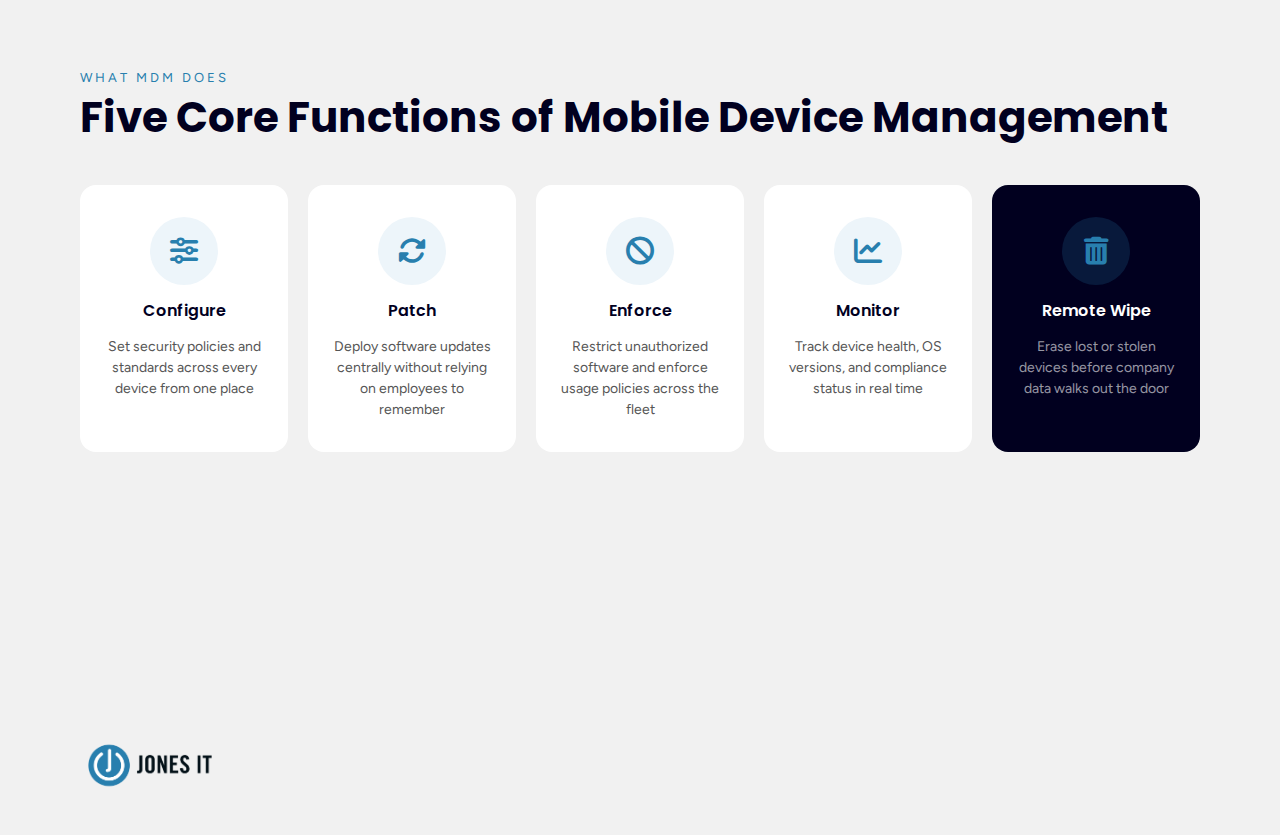
The core functions MDM handles:
Configuring each device to meet the organization’s security policies and standards.
Deploying software updates and patches centrally, without relying on individual employees to remember.
Enforcing application usage policies and restricting unauthorized software.
Monitoring device health and performance across the fleet.
Remotely diagnosing, troubleshooting, locking, or wiping devices as needed.
The founder zeroed in on the last one. “Wait, I can wipe a laptop remotely?” Yes. And when you’re running a team where half the machines are personal devices carrying company data, that capability stops feeling like a nice-to-have very quickly.
Why Small Businesses Need MDM More Than They Think
When we told the founder he needed MDM, his first reaction was skepticism. He’d assumed MDM was enterprise software, something you bolt on at 200 people when you have a dedicated IT department to run it. We hear this constantly, and it’s one of the more expensive assumptions a growing startup can make.
Small businesses are, in practice, more exposed to the risks MDM addresses. With fewer IT resources, there’s less capacity for the manual device checks that would catch a machine running end-of-life software. As headcount grows quickly, new machines get onboarded without a standardized setup process. And as more infrastructure moves to the cloud, employees end up accessing sensitive company data from devices nobody has formally reviewed.
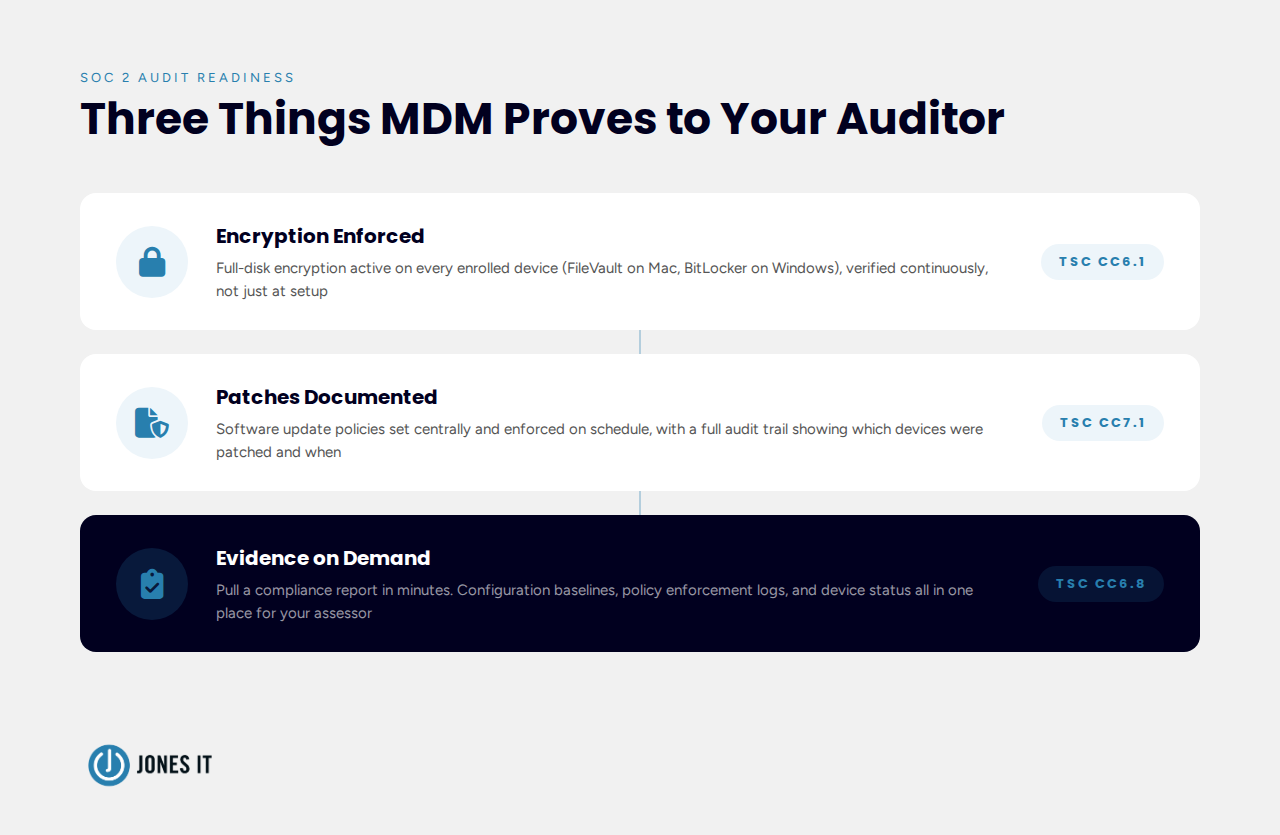
For this founder, the compliance deadline made it concrete. SOC 2 Trust Services Criteria require demonstrable controls over device configuration and access. Auditors want to see that endpoints are encrypted, patched, and monitored, and they want documentation proving it, not a verbal assurance. MDM is how you produce that evidence at scale, even when your “scale” is twelve people.
What MDM Actually Changes for a Small Startup
Once the founder understood what MDM was, the conversation shifted to what it would actually do for his team day-to-day. Four things landed for him.
Visibility across every device, not just the ones IT provisioned
Before MDM, the founder’s version of device oversight was asking employees to confirm their laptops were encrypted during onboarding and hoping they’d stay that way. With MDM in place, his IT console would show every device’s encryption status, OS version, and last check-in time in real time. Software installs, screen lock policies, VPN configurations: all of it manageable from a single interface, across every machine, in minutes.
For a team where several employees worked remotely across different cities, this was the difference between IT visibility and IT hope.
A way to handle BYOD without turning it into a security liability
Half his team was on personal MacBooks. Bring Your Own Device (BYOD) policies are popular at early-stage companies because they avoid provisioning costs, but from a security standpoint they create real exposure: you can’t mandate OS updates on someone’s personal machine the way you can on company-owned hardware.
MDM handles this through containerization and conditional access policies. Work data and personal data stay separated on the device. The MDM agent can enforce minimum OS versions and encryption requirements as a condition of network access, without touching personal apps or files. The founder’s employees would keep their own machines; the company would get the oversight it needed. Most modern MDM platforms handle mixed fleets (macOS, iOS, Android, Windows) without requiring a different tool for each.
Patch management that doesn’t depend on employees remembering
The engineer running end-of-life software wasn’t malicious. He’d dismissed the update prompt a few too many times, then stopped seeing it. This is exactly how unpatched endpoints accumulate; not through negligence exactly, but through friction. MDM removes the friction by letting IT enforce update policies centrally, so critical patches roll out on a defined schedule rather than whenever an employee gets around to it.
For businesses with HIPAA obligations, patch enforcement matters beyond convenience. HIPAA patch management requirements specify that covered entities must keep software up to date as part of maintaining appropriate technical safeguards. MDM gives you the audit trail to prove it.
Compliance evidence that doesn’t require manual assembly
This was the one that mattered most for the audit. MDM lets you enforce full-disk encryption across every enrolled device (FileVault on Mac, BitLocker on Windows) and verify compliance status continuously. When an auditor asks whether your endpoints are encrypted and patched, MDM lets you pull a report rather than scramble for screenshots.
Endpoint compliance checks, configuration baselines, and automated policy enforcement are evidence, not just hygiene. Companies that have MDM in place before starting their SOC 2 journey consistently find the audit process less painful than those scrambling to document controls after the fact.
How We Helped To Choose the Right MDM Solution
Once the founder was sold on MDM, the next question was which one. MDM platforms vary more than the marketing materials suggest, and a tool built for a 200-person Windows enterprise is a different animal from what a 12-person Apple-first startup needs. We walked him through four decision points.
Will you manage it in-house or through an MSP?
He was about to engage an MSP for ongoing IT support, which simplified this question considerably. If you’re working with a Managed Service Provider, there’s a reasonable case for using whatever MDM platform they already operate. They’ll know it inside out, configuration will be faster, and ongoing support is built into the relationship.
If you’re managing IT in-house, the reasoning shifts. Prioritize platforms with strong documentation, responsive support, and an admin console your team can navigate without deep MDM expertise. Some platforms are built for enterprise IT departments with dedicated MDM engineers; others are designed to be approachable for a generalist IT manager or a tech-savvy ops lead.
What devices does your team actually use?
His team was almost entirely on Apple hardware. That narrowed the field considerably, because MDM platforms differ significantly in how well they handle different operating systems. A platform that excels at managing Apple devices may offer only basic Windows support, and vice versa.
Before evaluating tools, do a device audit: count the macOS, Windows, iOS, and Android devices on your network, and confirm which need full MDM enrollment versus lighter-touch mobile management. A common mistake is choosing a platform that can technically manage all your device types but handles some of them poorly. When asking vendors about cross-platform support, the useful question is not whether they support a given OS, but how deep that support goes.
What are your compliance requirements?
For the founder, SOC 2 was the immediate driver. We made sure the platform we recommended had explicit support for SOC 2 requirements: compliance reporting dashboards, automated policy checks against defined baselines, and audit-ready documentation he could hand directly to an assessor. Without that documentation layer, you can have perfect device hygiene and still struggle to demonstrate it to an auditor.
Some platforms have prebuilt compliance templates for common frameworks. Others require more manual configuration to get the same result. If compliance is a near-term priority, that difference in setup effort is worth factoring into your decision.
What does vendor support look like when something breaks?
MDM sits at the intersection of security and productivity, and when something breaks, it tends to break loudly. A device that can’t enroll, a policy that accidentally locks users out, a failed update push: these are the kinds of issues that need fast resolution. Before committing to a platform, look carefully at the support model: availability (24/7 vs. business hours), channels (chat, phone, email), and response time SLAs. For in-house-managed MDM especially, you don’t have an MSP to absorb the issue on your behalf.
Popular MDM Platforms Worth Evaluating
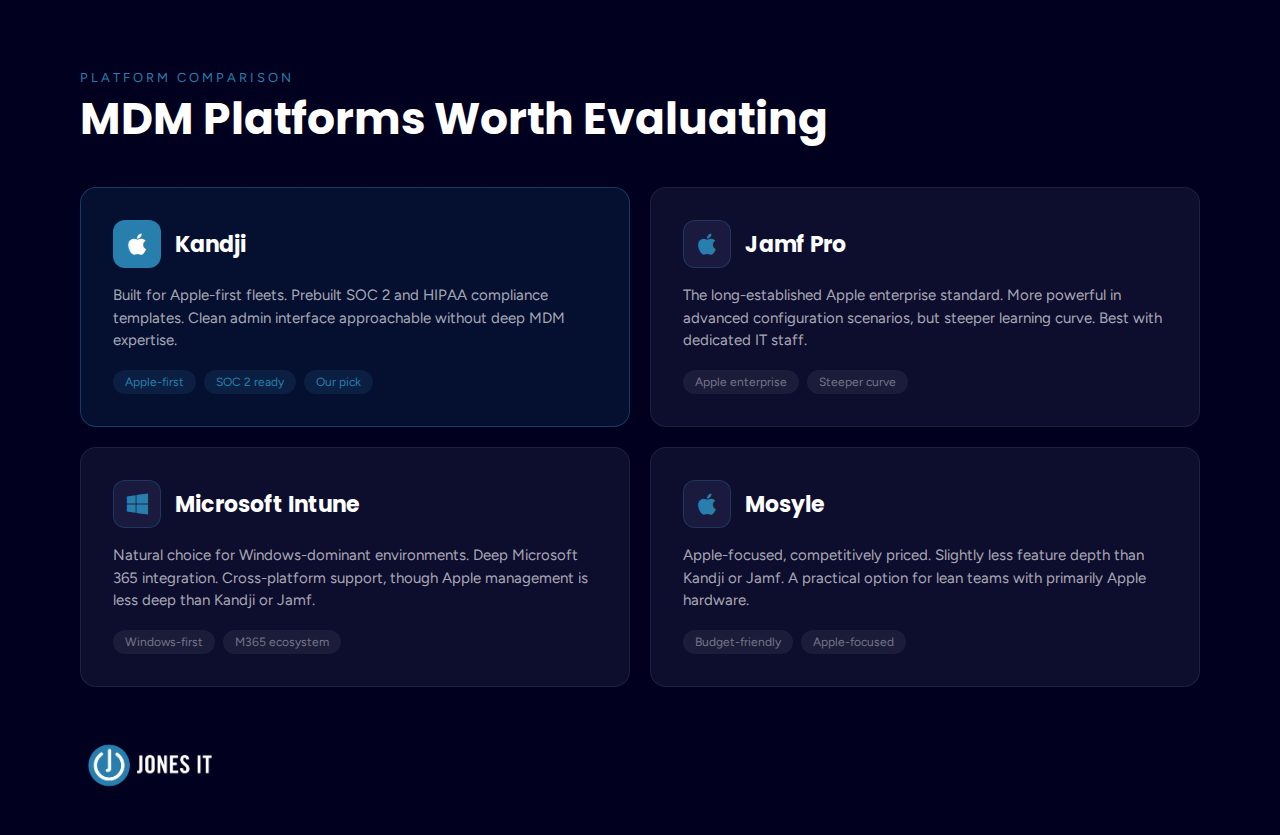
Given his Apple-first fleet, his compliance timeline, and the MSP relationship he was about to start, we pointed the founder toward Kandji. But the right platform depends on your specific situation, so here’s how the main options compare:
Kandji – Built specifically for Apple device fleets (macOS, iOS, iPadOS, tvOS). Kandji’s prebuilt compliance templates and automated remediation workflows make it a strong fit for startups moving toward SOC 2 or HIPAA. The admin interface is clean and approachable without being shallow.
Jamf Pro – The long-established standard for Apple enterprise management. More powerful than Kandji in some advanced configuration scenarios, but with a steeper learning curve. Better suited to teams with dedicated IT staff or an established MSP relationship.
Microsoft Intune – The natural choice for Windows-dominant environments, and well-integrated with the Microsoft 365 ecosystem. Intune handles cross-platform management including macOS and mobile, though its Apple support is less deep than Kandji or Jamf.
Mosyle – Another Apple-focused platform, positioned slightly below Kandji and Jamf in feature depth but competitively priced. A practical option for smaller teams with leaner IT budgets and primarily Apple hardware.
None of these is the universal right answer. The best MDM for your business depends on your device mix, your compliance requirements, and whether you’re managing it in-house or through a partner. What we’d caution against is defaulting to whichever platform has the most name recognition. Fit matters more than familiarity.
What the MDM Rollout Actually Looked Like
One thing we told the founder early: MDM is a policy project more than a deployment project. The software is the easy part. Choosing a platform, enrolling devices, and getting the agent running takes days, not months. The harder work is deciding what your policies should actually be: which apps are permitted, what OS versions are required, how quickly patches must be applied, and what happens to a device when an employee leaves.
Here’s the sequence we ran with his team:
Device inventory first. We counted everything (laptops, phones, tablets), noted OS versions, and identified which were company-owned versus personal. His actual fleet was slightly different from what he thought it was.
Baseline policies defined before any software was installed. Minimum OS version, full-disk encryption required, screen lock timer, VPN configuration. We kept it simple for the first pass.
Company-owned devices enrolled first, personal devices second. BYOD enrollment required a short conversation with each employee about what the MDM agent could and couldn’t see on their personal machine.
Configuration documented as we went. Every policy we set, we logged. That documentation became part of his SOC 2 evidence package.
The whole rollout took about two weeks, including the employee communications. His audit was eight weeks later.
He Passed The Audit
The founder called us after his SOC 2 audit closed. His auditor had commented that his endpoint controls were better documented than those of companies three times his size. That’s not because he had a sophisticated IT operation; he had twelve people and a two-week MDM rollout. It’s because the documentation was clean, the policies were enforced, and MDM could produce the evidence on demand.
If your company is approaching a compliance milestone, or if device management is starting to feel like a real operational gap, MDM is one of those investments that pays back quickly. At Jones IT, we help Bay Area startups select, deploy, and manage MDM solutions that fit their device environment and compliance requirements. Reach out if you’d like to talk through your situation.



About The Author

Michael LeMayIT Systems Engineering Manager at Jones IT
Michael LeMay has spent over seven years at Jones IT, growing from consultant to team lead. Before getting into IT, he spent nearly seven years as an F-16 and C-17 jet engine mechanic in the United States Air Force. He brings that same precision and discipline to troubleshooting complex systems today.
Learn how to establish an AI tool approval process for startups with this 5-step workflow, vendor review checklist, and data loss prevention controls.