
Comprehensive Guide to Managed IT Services Pricing, Plans, And ROI
Updated: March 25, 2026
Managed IT services pricing in the US typically ranges from $100 to $300 per user per month, depending on the provider, the services included, and the pricing model. For most small and mid-size businesses, that range represents a significantly better return than building an equivalent capability in-house.
Here is a number worth sitting with before we get into the pricing models: according to research by Nexthink, the average employee experiences 4 IT issues per week, each lasting around 28 minutes. Based on California's mean hourly wage of $38.15, that works out to $8,901 per employee per year in lost time and opportunity cost alone. For a 40-person company, that is $356,040 per year walking out the door in unmanaged IT friction.
That figure comes from our detailed cost of IT analysis, which breaks down exactly how to calculate what poor IT management is costing your business. The question this post answers is the next one: once you decide to address it, what should managed IT services cost, what do the different pricing models mean in practice, and how do you evaluate the return?
What Are Managed IT Services? A Pricing-Relevant Overview
Before comparing pricing models, it helps to be precise about what managed IT services actually are. The terms IT support, IT services, IT consulting, and managed IT services are used interchangeably but they are not the same thing.
Managed IT services are IT functions managed by a third-party provider, typically under a contract with defined service level agreements (SLAs). The scope can be broad or narrow: some organisations outsource their entire IT operation to a Managed Services Provider (MSP); others use an MSP to complement an existing in-house team. What you outsource, and how much of it, directly shapes what you will pay.
Managed IT services can be either fully managed or partially managed. Fully managed services cover the entire IT function, from helpdesk to vendor management and strategic planning. Partially managed (or co-managed) services handle a defined subset, such as helpdesk and security monitoring, while the in-house team handles the rest.
With that distinction in mind, the three most common ways organisations use managed IT services are:
1. As the primary IT team
The MSP handles everything. This is the most common model for companies with 10 to 150 employees that want professional IT coverage without the overhead of building an in-house department. The MSP owns helpdesk, security, infrastructure monitoring, vendor relationships, and strategic planning.

2. Alongside an in-house IT team
This hybrid approach, also called co-managed IT services, brings in an MSP to fill skill gaps, handle overflow volume, or manage specific functions like cybersecurity or compliance. The in-house team focuses on business-critical or strategic work; the MSP handles everything else.
3. To support rapid growth
Companies scaling quickly often use an MSP to absorb the IT complexity that comes with fast hiring and infrastructure expansion, while the internal team focuses on strategic priorities. The MSP provides scalable capacity that can be adjusted as the organisation stabilises.
Managed IT Services Pricing Models: A Comparison of All 7
MSPs use several distinct pricing models. Each has different implications for cost predictability, billing complexity, and alignment of incentives between you and your provider. Here is how they compare.
1. Per Device
The monthly fee is calculated based on the number of devices the MSP supports. Servers attract higher rates; laptops and desktops attract lower rates; mobile devices and tablets are priced differently again. This model is straightforward for organisations with a stable, well-counted device fleet.
The complication arises with BYOD policies and remote work, where personal devices are used for work but may sit outside the billing scope. Per-device pricing can also create friction around device additions and removals, since each change affects the monthly bill.
2. Per User
The monthly fee is calculated per user rather than per device. All devices used by that user, whether company-issued or personal, are covered under a single billing line. This eliminates the BYOD complications of per-device pricing and is easier to manage when employees use multiple devices.
The limitation is that per-user pricing charges the same rate for every employee, regardless of how much IT support they actually need. In most organisations, a small proportion of employees generate the majority of helpdesk tickets. Heavy users and light users pay the same.
3. All-Inclusive (Fixed Monthly Fee)
A flat monthly fee covers all services with no usage-based billing. This is the simplest model from an administrative perspective and removes any friction around calling for support. The risk is that MSPs on this model face margin pressure if clients use more support than anticipated, which can over time create incentives to limit service quality.
4. Break/Fix (Hourly)
Service is provided on demand, billed by the hour. There is no ongoing relationship or proactive management. Break/fix is associated with reactive helpdesk support rather than managed services: you call when something breaks, a technician fixes it, you pay for the hours.
For organisations that rarely experience IT issues, the per-incident cost can be lower than a monthly retainer. For anyone operating a growing or compliance-sensitive environment, the absence of proactive monitoring and the unpredictability of costs make this model poorly suited.
5. A La Carte
Organisations select and pay for specific services: network monitoring, endpoint security, helpdesk, backup management, and so on. The appeal is flexibility; you pay only for what you use.
In practice, a la carte pricing tends to create scope disputes and billing complexity. Gray areas about what is included in each line item are common, and the scope of work in IT is difficult to cleanly partition. Monthly bills become difficult to predict, and providers have an incentive to charge for anything that sits outside the defined scope.
6. Tiered (Bundled Packages)
Services are pre-packaged into tiers, typically three. A base tier might include monitoring and helpdesk; a mid tier adds on-site support and better SLAs; a premium tier adds security management and compliance support.
Tiered pricing is administratively simple, but the packages are rarely a precise fit. Budget tiers tend to under-deliver on what most businesses actually need, while premium tiers often include services that not every client requires. The flexibility is lower than a la carte, and the incentive alignment is weaker than a flat-rate model.
7. All-Inclusive Hourly (Jones IT Model)
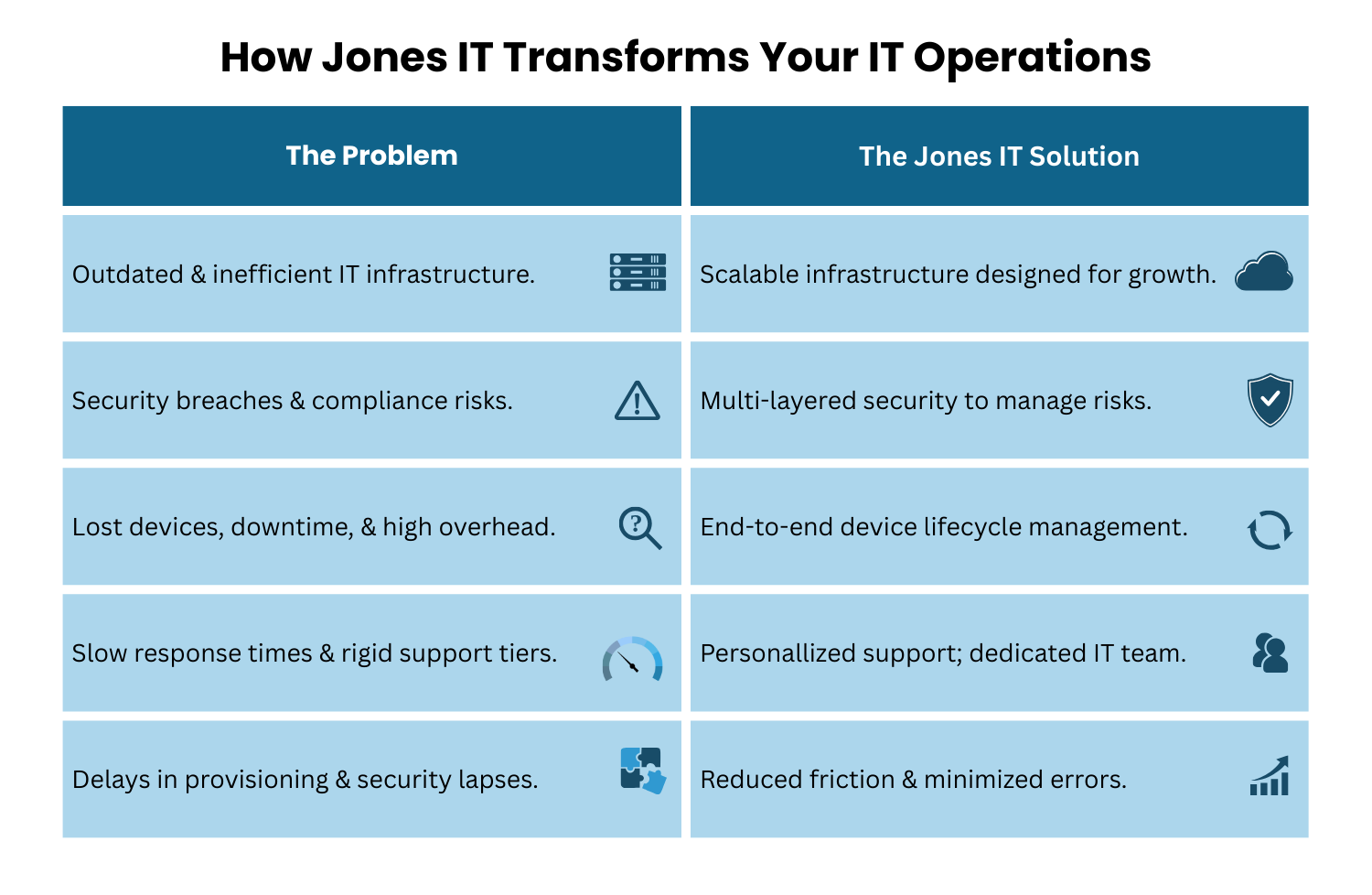
Jones IT uses a pricing model that combines the simplicity of all-inclusive coverage with hourly billing and a fixed minimum monthly commitment. One rate covers all services regardless of the type of work, so there is no separate pricing for network engineering versus helpdesk versus project work.
Hourly rates are tiered by volume: the more IT hours your organisation uses, the lower the rate per hour. The minimum monthly commitment ensures that we can maintain the staffing and SLA commitments your business depends on. This model is particularly well-suited to mid-size and growing organisations, where the variability in IT needs is high and per-user or per-device models would either over-charge during quiet periods or under-deliver during busy ones.
What Does Managed IT Services Pricing Actually Cover?
Regardless of which pricing model an MSP uses, the services included in a managed IT engagement typically fall across six functional areas. Understanding what each covers helps you evaluate whether a given price point represents good value.
Helpdesk support
Day-to-day technical support for employees: password resets, device issues, application problems, connectivity errors, and escalation for complex issues. Response time and resolution time for helpdesk tickets are typically defined in the SLA and are one of the most important measures of MSP quality.
Network monitoring and management
Proactive monitoring of your network infrastructure, with automated alerting and intervention when issues arise. This is where well-managed IT shifts from reactive to preventive: problems are identified and resolved before they cause downtime. We covered the detail on network monitoring in our guide to network performance for office networks.
Security and compliance
Endpoint protection, patch management, threat detection, and compliance support for frameworks including SOC 2, HIPAA, ISO 27001, CCPA, and PCI-DSS. For Bay Area technology companies, this is often the area where a well-qualified MSP delivers the most concentrated value. Our Compliance Kickstarter Program was built specifically for companies working toward their first compliance certification.
Asset management
Tracking, lifecycle management, and optimisation of your device fleet. A robust asset management program reduces costs by extending device useful life, timing upgrades correctly, and ensuring you are not paying for underused or redundant equipment.
Disaster recovery and business continuity
Backup systems, recovery procedures, and business continuity planning that ensures your organisation can resume operations quickly after a disruption. The cost of not having this in place is not theoretical: company-wide downtime from a ransomware attack or network outage costs significantly more per hour than a month of managed IT fees.
Cloud services management
Configuration, migration, optimisation, and security management for cloud environments including AWS, Microsoft 365, and Google Workspace. As most organisations run hybrid or cloud-first infrastructure, expertise in cloud management is a baseline requirement rather than a premium add-on.
Managed IT Services ROI: Is Outsourcing Worth the Cost?
The standard financial metrics for evaluating investments (ROI, payback period, NPV) are difficult to apply directly to IT services because IT services do not produce cash flow directly. They prevent disruption and reduce friction, which affects productivity and revenue indirectly. That does not make the financial case weaker; it makes it harder to model in a spreadsheet.
Here is a more practical framework for evaluating managed IT services pricing against the alternatives.
Step 1: Calculate your current cost of IT issues
Using the framework from our cost of IT analysis, the 2024 figure for California-based organisations is $8,901 per employee per year in lost time and opportunity cost. This is calculated as follows:
Average IT issues per employee: 4 per week (Nexthink research; only 55% of issues are reported, so actual frequency is roughly double the reported rate).
Average issue duration: 28 minutes.
Annual time lost: 28 min x 4 issues x 50 weeks = 5,600 minutes = 93.33 hours per employee.
California mean hourly wage Q1 2024: $38.15 (Employment Development Department).
Cost of lost time: 93.33 hrs x $38.15 = $3,560 per employee per year.
Opportunity cost (at 1.5x lost time): $5,341 per employee per year.
Total cost of unmanaged IT issues: $8,901 per employee per year.
For a 40-person company, that is $356,040 per year before accounting for any major incidents, compliance failures, or security breaches.
Step 2: Model the cost of internal IT versus outsourcing
We have run this calculation in detail in our post on the actual costs of DIY IT management. The short version: for a 40-person San Francisco company, outsourcing IT management costs approximately $46,250 over six months, compared to $57,917 for a single entry-level in-house IT hire over the same period. That is a saving of $11,667 in the first six months, widening further as headcount grows and internal IT costs scale non-linearly with each additional hire.
Step 3: Evaluate the non-financial returns
The cost comparison above covers explicit costs only. The case for managed IT services becomes more compelling when you factor in what it is difficult to put a number on: reduced security incident exposure, faster employee onboarding, compliance readiness without a dedicated internal compliance resource, and the recovery of engineering and leadership time currently absorbed by IT issues.
For a 40-person technology company where senior engineers are earning $200,000 or more, every hour spent on IT friction rather than product development has an opportunity cost far above the California average wage. The $8,901 per-employee figure is a floor, not a ceiling.
Choosing the Right Managed IT Services Pricing Model for Your Business
The right pricing model depends on three variables: the predictability of your IT needs, the size and composition of your team, and how much administrative overhead you are willing to carry.
Per-device and per-user models work well for organisations with stable, predictable headcounts and consistent IT usage. If your team size is unlikely to change significantly and your IT environment is relatively uniform, either model gives you predictable monthly costs.
All-inclusive flat-rate models suit organisations that want zero billing friction and are prepared to accept that the pricing may not perfectly match their actual usage in a given month.
A la carte and tiered models are most appropriate when your IT needs are narrow and well-defined, and you have the internal bandwidth to manage scope discussions with your provider. For most growing companies, the administrative overhead of these models outweighs the theoretical cost savings.
Hourly models with a minimum commitment, like the Jones IT model, suit organisations with variable IT needs, growth-stage companies where headcount and complexity are changing, and businesses that want the incentive alignment of paying for actual work rather than a fixed seat count.
If you want to see what managed IT services pricing would look like for your specific organisation, we are happy to walk through the numbers with you. Reach out to Jones IT for a transparent cost comparison tailored to your headcount, infrastructure, and compliance requirements.
About The Author

Hari SubediMarketing Manager at Jones IT
Hari is an online marketing professional with a focus on content marketing. He writes on topics related to IT, Security, and Small Business. He is also the founder and managing director of Girivar Kft., a business services company located in Budapest, Hungary.

Learn to build an IT investment business case that gets approved. We show you how to prove the cost of waiting vs. the cost of acting to win CFO buy-in.