
How To Scale IT After Getting Series A Funding For Your Startup
Updated: May 27, 2026
Scaling IT infrastructure after a Series A raise means building a network, device management system, security stack, and compliance foundation capable of supporting a team that will grow from roughly 20 to 80 people in 12 to 18 months.
Series A is when the real scaling begins. You have a working product, early revenue, and a round that typically lands between $8 and $15 million depending on your sector and stage. The money has to stretch 12 to 18 months, and the decisions you make in the first 60 days, particularly around people and infrastructure, will shape how well your team performs as you scale.
Most of those decisions get made correctly. Hiring, product development, go-to-market: these receive serious planning attention. IT infrastructure tends to get handled ad hoc, usually by a senior engineer who has better things to do. We have seen this pattern with hundreds of Bay Area startups, including companies like Figma, Superhuman, Intercom, Turo, AngelList, and Hotel Tonight before they became household names. The startups that scale smoothly are the ones that build the right IT foundation early. The ones that struggle are the ones that rebuild it later at three times the cost.
Here is the Series A IT infrastructure stack we recommend, based on over 20 years of working with Bay Area companies at exactly this stage.
In-House vs Outsourced IT Support for Series A Startups
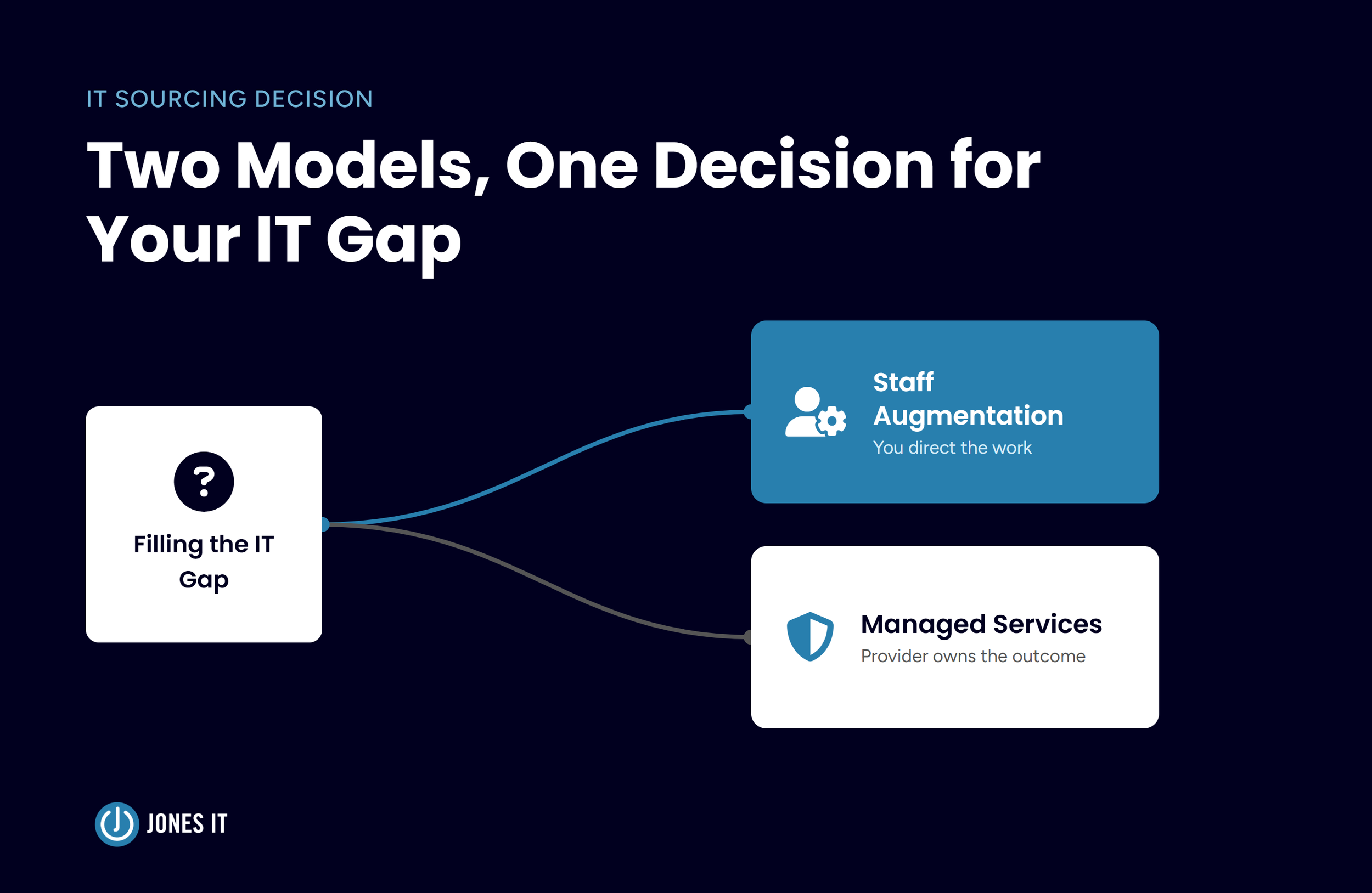
The first IT decision most Series A founders face is whether to hire an in-house IT person or outsource to a managed IT services provider. The honest answer depends on your headcount and your rate of change, but the numbers tend to favour outsourcing at this stage.
Here is what hiring looks like in 2026 numbers for San Francisco:
Entry-level IT technician: approximately $5,602/month in base salary
Benefits at 38.4%
Recruiting cost: $4,700
Training and onboarding: $1,420
Device: $1,500
Monthly software and SaaS: $240
Average annual increment: 4.6%
Total over 18 months: approximately $157,000 for one junior hire with limited experience, who will require supervision and is unlikely to cover the full range of skills your infrastructure needs. A more experienced hire would run closer to $200,000 over the same period. Either way, you get one person, with one set of skills, who takes holidays and gets sick.
With Jones IT, the equivalent 18-month cost for a 40-person company runs approximately $126,180. That is a saving of roughly $31,000 to $74,000 over the same period, depending on whether you were comparing against a junior or experienced hire. More importantly, for that cost you get access to IT technicians, network engineers, systems engineers, and project managers without paying extra for each. We have covered the detailed cost comparison in our post on managed IT services pricing. The calculation there shows what this looks like as your team scales beyond 40 people.
There is a practical dimension that does not show up in the numbers. At Series A, one of your engineers is almost certainly handling IT issues for the team on top of their primary work. According to Nexthink research, the average employee experiences 4 IT issues per week lasting around 28 minutes each. At a senior engineer's loaded cost, that is an expensive use of time. Getting IT off their plate is one of the highest-return investments you can make from the first tranche of your raise.
Not sure whether you have crossed the threshold where outside help makes sense? Our post on when a startup needs a managed IT provider walks through the specific signals to look for.
Building Your Series A IT Infrastructure: Network
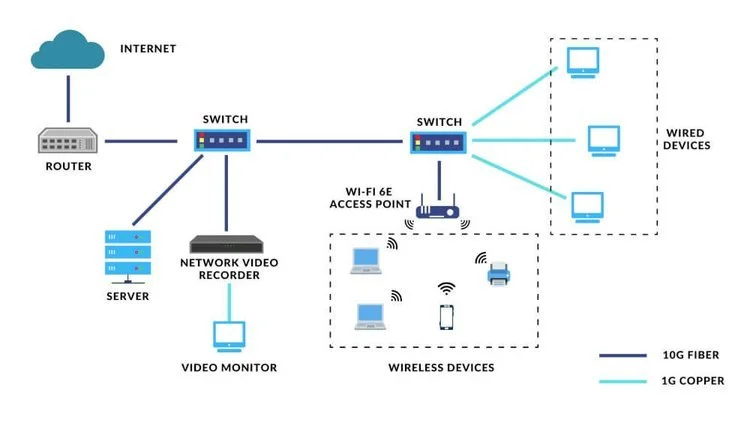
Your network is the foundation everything else runs on. Every device, application, and cloud service your team depends on passes through it. At Series A, you need Series A IT infrastructure that handles your current team comfortably, scales without a rebuild through your Series B, and carries enterprise-grade security without requiring a dedicated network engineer to manage it.
We recommend Cisco Meraki, a cloud-managed networking platform that gives you enterprise-grade performance with centralized remote management. After two decades of working with Bay Area startups across fintech, SaaS, biotech, AI, and defense tech, the combination of network performance, security features, and cloud-based management that Meraki offers is consistently the best fit for companies at this stage. The upfront cost is higher than budget alternatives, but the total cost of ownership over three years is lower, and you will not be ripping it out and starting over when you hit 80 people.
The key requirements for your Series A network infrastructure are:
Sufficient bandwidth for a growing team plus video conferencing load.
Segmented guest and corporate networks.
Advanced security features including intrusion prevention and content filtering.
Centralized management that your MSP can handle remotely without needing to be on-site for routine changes.
Security and Compliance: Non-Negotiable for Series A Startup IT
Security and compliance rarely get the attention they deserve in the first 60 days after a Series A closes. That is understandable, but it is expensive in hindsight. Enterprise customers and investors will ask about your security posture earlier than you expect. If you are in fintech, healthcare, or any business handling sensitive data, compliance requirements will shape your sales cycle.
The security baseline for a Series A startup IT stack should include:
Endpoint protection with EDR (Endpoint Detection and Response) on every device.
Multi-Factor Authentication across all accounts, including personal and shared logins.
A Mobile Device Management solution so you can enforce security policies and remotely wipe devices if an employee leaves.
Network security monitoring.
A password manager deployed company-wide.
On compliance, the frameworks most commonly relevant to Bay Area Series A startups are SOC 2, HIPAA (if you handle health data), CCPA, and increasingly ISO 27001 for enterprise sales. SOC 2 Type 2 in particular has become a default requirement for enterprise customers, and the earlier you start building toward it, the less disruptive the audit process will be. Our Compliance Kickstarter Program was built specifically for companies at this stage: post-Series A, selling to enterprises, and needing a clear path to their first certification without pulling engineering off product work.
One thing we tell every Series A founder is to not wait until a large customer asks for your SOC 2 report to start thinking about compliance. When that conversation happens on a sales call, you want the answer ready. If you want a month-by-month breakdown of what getting to SOC 2 actually looks like, our SOC 2 compliance timeline for Series A startups covers the full roadmap.
Choosing a Productivity Suite for Your Series A Startup
The choice of productivity suite for your Series A IT infrastructure comes down to Microsoft 365 or Google Workspace. Unless your business has a specific requirement that dictates the choice, Google Workspace is the better fit for most Series A startups. The two platforms are comparable on cloud storage, collaboration, and application capabilities. Where they diverge is in deployment and management overhead.
Microsoft 365 requires significantly more day-to-day support and troubleshooting. That overhead translates directly into higher IT costs. Google Workspace is faster to deploy, easier to manage, and produces fewer helpdesk tickets. For a startup where IT capacity is limited and every hour of support time matters, that operational difference adds up quickly.
Device Recommendations for Series A Startup Teams
For most Bay Area startups, the device decision is MacBook Pro versus Windows PC. We recommend MacBooks for the majority of roles, and particularly for engineering teams.
MacOS is a stable, Unix-based operating system that most engineers are already familiar with and prefer. MacBooks require significantly less IT support than Windows machines, with fewer driver conflicts, fewer software compatibility issues, and fewer security vulnerabilities requiring patching, and that reduced overhead shows up directly in your IT costs and in how much time your team loses to IT friction.
The practical consideration is cost. MacBook Pros represent a higher upfront device investment than comparable Windows machines. The total cost of ownership, when you factor in the reduced support burden and longer device lifespan, consistently favours Mac for software and engineering teams.
Device Management for Fast-Growing Startup Teams
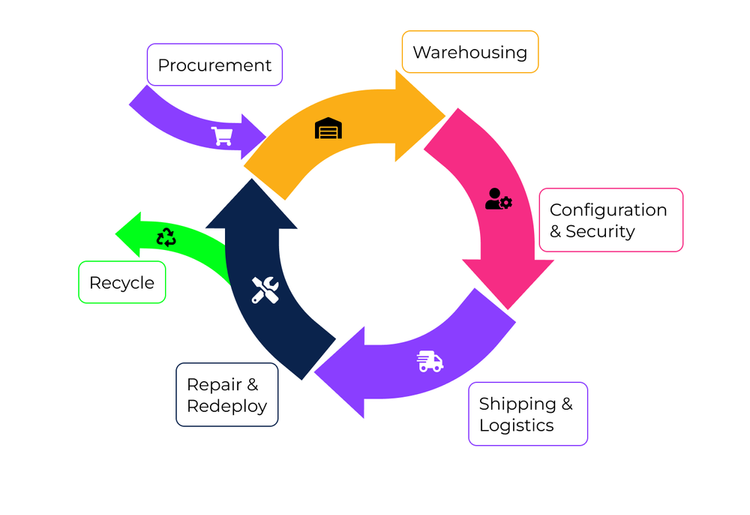
Every time someone joins or leaves your company, a chain of activities kicks off across HR, IT, purchasing, and logistics. At 20 people, this is manageable by feel. At 60 people growing quickly, it is a coordination problem that will cause onboarding delays and security gaps if you do not have the right systems in place.
We recommend pairing an IT Asset and Lifecycle Management solution like Bonboard with a Mobile Device Management platform like Kandji. Bonboard handles the end-to-end logistics of device lifecycle management: procurement, shipping, configuration, and recovery. Kandji sits on every device and handles security policy enforcement, software deployment, vulnerability remediation, and remote wipe when someone leaves.
Complete the stack with an Identity and Access Management (IAM) solution. We recommend Okta. Okta automates account provisioning and deprovisioning, enforces conditional access policies, and provides Single Sign-On across your application stack. When someone joins, their accounts go live automatically based on their role. When someone leaves, all access is revoked in one action. At Series A headcount and growth rate, the time this saves HR and IT compounds quickly. For a deeper look at why IAM matters at this stage, see our post on identity and access management for growing businesses.
Communication Tools for Series A Startup Teams
For team communication, Slack is the standard for Bay Area startups, and for good reason. We use Slack internally at Jones IT, and it integrates with virtually every other tool in a modern startup stack. Slack's channel-based structure keeps communication organised as your team grows, its notification controls respect focus time, and its integration capabilities reduce the context-switching that comes with managing multiple tools.
From an IT management perspective, Slack is straightforward to deploy and generates very few support issues. When we integrate Slack with your IT ticketing system, your employees can raise support requests directly from their primary communication tool. Ticket volume goes up, and response quality with it.

Building Series A IT Infrastructure That Scales With Your Startup
The technology decisions you make in the 60 days after a Series A close are harder to undo than they look at the time. A network built on consumer-grade equipment will need replacing at 60 people. An unmanaged device fleet will create a security incident at the worst possible moment. Compliance work deferred until an enterprise customer asks for it will cost you a deal.
Every dollar of Series A capital spent on the wrong IT infrastructure costs you twice: once when you buy it, and again when you replace it 12 months later under pressure. The Series A IT infrastructure stack we have described above is what we have seen work consistently across hundreds of Bay Area startups over two decades, from early-stage companies to the ones that have since become well-known names.
If you want a detailed checklist to work from as you build out your Series A IT infrastructure, we have put one together specifically for companies at this stage: IT Infrastructure Checklist for Series A Startups. And if you want to see how everything fits together into a broader IT stack, our post on the IT stack for running efficient startups covers the full picture.
If your startup needs help building or scaling its Series A IT infrastructure, reach out to Jones IT. We can walk through your current setup, identify the gaps, and build a plan that fits your headcount and your runway.


Mac vs. PC for startups isn't a company-wide choice; it’s a per-role one. Use this framework to match hardware to software needs and efficiently manage a mixed fleet.