
It is 9:15 a.m. on a Monday. Your newest hire, an engineer who turned down two other offers to join your team, opens their laptop in the spare bedroom they converted into a home office. They cannot get into GitHub. Their Slack account exists but has no channels beyond the defaults. The project management tool does not recognize their email address. By 11:00, they are typing an apologetic message to their manager asking whether IT is aware. By noon, half a day is gone.
I have watched this play out more times than I can count. The new hire is not the problem. The manager is not the problem. The problem is that nobody built a process to make sure the machine was ready before the pilot climbed in.
Now picture a different scenario, six months earlier. A product manager leaves the company after giving three weeks' notice. The farewell messages are warm. But it is Thursday evening of the following week before anyone thinks to check whether her access to your CRM, AWS environment, and GitHub organization has actually been revoked. It has not.
Both failures trace back to the same root cause: the absence of a structured employee IT lifecycle management process. One costs you a week of productivity and some goodwill. The other is an open security liability sitting there unattended.
What Employee IT Lifecycle Management Actually Covers
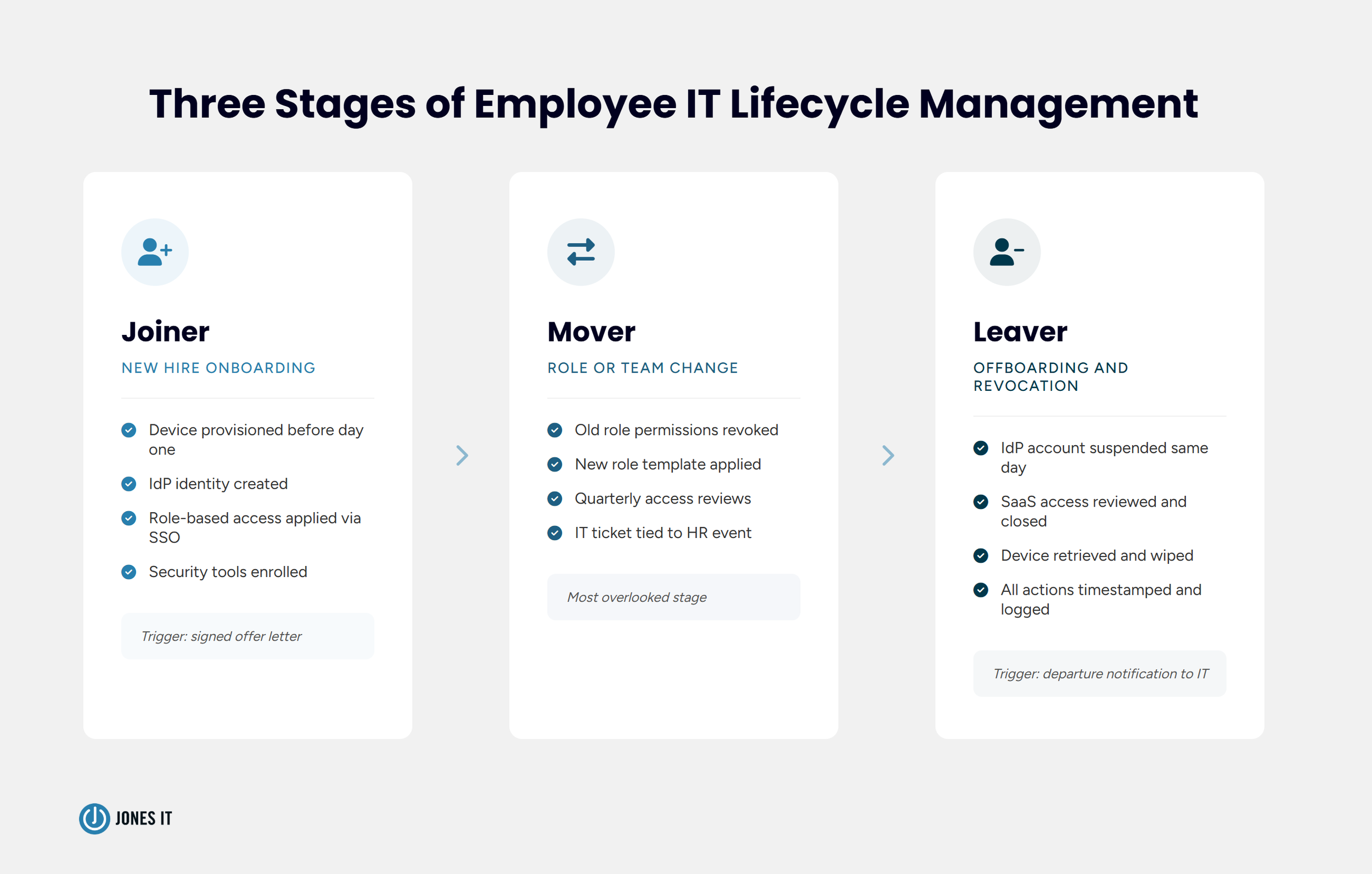
Employee IT lifecycle management is the process of provisioning access and devices for new hires, updating permissions when employees change roles, and revoking all credentials when they leave. The full arc runs from the moment an offer is accepted to the moment an employee's last account is deprovisioned and their device is wiped.
The industry shorthand is the Joiner-Mover-Leaver (JML) framework. Joiners are new hires. Movers are employees who change roles, teams, or locations. Leavers are departing employees. Each stage has distinct IT requirements. In my experience, most companies handle joiners reasonably well, struggle with movers, and handle leavers inconsistently.
The stakes at each stage are different. A poor joiner experience is primarily an operational and cultural problem. A missed mover update is a privilege creep problem, where an employee accumulates permissions from previous roles they no longer need. A failed leaver process is a security and compliance problem, and the damage from it can take weeks to surface.
The Joiner Stage: Setting New Hires Up for Day One
The goal of IT onboarding is simple: by the time a new hire logs in for the first time, everything they need should already be there. No waiting for access requests to clear. No hunting for the right person to ask about a tool. Just a configured device, a populated inbox, and access to the systems their role requires.
Getting there means starting before the hire's first day. The trigger should be the signed offer letter, not the start date. Waiting until the week before is how you end up scrambling. A standard joiner checklist covers:
Device procurement and configuration, with MDM enrollment completed before shipping;
Identity creation in your IdP (identity provider), typically Google Workspace, Microsoft Entra ID, or Okta;
Role-based access provisioning for core SaaS tools via SSO where possible;
Email and Slack setup, including team channel memberships;
Security tool enrollment: endpoint protection, password manager, MFA;
Sharing of IT policy, acceptable use policy, and any security awareness training requirements.
The phrase 'role-based access' is doing a lot of work in that list. Access should be determined by the role, not by ad hoc requests that pile up in someone's inbox. If you define access templates for each role in your organization, you can provision a new hire quickly and consistently without anyone making judgment calls about what they should or should not have. That is also the foundation of a defensible access control posture when SOC 2 or HIPAA auditors come asking. A well-structured IT onboarding and offboarding process for startups starts here.
For a deeper look at device deployment and MDM configuration for remote hires specifically, our guide to IT onboarding and offboarding for remote employees covers the tooling and logistics in detail.
The Mover Stage: When Roles Change, Access Should Too
This is the stage where I see the most unexamined risk. The joiner and leaver stages at least get people's attention. The mover stage tends to get skipped entirely because the consequences do not announce themselves right away.
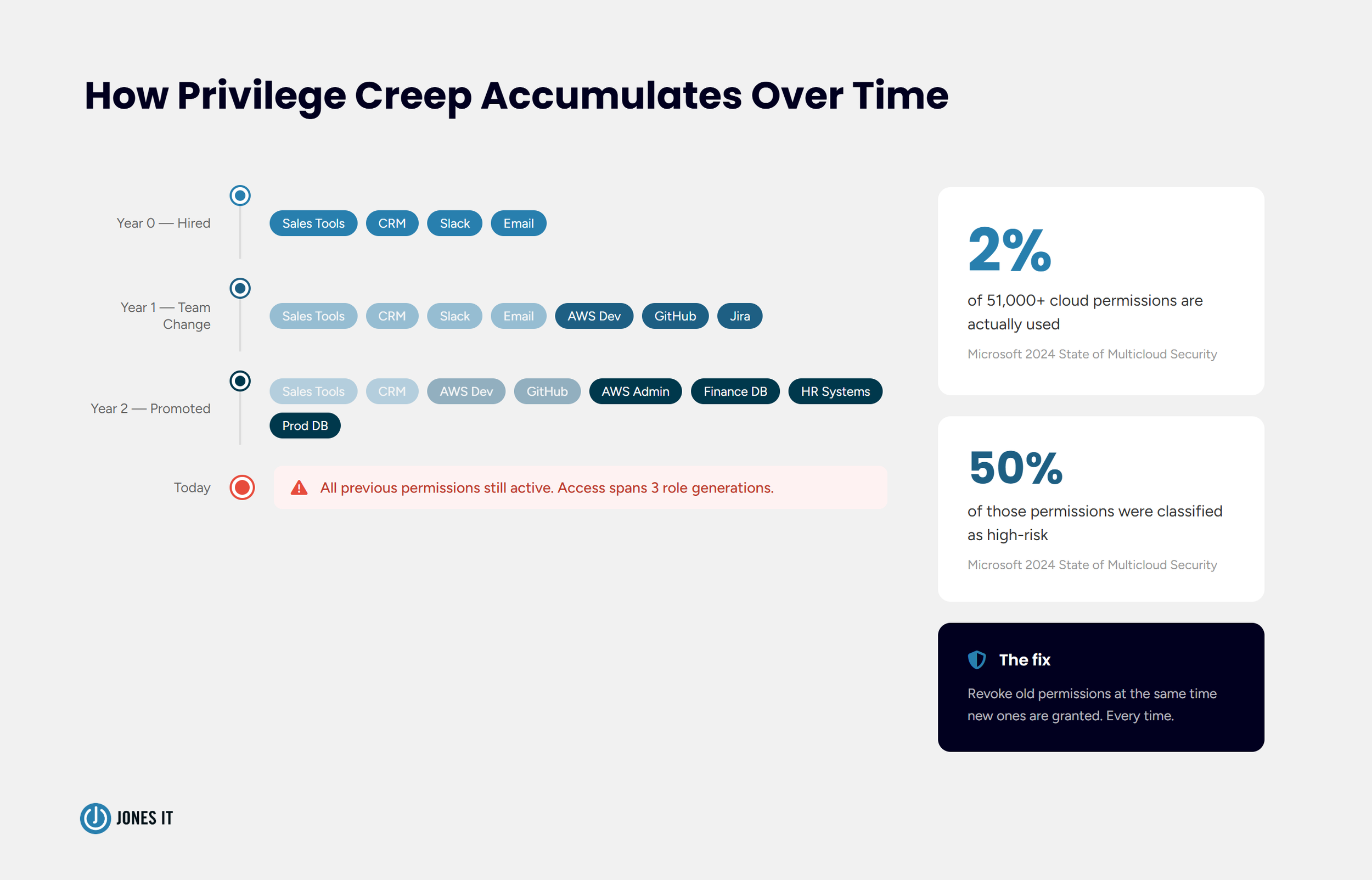
When an employee moves from an individual contributor role to a management position, or from one product team to another, their access needs change. The new role requires new permissions. The old role no longer applies. In a well-run environment, old permissions are revoked when new ones are granted. In most environments, they are simply added to, indefinitely.
The result is privilege creep: an accumulation of stale permissions that grows with every role change, every project assignment, every temporary access grant nobody remembers to revoke. An employee who has been at your company for three years and changed teams twice might have access to systems they have not touched in eighteen months. Microsoft's 2024 State of Multicloud Security Report put numbers to this: of more than 51,000 permissions granted across cloud environments, only 2% were actually being used, and 50% were classified as high-risk. Most of that gap is mover drift. In a SOC 2 audit, that is exactly the kind of finding that requires explanation.
Addressing the mover stage requires two things. First, a defined process for capturing role changes before they happen, so IT has time to update access in parallel with the HR transition. Second, periodic access reviews that catch the drift over time. Most compliance frameworks, including SOC 2 Type II and ISO 27001, require access reviews at least quarterly. If you are not running them, you are accumulating exposure you cannot see.
The practical starting point is tying any change in employment status, whether that is a promotion, team transfer, or title change, to a corresponding IT ticket. HR should not be updating a BambooHR record without IT knowing about it. A shared intake form and a clear owner are enough to close most of the gap. You do not need expensive automation to start.
The Leaver Stage: IT Offboarding and Access Revocation
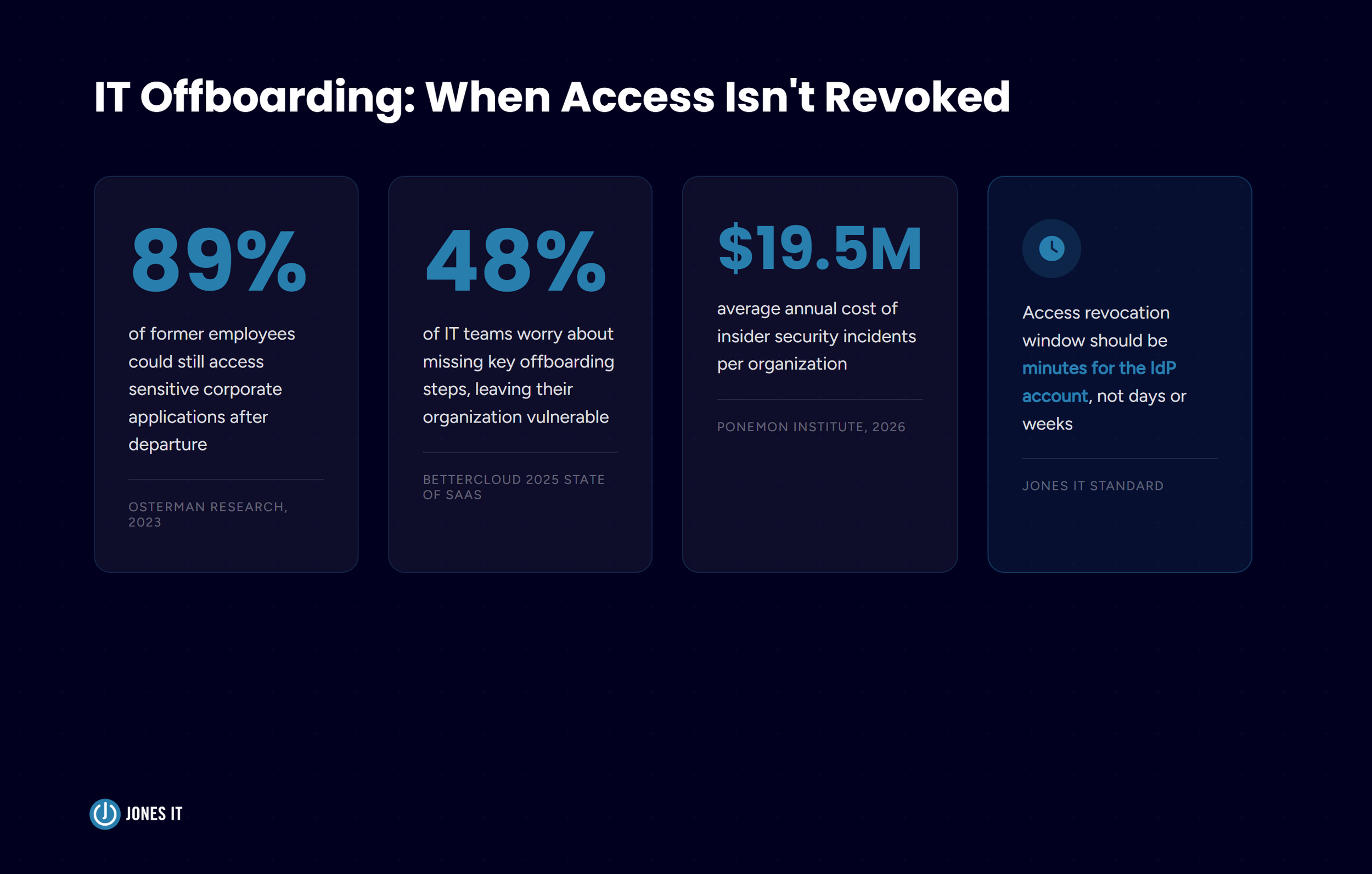
Former employees with active credentials are the most common and least discussed security exposure I see at growing companies. Osterman Research found that 89% of employees could still access sensitive corporate applications after their departure. That number does not surprise me. The pattern matches what we encounter when companies bring us in to clean things up.
The cost of getting this wrong is not abstract. The Ponemon Institute's 2026 Cost of Insider Risks Global Report put the average annual cost of insider security incidents at $19.5 million, with the average individual incident costing $676,517. Those figures include negligent insiders, not just malicious ones. A former employee who retains access to your customer data, source code, or financial systems is a liability your security controls did not close. And beyond the financial exposure, there are compliance obligations: SOC 2, HIPAA, and most enterprise security questionnaires will ask about your offboarding process specifically.
The leaver checklist is not complicated. Every item on it needs to happen on the day of departure, not the following week:
Suspend the IdP account immediately on the employee's last day;
Revoke or transfer ownership of SaaS accounts not covered by SSO;
Remove access to cloud environments (AWS, GCP, Azure) and version control;
Retrieve all company devices and initiate remote wipe if retrieval is not possible;
Reassign any shared credentials or service accounts the employee may have used;
Forward email and transfer files per company policy;
Log all actions with timestamps for your audit trail.
That item about accounts not covered by SSO is the one that catches people. SSO covers the tools you know about. The tools you do not know about, the ones employees signed up for directly with their work email, are the gap. BetterCloud's 2025 State of SaaS report found the average company now manages 106 SaaS applications. Every one of those is a potential orphaned account when someone leaves. Regular application discovery and a culture of logging new tool adoptions through IT are the only reliable ways to keep that list current.
On timing: a 24-hour window between departure and access revocation is not acceptable. A well-run process gets the IdP account suspended within the hour. Everything else follows within the same business day.
How to Build a Lifecycle Process That Scales
A process that works for a 20-person company will not survive a 100-person company intact. I have seen this enough times to be confident about it. The mechanics that hold up when HR and IT are two people who sit near each other collapse when you add headcount, distributed teams, and a growing SaaS stack. Here is what to build before you outgrow what you have.
Start With an Identity Foundation
The prerequisite for everything else in employee IT lifecycle management is a centralized identity provider. Google Workspace, Microsoft Entra ID, and Okta are the most common choices for the companies we work with. The IdP is the single source of truth for who has access to what. User provisioning and deprovisioning through the IdP, combined with SSO for as many applications as possible, gives you control over the full access picture.
For a full explanation of IAM architecture and how to choose the right approach for your business, our post on the importance of identity and access management for small businesses is a good starting point.
Define Role-Based Access Templates
Before you can provision consistently, you need to know what each role requires. Documenting access templates for your most common roles, even just in a spreadsheet, gives HR and IT a shared baseline. When a new engineer joins, you apply the engineering template. When a sales rep becomes a sales manager, you know exactly what to add and what to revoke. Templates are also how you scope quarterly access reviews: instead of auditing everyone individually, you check whether current access matches the template for the current role.
Tie IT Workflows to HR Events
The most common failure in employee IT lifecycle management is the handoff between HR and IT. A resignation is accepted, but IT is not notified until after the person has already left. A hire is confirmed, but IT is not looped in until two days before the start date. Closing this gap means making HR-to-IT communication structural. A shared intake form, a dedicated Slack channel, or a simple ticketing workflow establishes the trigger points. IT steps need to be tied to the HR event, not dependent on someone remembering to send an email.
Document Everything
Every step in this process needs a paper trail. SOC 2 CC6.2 requires that access is provisioned based on authorization and revoked in a timely manner when no longer needed. Meeting that requirement means having the right process and being able to prove you ran it. Timestamped logs, completed checklists, and a clear chain of approval are what turn a good process into a defensible one. For more on the standard itself, the AICPA's SOC 2 documentation is the primary reference.
What Good IT Lifecycle Management Looks Like
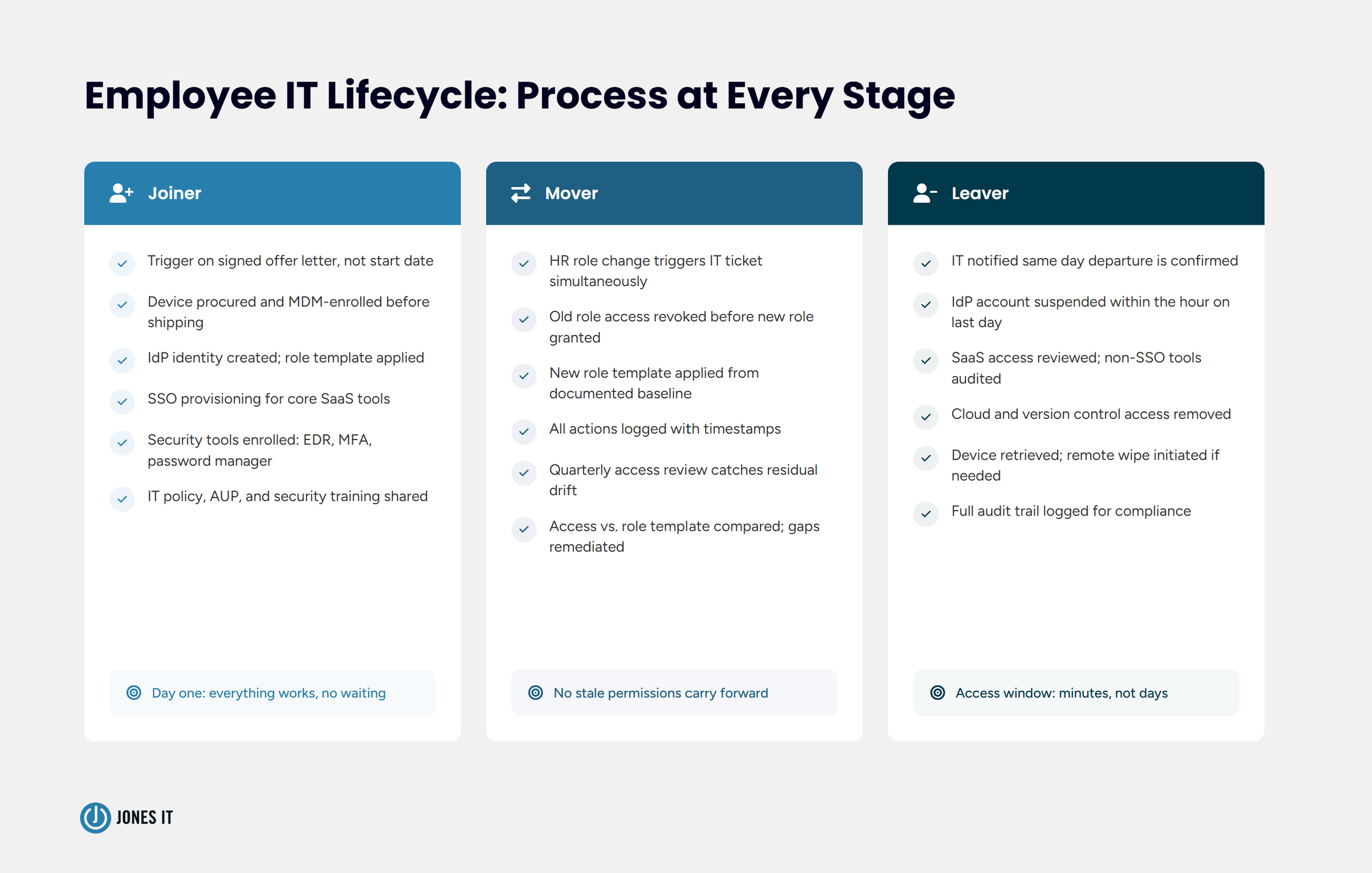
Here is what a well-run employee IT lifecycle management process looks like in practice at the companies we support:
A hire is confirmed, HR submits an IT onboarding request, and IT provisions a configured device and role-based access before day one. The new hire logs in and has everything they need. No waiting, no tickets, no apologetic Slack messages to the manager.
A role change triggers a parallel IT workflow. Access for the prior role is revoked; the new role template is applied. The employee carries no stale permissions forward.
A departure notification reaches IT the same day. On the last day, the IdP account is suspended within the hour, SaaS access is reviewed and closed, and the device return is initiated. The former employee's access window is measured in minutes.
Getting from where most growing companies are to that standard takes the right infrastructure, documented processes, and usually a managed IT partner who has built these systems before at companies at your stage. If your current process is not reliably delivering that experience, that is the gap worth closing.
Get Started With Employee IT Lifecycle Management
Employee IT lifecycle management is not a single task or a one-time project. It is an operational discipline that touches every hire, role change, and departure in your organization. The companies that get it right run cleaner audits, have fewer security incidents, and give their employees a better experience from day one.
The starting point is not complicated: define your role-based access templates, establish the HR-to-IT handoff triggers, and document what you do. Then run the process every time, without shortcuts.
If you want to talk through what a structured employee IT lifecycle management process looks like for your team, we are happy to help. Reach out and we can walk through where your current process stands and what it would take to close the gaps.
Let's talk about your IT process…

About The Author

Michael LeMayIT Systems Engineering Manager at Jones IT
Michael LeMay has spent over seven years at Jones IT, growing from consultant to team lead. Before getting into IT, he spent nearly seven years as an F-16 and C-17 jet engine mechanic in the United States Air Force. He brings that same precision and discipline to troubleshooting complex systems today.
Learn how IT support for VC firms works best as a shared baseline. Protect your portfolio companies without adding a central help desk operational burden.