
Why Distributed Teams Still Need On-site IT Support
It was a Thursday afternoon. Twelve people were in their SoMa office for a company-wide collaboration day, the kind the leadership team had been scheduling more deliberately since moving to a hybrid model. The morning had gone well. Then, around 1 p.m., the internet died.
Not for one person. For everyone.
The company's remote MSP was on the case within minutes. They pinged the router. It responded. They checked the firewall. Fine. They ran diagnostics on the ISP connection. Clean signal all the way to the building. Forty-five minutes in, they had ruled out every software-layer explanation they could reach from their screens. The office, meanwhile, was on hotspots, Zoom calls were dropping, and the engineering team had given up on the shared dev environment entirely.
When an engineer finally reached on-site, he walked to the network closet, traced a cable from the patch panel to the managed switch, and found a port that had been intermittently failing. It looked fine in remote diagnostics, but it wasn’t fine. He moved the uplink to a healthy port, and the office was back up in minutes.
I have seen versions of this scenario more times than I can count. And every time, it points to the same blind spot: the assumption that remote IT support alone is sufficient for an office that still has physical infrastructure. It is not, and on-site IT support for distributed teams is exactly what fills that gap.
Your Team Went Distributed; Your Office Infrastructure Did Not.
On-site IT support for distributed teams is the practice of maintaining hands-on engineering access to the physical infrastructure of an office whose workforce is largely or partially remote. It covers the hardware, cabling, and systems that exist in a fixed location and cannot be diagnosed, repaired, or replaced over a remote session.
The distributed workforce model has changed a lot about how companies think about IT. Device management is largely remote now. Helpdesk support is remote. Most of the day-to-day IT work that keeps a 40-person SaaS company running happens without anyone setting foot in the office, and that is genuinely good. We are not arguing against remote IT support. My team uses it constantly. And hybrid work is not going away. Gallup's 2025 workforce data finds that hybrid workers now average 2.3 days per week in the office, and that number has held steady. Offices are not disappearing, and the physical infrastructure inside them is not going anywhere either.
The shift to distributed work created a blind spot, though. The office did not go remote when the people did. The network rack is still in the closet. The patch panel still has 48 ports with 48 cables connected to 48 devices. The access points still need to be positioned, configured, and occasionally swapped out. The conference room AV system still has an HDMI matrix that someone needs to physically touch when it locks up. The power-over-ethernet switch feeding half the wireless infrastructure still needs a hands-on reboot when a firmware update goes sideways.
None of that is in the cloud. And when any of it breaks, it does not matter how good your remote IT partner is.
What Remote IT Support Can and Cannot Do
Remote IT handles the majority of what any office deals with on a given day: forgotten passwords, VPN configuration, cloud application troubleshooting, device enrollment, and user onboarding. These are software and cloud problems, and remote tools solve them well.
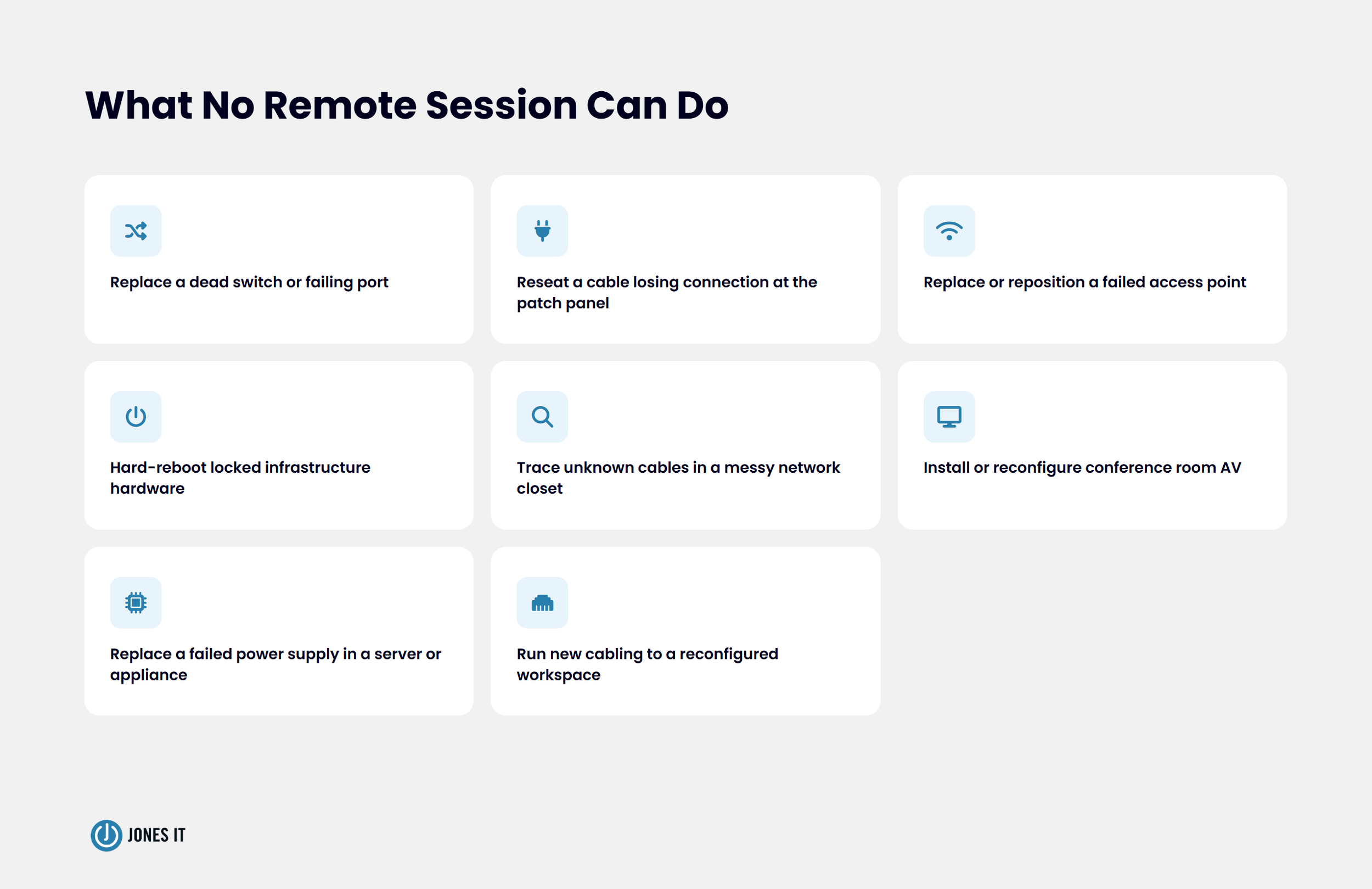
The physical layer is a different category entirely. Here is what no remote session can do, regardless of how sophisticated the monitoring tools are:
Swap a failing switch port or replace a dead switch.
Reseat a cable that is intermittently losing connection at the patch panel.
Replace an access point that has failed or needs repositioning for better coverage.
Reboot infrastructure hardware that has locked up and stopped responding to remote management.
Trace an unknown cable in a disorganized network closet to identify what it connects to.
Install or reconfigure conference room AV equipment.
Replace a failed power supply in a server or network appliance.
Run new cabling to a reconfigured workspace.
The stakes for getting this wrong are concrete. ITIC's 2024 Hourly Cost of Downtime Survey found that over 90% of small and midsize businesses with up to 200 employees estimated their downtime cost at more than $300,000 per hour. Even at the lower end of that range, a 45-minute outage that a remote session cannot resolve is not a minor inconvenience. It is a material business cost that a single engineer with physical access to the right port could have resolved in ten minutes.
The diagnostic process for physical problems often starts remotely. My team will check error logs, run interface statistics, and identify probable hardware failures before anyone drives to the office. That initial assessment is a narrowing exercise, not a resolution. It tells you what to bring and where to look. Someone still has to show up.
The companies that feel this most acutely are the ones whose offices have aged. A team that moved into a SoMa loft four years ago and grew from 15 to 55 people is now running substantially more load through infrastructure installed during a different era of the company. The office IT infrastructure that made sense in 2021 is often genuinely messy now.

The Physical Problems That Stop Bay Area Offices Cold
My team has been providing on-site IT support in Bay Area offices for over a decade. There are patterns to what breaks, and they are almost always physical. The Uptime Institute's 2025 Annual Outage Analysis found that IT and networking-related outages increased in 2024, now accounting for 23% of all impactful outages, a category that grows directly from the physical layer problems, which remote support cannot reach. What follows is what we actually see on the ground.
Network Hardware Failures
Switches fail. Access points fail. Patch panel ports degrade. Power-over-Ethernet injectors stop delivering consistent power. These failures are often gradual rather than sudden, which is why they show up as intermittent problems that are genuinely hard to diagnose remotely. A port that works 90% of the time looks fine in monitoring dashboards right up until it causes a 45-minute outage on a busy Thursday.
I have debugged Cisco and Meraki gear at 2 a.m. Enterprise-grade equipment fails less often than consumer gear, but it does fail. And when it does, you need someone who can physically assess the hardware, confirm the fault, and swap the component or bring in a replacement. Our guide to business Wi-Fi infrastructure covers access point selection and placement in depth, and Cisco Meraki's enterprise Wi-Fi documentation is a useful reference for understanding what enterprise-grade management actually looks like. The point for distributed teams is simpler: even the best-planned wireless network needs hands-on maintenance over time.
Cabling and Patch Panel Issues
Cabling is the most underestimated source of office network issues, and I say that as someone who has spent a lot of time in network closets. Fluke Networks, whose test equipment is the industry standard for structured cabling certification, has documented that poor data cabling causes as much as half of all network failures. Half. And yet cabling is almost never the first thing a remote session investigates, because it simply cannot. A cable bent around a sharp corner during a desk reconfiguration may carry a signal most of the time. A patch panel connection never fully seated causes errors only under load. A CAT5e run stapled to a baseboard and walked on for three years fails intermittently in ways that look exactly like a software problem from the outside. Physical IT support at the cabling layer is slow, methodical work that has no remote equivalent.
Remote diagnostics can flag elevated error rates on an interface, but they cannot see the cable. They cannot feel whether the RJ45 connector clicks properly into the port. They cannot trace a run behind a wall to find the damaged section. Physical layer troubleshooting requires physical presence. There is no substitute.
Conference Room AV Systems
Conference room AV is the office IT problem distributed teams feel most viscerally, because it fails at the worst possible moment. The all-hands starts in five minutes. The display will not accept the HDMI input. The codec is showing a solid red light.
We covered the specifics in our conference room AV setup post. The short version: AV systems require onsite setup, onsite calibration, and onsite troubleshooting. The complexity of a modern conference room, a display, a camera, an audio system, a codec, and a room scheduling panel all talking to each other over the network, is real. Remote support can restart services and check connectivity, but it cannot reseat a cable, power-cycle the right device in the right sequence, or swap out a unit that has failed.
Access Control and Physical Security
Many Bay Area offices run badge-based access control systems that integrate with the IT network. When these need installation, reconfiguration, or troubleshooting, they require someone physically present to handle both the IT and the hardware side. A door that will not unlock because of a failed reader or a misconfigured controller is not a problem that resolves over a screen share.
Why Bay Area Office IT Infrastructure Is Harder Than It Looks
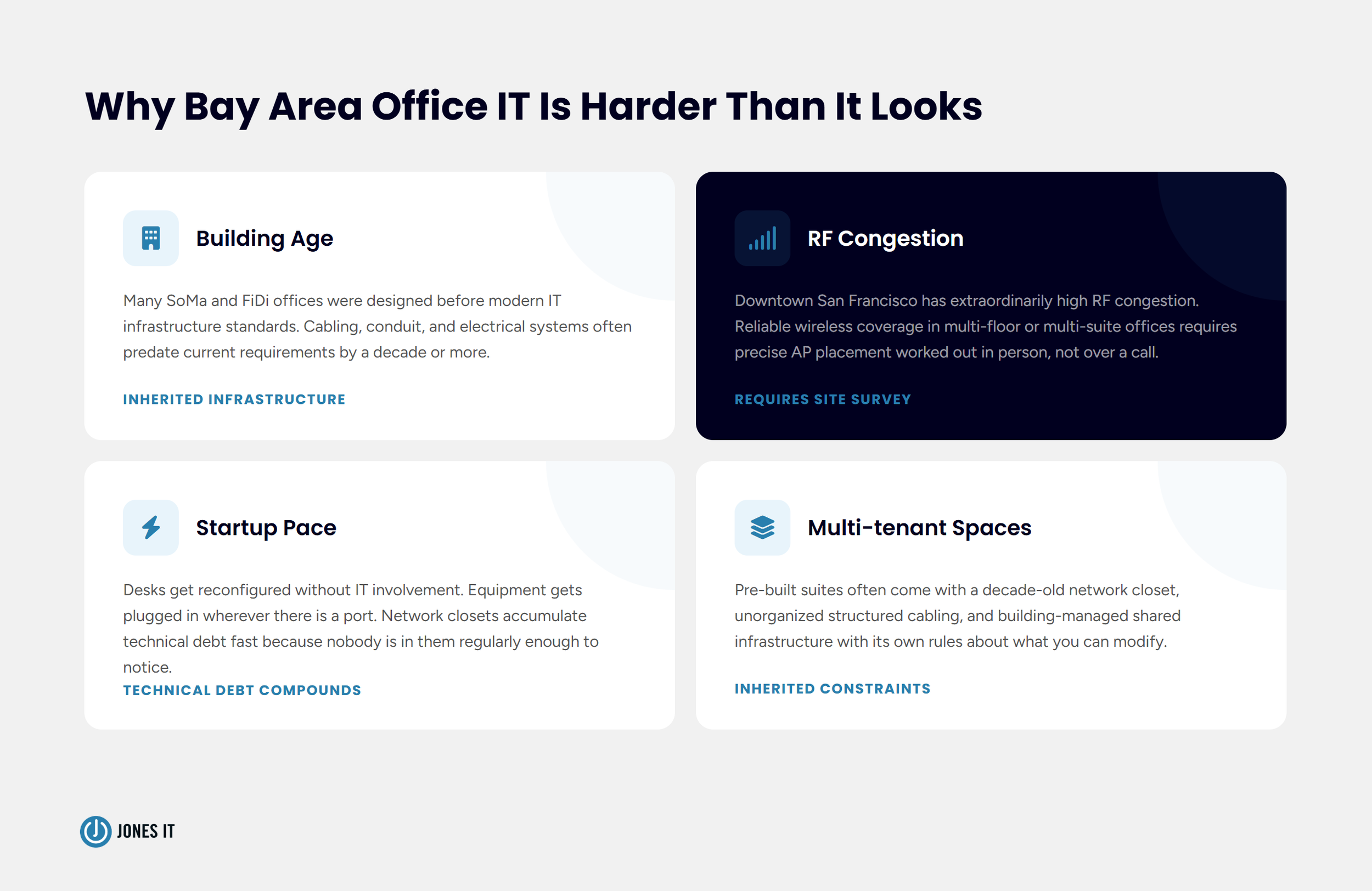
Bay Area office IT infrastructure has physical characteristics that make on-site IT support more complex than in most markets. My team works in offices across SoMa, the Financial District, Mission Bay, Dogpatch, Potrero Hill, and the broader Bay Area; a few things make the physical environment here genuinely different from what you encounter elsewhere.
Building age and infrastructure variability are real factors. A lot of the office IT infrastructure Bay Area startups occupy is in buildings designed for a different era of technology. A Series A company moving into a pre-built suite in a multi-tenant building often inherits whatever the previous tenant left behind: structured cabling installed a decade ago, a network closet that was never properly organized, and building-managed shared infrastructure with its own rules about what you can and cannot modify.
Dense urban environments also create Wi-Fi conditions that require careful physical planning. Downtown San Francisco has extraordinarily high RF congestion. Getting reliable wireless coverage in a multi-floor or multi-suite environment often requires precise access point placement that we work out in person, not over a call.
And then there is the pace. Bay Area startups move fast. Desk reconfigurations happen without IT involvement. New equipment gets plugged in wherever there is a port. Network closets accumulate technical debt quickly because nobody is in them regularly enough to notice. By the time a distributed team realizes the office infrastructure has become a liability, it is often too late.
What Onsite IT Support for Distributed Teams Actually Looks Like
The model that works for distributed-first companies with physical offices combines remote capabilities for the 80% of issues that remote tools handle well, with local onsite IT support for the physical layer work that cannot be done any other way.
Proactive Scheduled Visits
Reactive-only onsite IT support is expensive and disruptive. If the only time an engineer shows up is when something is already broken, you pay for loss of productivity and absorb the downtime. Scheduled proactive visits, even quarterly, let us inspect the physical infrastructure, catch small issues before they become outages, and maintain the cable management and documentation that keeps the office network legible.
We do regular pre-scheduled onsite visits for our managed IT services clients. A network closet that gets looked at four times a year stays in a manageable state. One that goes 18 months without physical attention often does not, and the cleanup is always more work than the maintenance would have been.
Local Response Time That Actually Matters
When the office is down and the problem is physical, response time is everything. A remote-only IT provider can be on a call with you immediately, but if the resolution requires someone in the building, you are waiting for however long it takes to find and dispatch a field technician. That may be hours if the provider is not locally staffed.
We are headquartered in SoMa. My engineers are in the Bay Area. When a client calls with a physical infrastructure issue, we can have someone on-site quickly, not because a contract says so, but because we are actually local. That distinction matters a great deal when a conference room has gone dark 30 minutes before a board meeting.
Infrastructure That Scales With the Team
Distributed teams grow. When headcount goes from 30 to 60, the office infrastructure often needs to grow with it: additional workstations, an extended wired network, new access points, upgraded switching capacity, and new cabling to a reconfigured workspace. None of that happens remotely.
An IT partner who knows your office can plan and execute those expansions while keeping technical debt low. For Series A companies thinking through what their infrastructure needs to look like at 100 people, our IT infrastructure checklist for Series A startups is a useful starting point.
Signs Your Office Needs Onsite IT Support
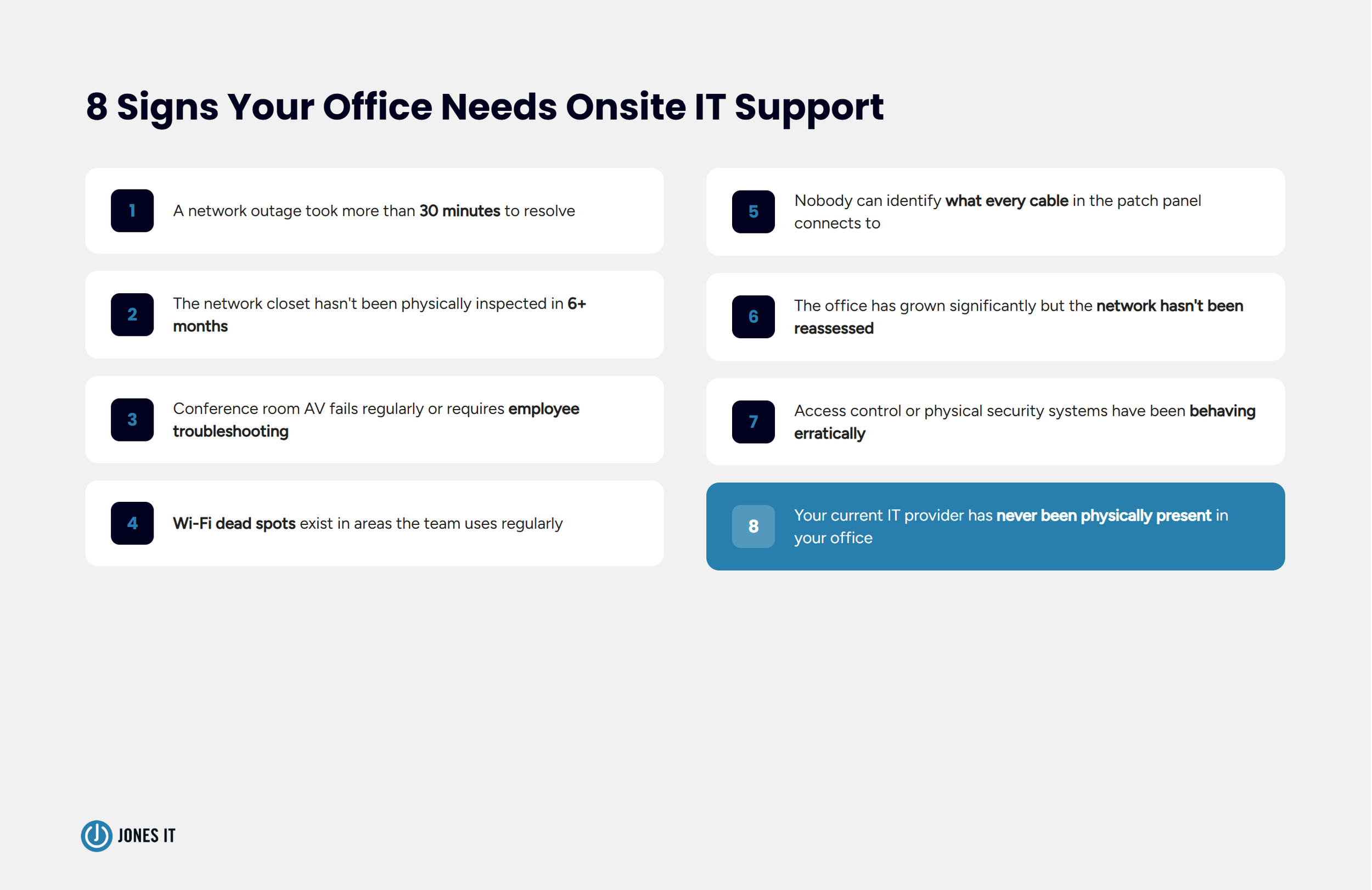
If your distributed team has a physical office and you rely entirely on remote IT support, here are the signals worth paying attention to:
Your office has experienced a network outage that took more than 30 minutes to resolve.
The network closet has not been physically inspected in more than six months.
Conference room AV systems fail regularly or require employee troubleshooting.
Wi-Fi dead spots exist in areas the team uses regularly.
Nobody on the team can identify what every cable in the patch panel connects to.
The office has grown significantly since the network infrastructure was last assessed.
Access control or physical security systems have been behaving erratically.
Your current IT provider has never been physically present in your office.
Any one of these is worth paying attention to. Several together is a strong signal that the physical layer of your office has been accumulating problems that remote IT support cannot resolve.
Why On-site IT Support Still Matters for Distributed Teams
There is a version of the distributed-work future where offices are truly minimal, where the people who come in on any given day work on laptops connected to cloud services, and nothing in the building requires a dedicated IT presence. Some companies are building toward that. Most Bay Area startups are not there yet.
In the meantime, the office has a network rack, a patch panel, access points, conference room equipment, and a cabling infrastructure that needs to be maintained by someone who can actually touch it. Remote IT does a lot of things well. On-site IT support for distributed teams is a different discipline, and the companies that treat it as optional tend to find out why it matters at the worst possible time.
If your team has a Bay Area office and you are not sure whether your current setup has the physical IT support coverage it needs, we are happy to take a look. Reach out to us, and we can talk through your infrastructure and where the gaps might be.



About The Author

Sarang JoshiCTO at Jones IT
Sarang Joshi leads and mentors the engineering team at Jones IT. With a Master's in Computer Engineering from San Jose State and over a decade of hands-on experience, he's the person we call when the toughest infrastructure problems show up. Cisco, Meraki, AWS, Azure, you name it, Sarang has probably debugged it at 2 am and still made it to standup.
Learn to build an IT investment business case that gets approved. We show you how to prove the cost of waiting vs. the cost of acting to win CFO buy-in.