
A forty-person Series A startup I worked with last year had two new hires starting the same Monday: a senior engineer and a financial controller. Their ops team ordered two identical MacBook Pros because that's what the last several hires got, and they all loved them; nobody had complained. The engineer was thrilled. The controller, on the other hand, spent her first two weeks fighting with a finance model built on Excel macros that only run properly on Windows. She eventually asked IT to source a loaner PC just to close the month.
Nobody made a bad decision here. They just made a fast one, and fast decisions default to whatever worked last time. Someone ordered several Macs in a row; it became policy by inertia, and that's how most startups end up standardized on one platform for the whole company without anyone actually having evaluated the choices.
Mac vs. PC for Startups: Why Company-Wide Standardization Is the Wrong Question
The Mac vs. PC for startups debate usually gets framed as a single company-wide decision. It shouldn't be. The right platform depends on what a given role actually runs day-to-day, and most startups that are larger than ten or fifteen employees already have enough functional variety that one answer doesn't fit everyone. An engineer building on a Unix-based stack has different needs than a controller running finance macros, and a designer working in color-accurate video has different needs than a sales rep living in a CRM.
We think about this the same way we'd think about any equipment decision: match the tool to the job, then figure out how to support the resulting mix without doubling the IT workload. That second part is where most of the actual friction lives, and the majority of this article is dedicated to addressing it.
What's Already Settled: Why Mac Wins the Comparison for Startups
If you're looking at raw total cost of ownership (TCO) across an entire fleet, the math tends to favor Mac. Higher device lifespan, stronger resale value, and lower average support load pull the long-term total cost below that of PC in most published comparisons, even with the higher sticker price. We broke down the full procurement, deployment, repair, and lifespan math in our Mac vs PC Comparison From A Business Perspective post, so we won't repeat that analysis here.
What that comparison doesn't answer is the question that growing startups actually have: not "which platform is cheaper in aggregate," but "which platform is right for this specific hire I'm making this week." That's a different equation, and involves IT overhead and software compatibility more than just the procurement cost.
The IT Overhead Question: MDM Enrollment, Ticket Types, and Patching Cadence
Total cost of ownership numbers tend to flatten IT overhead into a single line item. But, in practice, it splits into three separate questions: how hard is it to enroll and configure a new device, what kind of tickets does the platform generate once it's in a user’s hands, and how much ongoing work does supporting it require.
Mac Deployment: Apple Business Manager and Automated Device Enrollment
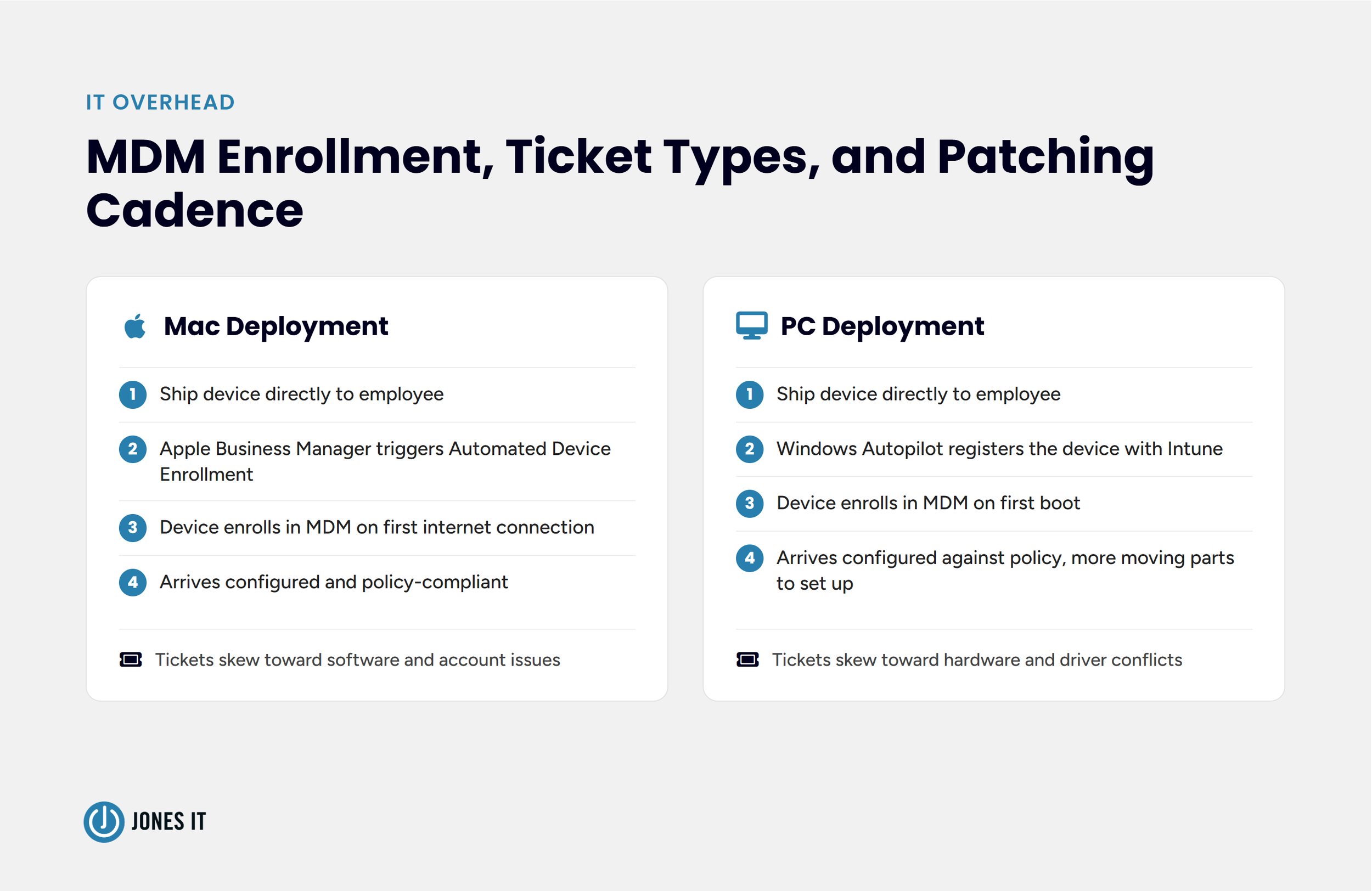
Apple's Automated Device Enrollment through Apple Business Manager lets a new Mac ship directly to an employee, enroll itself in your mobile device management (MDM) platform the first time it connects to the internet, and reach a configured, policy-compliant state without IT ever touching the physical device. For a distributed or hybrid startup, that zero-touch flow removes a real chunk of onboarding labor. But it also constrains you to Apple's enrollment model, leaving little room to deviate from it, which is fine until you have a use case it doesn't cover well.
PC Deployment: Intune, Autopilot, and Third-Party MDM
Windows has an equivalent zero-touch path through Microsoft Intune and Windows Autopilot, where a device that ships to an employee and configures itself against your policies on first boot and it gets you to a similar end state. The setup, however, tends to involve more moving parts to get there. Startups running Windows also have more MDM vendors to choose from outside Microsoft's own stack. Whether that's flexibility or fragmentation depends on how much time your IT function has to evaluate vendors.
What Kind of Ticket Each Platform Actually Generates
Ticket volume is the part that doesn't show up in a TCO spreadsheet. Mac support tickets tend to cluster around software behavior and account-level issues since the hardware and OS come from a single vendor with a small number of configurations. PC tickets, on the other hand, skew toward hardware and driver conflicts, because a Windows fleet usually spans multiple manufacturers, each shipping their own driver stack on top of the OS. Neither pattern is inherently worse. A driver conflict on a PC is often a five-minute fix once you know the manufacturer's quirks. A macOS permissions or account sync issue can eat more time than its ticket count suggests. What matters for a startup is which pattern your IT function, whether that's an internal hire or an MSP, is better and faster at resolving.
Software Compatibility by Function: Where Each Platform Breaks
Compatibility problems rarely show up as "this software doesn't run". Rather, they show up as "this software runs, but the macro doesn't work, or the plugin isn't available, or performance is noticeably worse than the Windows/Mac version." That distinction has an outsized impact because it's easy to choose a Mac for a role because the core application exists on both platforms, then discover the gap only after someone's three weeks into using it. If the deciding factor for your team is the surrounding software ecosystem rather than a single application, our comparison of the Mac + Google Workspace and Windows + Microsoft 365 ecosystems goes deeper on that trade-off.
Finance and Operations: Excel Macros, Power BI Desktop, and Access
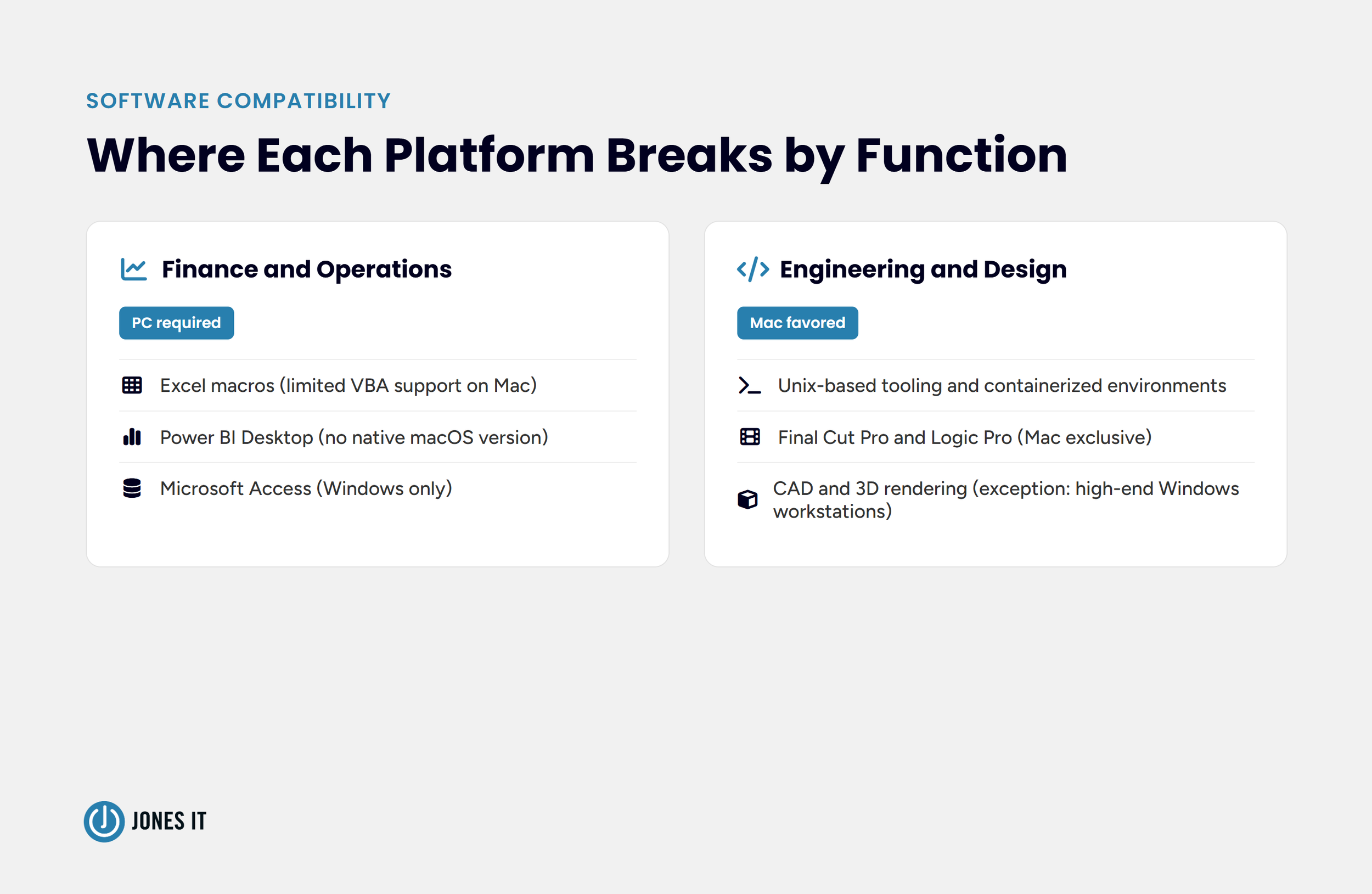
Finance and operations roles run into the software compatibility issue most often. Excel on Mac lacks full VBA macro support in several configurations, Power BI Desktop doesn't have a native macOS version at all, and Microsoft Access is Windows-only. If a finance hire's job depends on any of these, PC isn't a preference; it's a requirement. We've seen startups discover this after the new hire started working, which is a worse time to find out than before shipping the laptop.
Engineering and Design: Unix Tooling, Final Cut Pro, and CAD
Engineering and design roles tend to favor Mac for different reasons than finance does. macOS's Unix-based foundation makes it a natural fit for developers working with common command-line tooling and containerized environments, and creative tools like Final Cut Pro and Logic Pro are Mac-exclusive. The exception worth naming is CAD and heavy 3D rendering work, where high-end Windows workstations still outperform comparable Mac hardware for certain workloads. Therefore, a mechanical or hardware engineer isn't automatically a Mac user the way a software engineer usually is.
The Decision Table: Which Roles Should Get a Mac, a PC, or Either
Here's how we'd map platform to role for a typical startup, based on what each function runs rather than company-wide preference:
| Role | Recommended Platform | Reasoning |
|---|---|---|
Software Engineering |
Mac | Unix-based tooling, smooth containerized dev environments |
Design and Creative |
Mac | Final Cut Pro, Logic Pro, color-accurate displays |
Finance and Accounting |
PC | Excel macros, Power BI Desktop, Access dependencies |
Operations |
PC (lean) | Same software dependencies as finance, though lighter and often cloud-tool-based |
Hardware / Mechanical Engineering |
PC | CAD and rendering performance on Windows workstations |
Sales and Customer Success |
Either | Cloud-based CRM and communication tools run equally well on both |
Executive and Leadership |
Either | Preference-driven; no strong technical dependency either way |
Treat this table as a starting point, not a rulebook. If your finance team runs entirely on Google Sheets and cloud tools with no macro dependency, the PC requirement disappears. If your engineers are doing Windows-specific driver work, the Mac default doesn't hold. The table works well when informed by what your team actually runs, not what's typical for the role title.
Once you've aligned your hardware with these functional requirements, the natural question that follows is how to support a mixed fleet without overwhelming your IT resources.
Running a Mixed Fleet Without Doubling Your IT Overhead
The instinct to standardize on one platform usually comes from the concern that managing two operating systems is like managing two IT functions. It doesn't have to. Most modern MDM platforms, including the major unified endpoint management (UEM) tools, which extend MDM to cover both platforms from one console, handle Mac and Windows enrollment, patching, and policy enforcement without separate infrastructure. The real overhead comes from running two platforms without picking a management tool that supports both.
A few things make a mixed fleet manageable rather than chaotic. Standardize your MDM platform before you standardize your hardware, not after. Keep patching cadence consistent across both platforms rather than treating one as an afterthought. In practice, this usually means picking a single patch window, say every Tuesday, and applying it to both platforms rather than letting Windows updates run on Microsoft's schedule while Mac updates trail behind on whatever cadence IT gets around to. The goal isn't identical tooling, but identical discipline. Document which roles default to which platform so the decision doesn't get reexamined with every new hire. Our guide on zero-touch IT onboarding walks through the MDM foundation this depends on in more detail.
The controller from the story at the start of this post didn't need her company to abandon Mac. She just needed the ops team to ask what she'd be running before ordering the laptop.
Get Mixed Fleet Support Before Your Next Hire
A mixed fleet only stays manageable with the right MDM foundation underneath it. If you're weighing Mac and PC across a growing team and want help setting up device management that handles both without adding overhead, reach out to Jones IT, and we'll help you build it.




About The Author

Michael LeMayIT Systems Engineering Manager at Jones IT
Michael LeMay has spent over seven years at Jones IT, growing from consultant to team lead. Before getting into IT, he spent nearly seven years as an F-16 and C-17 jet engine mechanic in the United States Air Force. He brings that same precision and discipline to troubleshooting complex systems today.
Discover what "not a traditional MSP" really means. Evaluate managed IT services with our guide to contract terms, pricing, and 4 essential questions.