
A Series A SaaS startup in SoMa received a security questionnaire from an enterprise prospect. Question 41 asked for their AI tool approval process along with the list of approved AI tools employees could use. The company had neither. Its operations lead posted in the all-hands Slack channel asking everyone to name the AI tools they used for work, and within the hour, eleven had been named.
A meeting-notes bot had been connected to the shared calendar of the whole sales team, an engineer was running a coding assistant on a personal account, and two of the tools were unfamiliar to everyone in IT. Nobody had acted carelessly. Each person had found something useful for their role and started using it. Since no AI tool approval process existed, nobody had thought to ask for approval. And no one imagined they needed one until a customer asked.
The operations lead's situation is common. IBM's 2025 Cost of a Data Breach research found that among organizations with AI governance policies, fewer than half had an approval process for AI deployments, and only 34% audited regularly for unsanctioned AI.
What Is an AI Tool Approval Process?
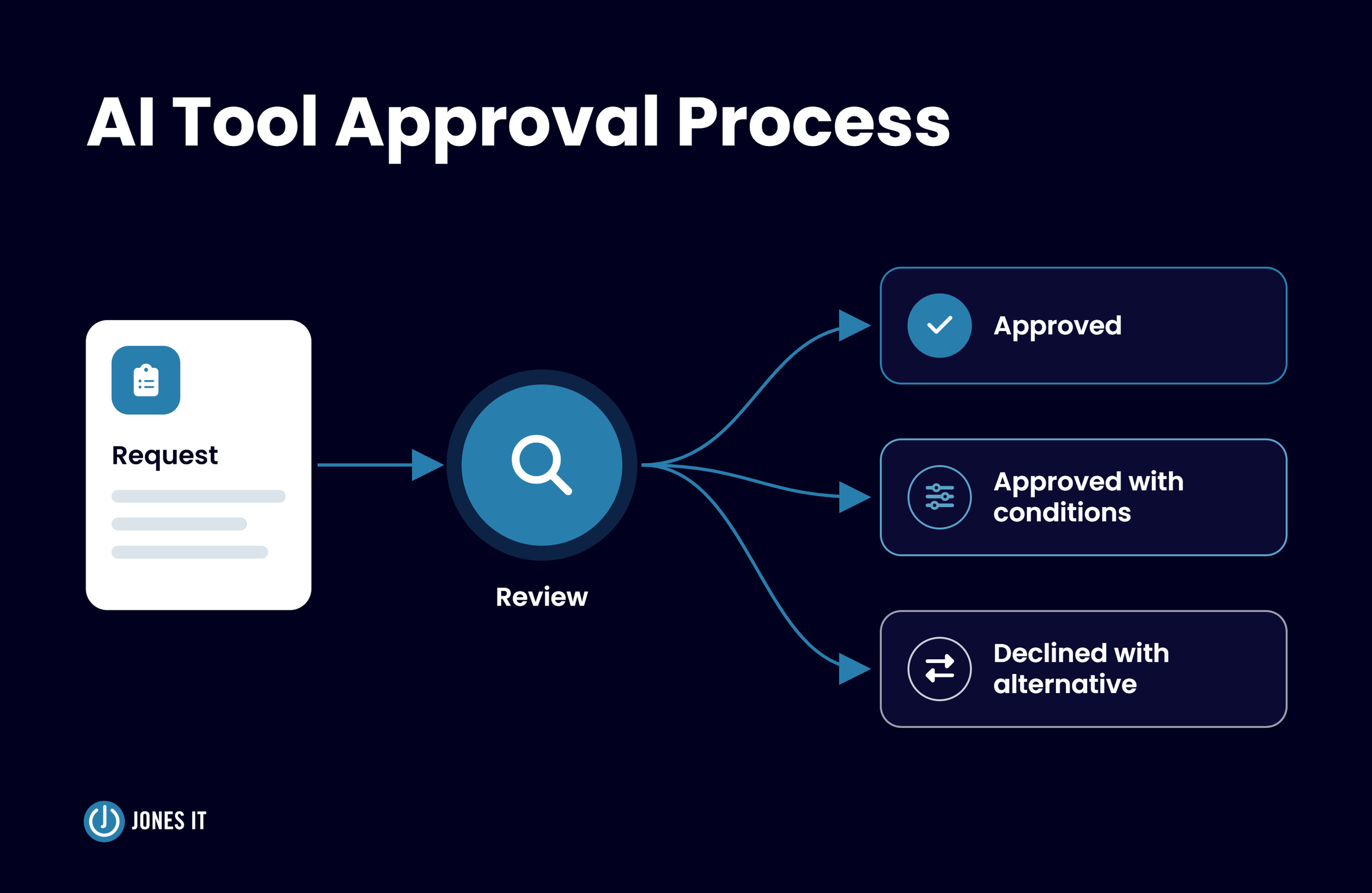
An AI tool approval process is a documented workflow that decides which AI tools employees may use, with what data, and under what conditions. The process starts with an employee request, leading to a decision recorded on an approved AI tools list, which is reviewed on a schedule so that the list stays accurate as vendors change their terms and features.
Every request results in one of three outcomes: approved, approved with conditions (a restricted data tier, a named user group, business plan only), or declined with an alternative. The decline that offers an approved alternative keeps people inside the process, since an employee who hears only a no will likely use the tool anyway on a personal account.
This approval process is a subset of your acceptable use policy, which states the rules, and the process applies them to each specific tool. Our guide on Safe AI Use and Security Guidance Employees Actually Need covers that policy side.
Why Your Startup Needs an AI Tool Approval Process Before Customers Ask
Enterprise customers transfer their own vendor risk obligations to their suppliers, and questions about AI use are now common in such standard security questionnaires. A typical version asks whether you have an AI acceptable use policy, and a complete answer requires the list of approved tools, the input restrictions, the human review expectations, and the policy owner. A startup with a policy but no process can describe its rules; however, it cannot show an approved tool, an owner, or a review date.
Each month without a process adds tools with their own contracts, stored prompts, OAuth grants (permissions that let a tool read data in Google Workspace or Microsoft 365), and exported files. Reviewing a tool before employees start using it costs just a form and a checklist, while reviewing a tool that a team has fed customer data for six months costs a whole lot more.
What to Say When a Security Questionnaire Asks About Employee AI Use
Answer with evidence. Any company can adapt the following response provided their established process ensures each statement is true:
We maintain an approved AI tools list, reviewed quarterly by our security lead. Employees request new AI tools through a documented intake form, and each request is reviewed against the sensitivity of the data involved before approval. Customer data may be used only in tools approved for that data tier, with single sign-on (SSO) and audit logging enabled.
Attach the list and the request form, along with the date of the last review, since evidence closes the question faster than description.
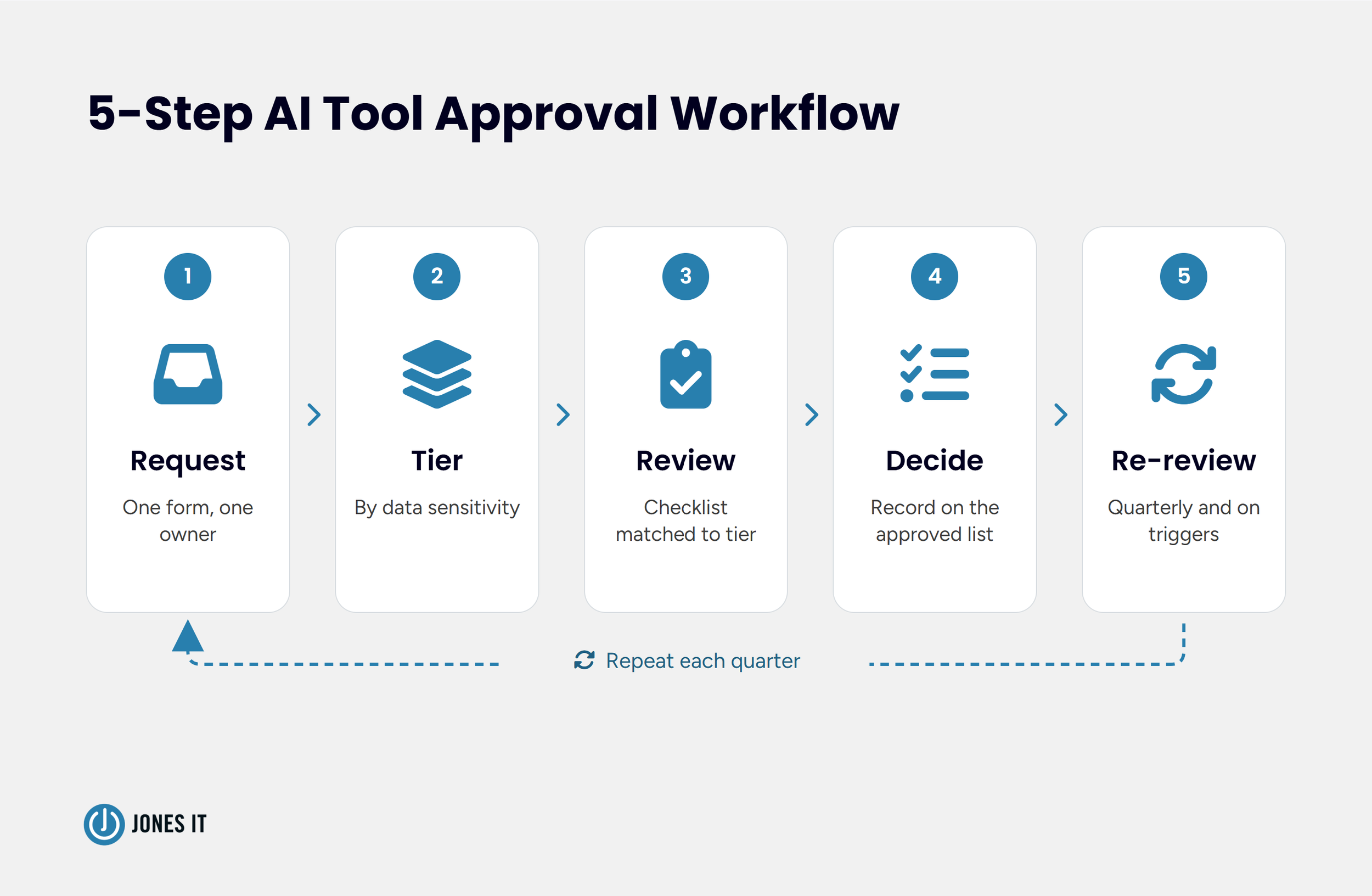
The 5-Step AI Tool Approval Workflow
The workflow below is ideal for a 20-150 employee company running Google Workspace or Microsoft 365 with an identity and access management provider.
Step 1: Collect Requests in One Place
Pick one channel, whether a form, a ticket queue, or a dedicated Slack workflow, and designate an owner for it. The form should ask for the tool and vendor, the use case, the requesting team, the types of data involved, the number of users, whether the plan is free or paid, and whether the tool connects to Workspace or Microsoft 365 through OAuth. Seven fields keep the form to about two minutes and don't burden end users.
Step 2: Tier the Request by Data Sensitivity
In our SME Security Playbook for AI Deployment, we describe a four-level data classification of Public, Internal, Confidential, and Restricted. Those same labels map to three review tiers.
| Tier | Data involved | Review | Target turnaround |
|---|---|---|---|
| Tier 1 | Public information only | Manager approval and the intake form | Same business day |
| Tier 2 | Internal data | Short vendor checklist (items 1 to 4 below) | 3 business days |
| Tier 3 | Confidential and Restricted data | Full vendor checklist, data processing agreement, named owner sign-off | 10 business days |
Our AI Risk Management FAQ sorts AI systems by decision impact such as hiring or credit, while the tiers above sort tools by data sensitivity. Assign the tier based on the most sensitive data the tool will be permitted to access, including through integrations, not just what employees paste or upload. Tier 1 applies only when both inputs and permitted access are limited to public information.
Step 3: Run the Review and Set Turnaround Targets
Tier 1 requests need a manager's sign-off, Tier 2 requests use the short vendor checklist below, and Tier 3 requests use the full version of the checklist. Publish the turnaround targets, because a queue with no stated timeline pushes employees toward expense reports and personal accounts. Some guides quote two to four weeks for a full review, and I would not wait that long. The numbers in the table are our starting point rather than a benchmark, so adjust them to your reviewers' capacity.
Step 4: Record the Decision and Its Conditions
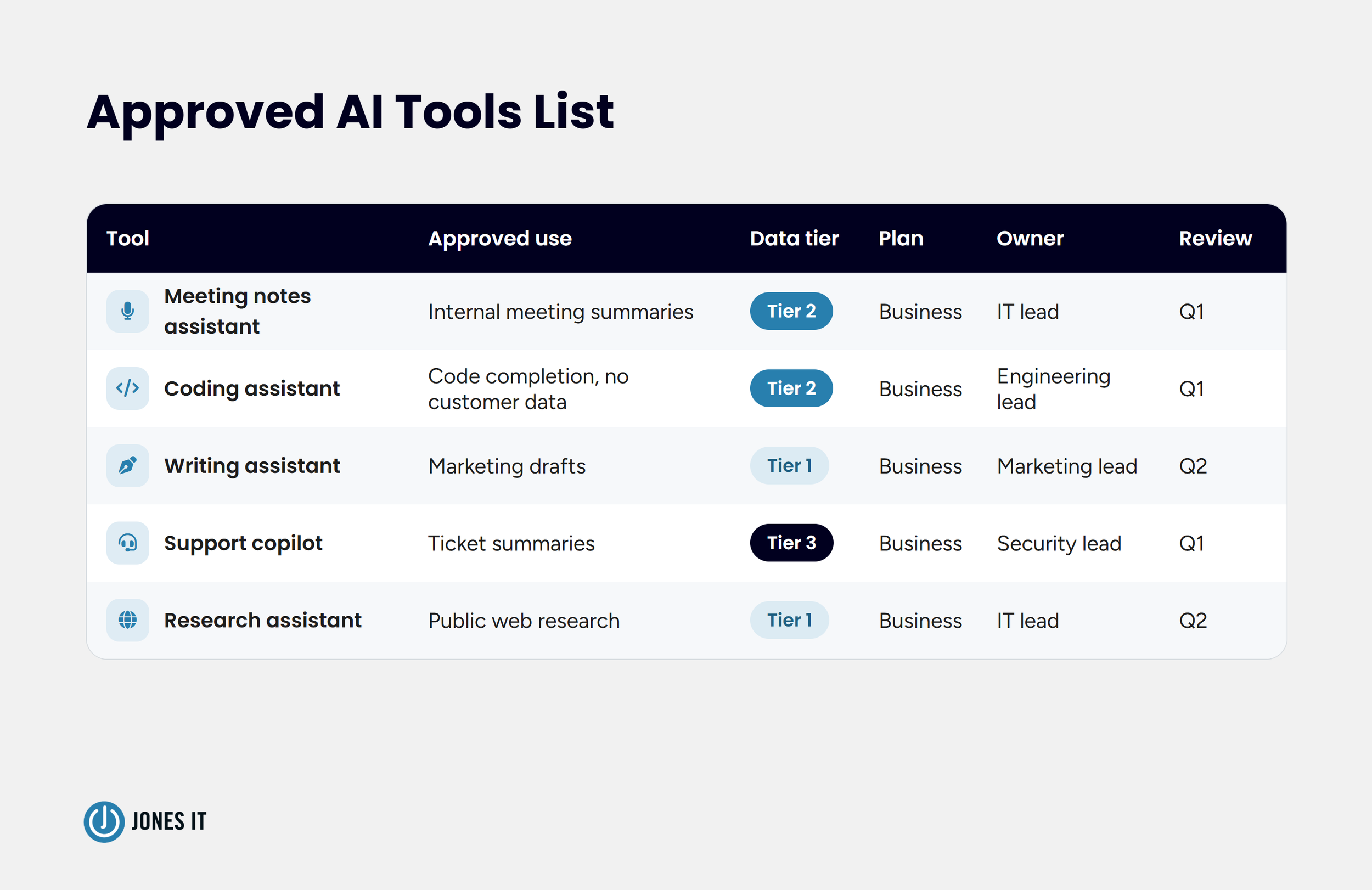
Every decision goes on the approved AI tools list with the tool, the approved use case, the data tier, the user group, the subscription plan (business or consumer), the owner, and the next review date. Approval attaches to the plan and use case that were reviewed, so a tool approved for meeting summaries on a business plan is not approved for support transcripts on a free one. Provision the business plan through SSO with logging turned on. A consumer plan, if approved, is limited to public data and is not connected to company accounts. Give every declined request a named alternative from the approved list.
Step 5: Re-Review on a Schedule and on Triggers
Review the full list every quarter, and re-review a single tool whenever one of the following happens:
The vendor changes its terms, retention period, or model training policy.
A new AI feature starts touching data, such as features switched on by default inside platforms you have already approved.
The tool requests a broader OAuth scope.
The vendor reports a security incident.
A team wants to move a more sensitive data tier into the tool.
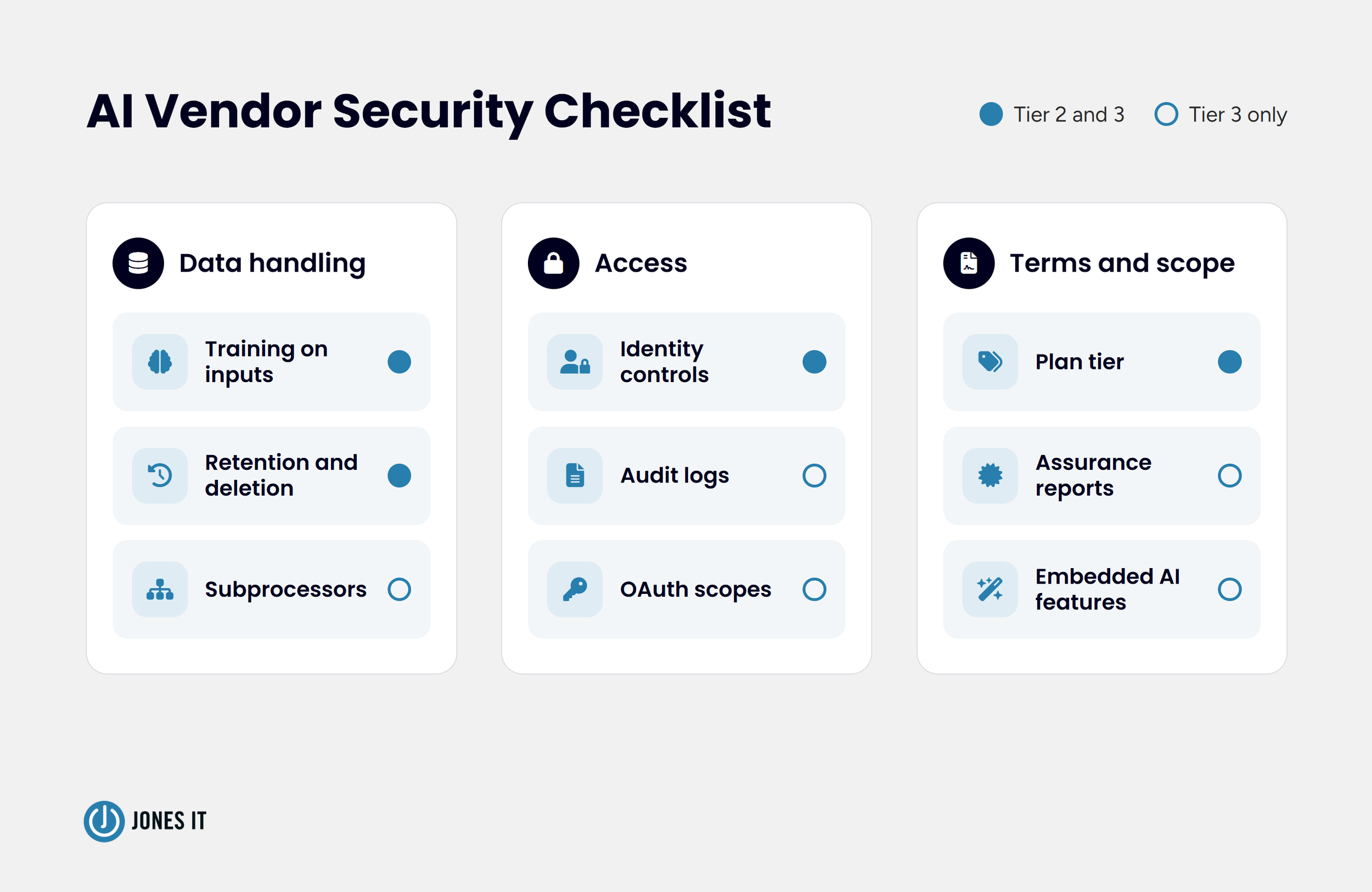
AI Vendor Security Checklist: What to Verify Before You Approve
Before approving any new vendor, verify the key security dimensions to ensure regulatory compliance, protect sensitive data, and mitigate potential operational and technical risks.
Training on inputs. Confirm in the vendor's written terms whether prompts and files train the model, and whether the opt-out applies to your subscription plan.
Retention and deletion. Find out how long prompts, files, and outputs are stored and whether an admin can delete them or shorten the retention period.
Plan tier. Business and consumer plans carry different terms, so approve the plan as well as the tool.
Identity controls. Look for SSO, enforced multifactor authentication (MFA), and SCIM (automated user provisioning), so offboarding removes access. Our guide to identity and access management for startups covers the groundwork for establishing identity controls.
Audit logs. Find out if there are admin-visible records of who used the tool and what was shared, exportable to your own storage.
Subprocessors. Ask for the full list of subprocessors, including the model providers behind the tool, and sign a data processing agreement before any confidential or restricted data is entered into the tool.
Assurance reports. Request a current SOC 2 Type II or ISO 27001 report and read the scope, because a report covering the vendor's corporate systems says little about the product you are buying.
Integrations and OAuth scopes. List what the tool can read in Google Workspace or Microsoft 365 (mail, files, calendars) and whether users or admins grant the access.
Embedded AI features. Copilot in Microsoft 365 and Gemini in Workspace arrive through vendor updates to platforms you already approved, so review those features before enabling access to company data..
Our AI Risk Management FAQ covers the rest, including contract terms such as liability and indemnification, along with breach notification timelines.
What to Do About AI Tools Employees Already Use
Start with discovery. The SSO application list and the OAuth grants in your admin console show which tools have connected to company accounts. Expense and corporate card records show which carry a subscription, and a browser extension inventory from your device management tool shows what lives in the toolbar. A short survey can fill in the gaps, if any. Our guide to shadow IT covers the risks and management methods.
Run every discovered tool through the same intake form, and fast-track the business plans of the tools people like and already use, since moving a habit onto a managed plan is easier than replacing it.
I favor a two-to-four week amnesty window at the start, with a clear date after which unapproved tools lose access to company data. People disclose what they use when disclosure carries no penalty. I go back and forth on the length, since a long window invites drift and a short one invites silence, and a few weeks seems to offer a perfect balance.
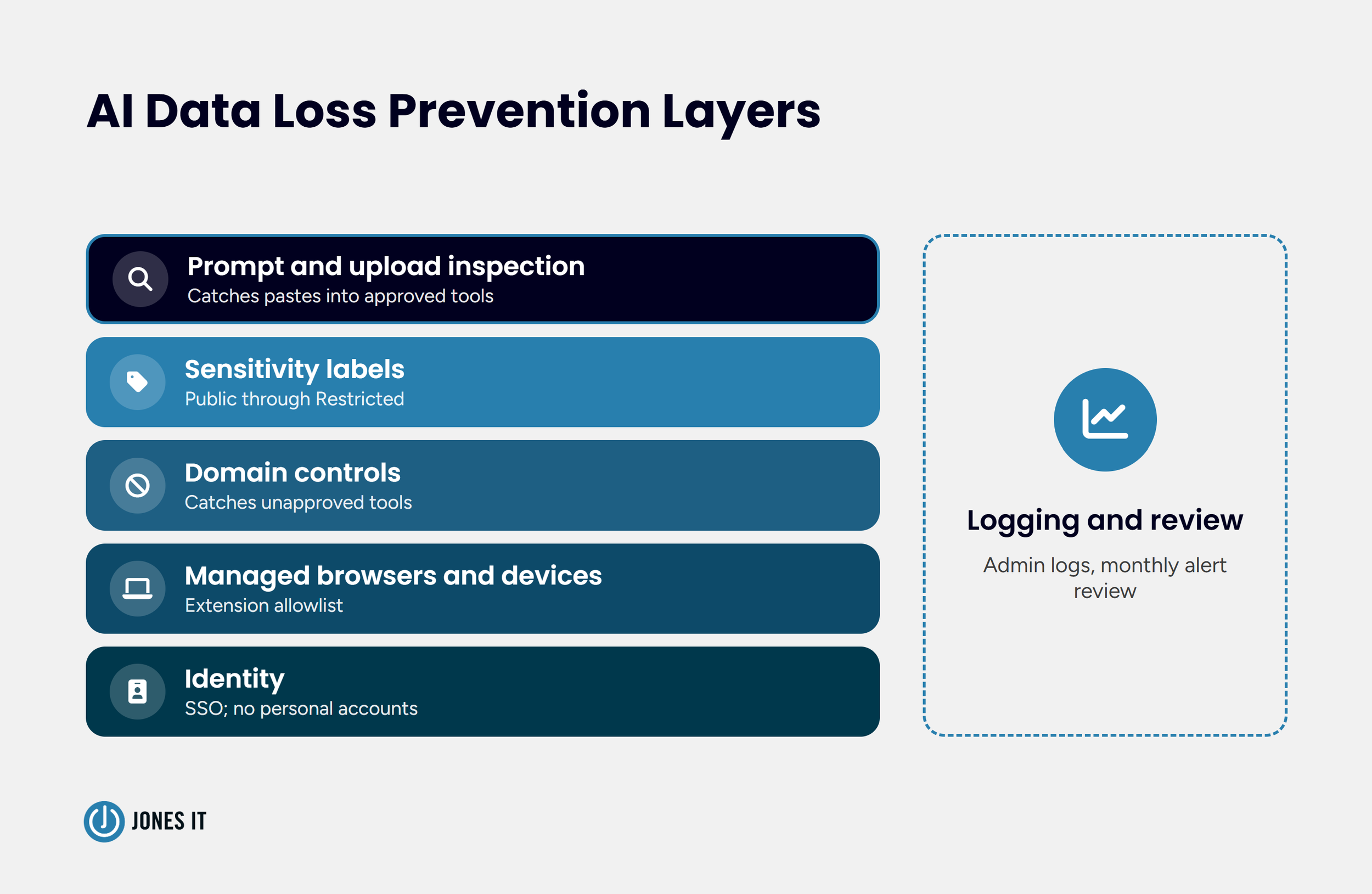
AI Data Loss Prevention: Controls That Enforce Your Approved List
An approved list changes behavior if the controls behind it make the approval path the easy one. Ensure your approved list effectively shifts behavior by implementing these security layers (arranged from foundational to advanced) to make compliance the path of least resistance:
Identity. Require SSO for approved tools that access non-public company data, and block personal-account use of those tools on managed browsers. Approved consumer plans may be used only with public information and must not connect to company accounts.
Managed browsers and devices. Push browser policies, such as an extension allowlist, through your device management tool.
Domain controls. Block or warn on unapproved AI domains at the DNS or web gateway layer. Domain blocks catch unapproved tools but say nothing about what is typed into approved ones.
Sensitivity labels. Apply the Public through Restricted data labels in your productivity suite so Restricted files carry their classification into DLP (data loss prevention) rules.
Prompt and upload inspection. Add browser-level DLP that inspects pastes and uploads into AI tools. A research note hosted by Cloud Security Alliance discusses potential gaps in traditional DLP and secure web gateway coverage: some browser activity may fall outside their inspection coverage, depending on the tool and configuration.
Logging and review. Collect the admin logs from approved tools and review alerts monthly.
No single layer covers the whole path, and the first three are largely configuration work.
Getting Your AI Tool Approval Process Running
The operations lead from the opening spent two weeks on the process. Of the eleven tools, six went on the approved list at the tier they needed, three were approved with conditions (no customer data), one moved from a personal account to a company-managed plan, and one was retired. Her answer to question 41 attached the approved list and the intake form, with the date of the next quarterly review noted, and the questionnaire went back the following week.
If you want a second set of eyes on your current AI tools, or help standing up the process, our Cybersecurity and Compliance Management service includes vendor risk assessment, and we are glad to walk through your list with you.
AI Tool Approval Process FAQ
How long should an AI tool approval process take?
Match the turnaround to the tier, from the same business day for public-data tools to ten business days for Confidential or Restricted data. Publish the targets so employees know what to expect.
Which AI tools need formal approval?
Any tool that touches company data, such as AI features inside platforms you already use once they can read company files, mail, or calendars. Tools used only with public information can follow the lighter Tier 1 path.
Who approves AI tools at a startup?
One named owner with a backup, usually the security or IT lead, and at the smallest companies, the founder, with legal counsel consulted for Restricted data. A single accountable person moves faster than a committee.


Learn how to establish an AI tool approval process for startups with this 5-step workflow, vendor review checklist, and data loss prevention controls.